GameCuki is reader-supported. When you buy through links on our site, we may earn an affiliate commission at no extra cost to you. As an Amazon Associate I earn from qualifying purchases. Learn more.
Your Ryzen 7 9800X3D does the heavy lifting in games, so the board underneath it is really a decision about storage slots, USB speed, size and looks. Picking the best motherboard for 9800X3D builds starts with one easy fact: every board here uses the AM5 socket, so they all run the chip. These eight picks span B650, B850 and X870E boards, from a budget ATX board to a Mini-ITX board and a rear-connect board for hidden-cable builds.
Building the whole machine? Pair the board with the best thermal paste for a cooler that holds the CPU steady, or skip the build and check our best prebuilt gaming PCs.
Best Motherboard for 9800X3D: Our Picks in Detail
GameCuki may earn a commission if you buy through the links below. That never changes which boards make the list or how they rank.

1
Best for Most 9800X3D Builds
MSI MAG B850 Tomahawk MAX WiFi II
Bottom line: A B850 ATX board with a strong 80A VRM, four M.2 slots and Wi-Fi 7, it gives a 9800X3D everything a gaming build needs without paying X870 money.
The Tomahawk MAX WiFi II is the refreshed version of one of the most popular B850 boards. It keeps the strong power delivery and wide connectivity of the original, adds an extra M.2 socket and drops most of the loud yellow-green accents.
Pros & Cons
Pros- 80A power stages with a large heatsink and extra choke thermal pads
- Two PCIe 5.0 x4 M.2 slots for the fastest SSDs
- Four M.2 slots in total, with tool-free clips for easy installs
- Wi-Fi 7 with Bluetooth 5.4 built in
- 5Gbps wired LAN for a fast home network
- PCIe 5.0 x16 slot ready for current and future graphics cards
- OC Engine chip for BCLK overclocking and a 64MB BIOS for long-term CPU support
- Combo fan header and fan connectors for a pump and case fans
Cons- No USB4 ports
- One of the four M.2 slots only runs at PCIe 4.0 x2
Why We Picked It
A 9800X3D does not need a flagship board, it needs a stable one, and this board is exactly that. The 80A power stages and heatsink with added thermal pads keep the CPU fed under long gaming sessions, and the 64MB BIOS gives the board room for future AM5 chips. You also get four M.2 slots, two of them PCIe 5.0, plus fast networking in a clean black design. It covers nearly everything a B850 board can offer for a 9800X3D rig.
Who It's For
You are building a gaming PC around a 9800X3D and want one board you will not outgrow. A fast GPU, a Gen5 boot drive, a second Gen5 SSD for games and a couple of extra NVMe drives all fit without a riser card.
You care more about frame rates than USB4 ports. Everything you plug in daily, from keyboard and mouse to a headset and a USB-C drive, has a port on the rear panel, and Wi-Fi 7 keeps the connection solid if your router sits in another room.
Specs & Configurations
- Chipset
- AMD B850, ATX
- Power
- 14 Duet Rail VRM, 80A SPS
- Storage
- 4 M.2 slots, 2 of them PCIe 5.0 x4
- Networking
- Wi-Fi 7 and 5Gbps LAN
- GPU slot
- PCIe 5.0 x16
- Memory
- 4 DDR5 slots, up to 8400+ MT/s (OC)

2
Best for a Low-Cost 9800X3D Build
Gigabyte B650 AORUS Elite AX
Bottom line: An affordable way into a 9800X3D build, with a 14+2+1 VRM, Wi-Fi 6E and plenty of USB, as long as you accept a PCIe 4.0 graphics slot.
The B650 Aorus Elite AX is the board to buy when the budget has to stretch to a GPU and fast RAM. It has been a staple of AM5 budget builds since the platform launched and still supports Ryzen 9000 chips.
Pros & Cons
Pros- Full-size ATX layout with room for a big cooler and graphics card
- 14+2+1 power phases with 70A stages handle a 9800X3D, even with overclocking
- Twelve USB ports on the rear panel, including a 20 Gbps USB-C
- Three M.2 slots, one of them PCIe 5.0 x4, plus four SATA ports
- 2.5GbE LAN and Wi-Fi 6E built in
- Full-coverage MOSFET heatsinks with a 6mm heatpipe
- EXPO memory support for DDR5 kits
- Covers Ryzen 9000, 8000 and 7000 CPUs
Cons- No PCIe 5.0 graphics slot
- The audio codec is budget-grade
- May need a BIOS update before a 9800X3D will boot
Why We Picked It
Games on a 9800X3D lean on the CPU and GPU, and the lack of a PCIe 5.0 graphics slot has a negligible impact. What you do get is a solid power design, three M.2 slots and a generous rear panel at a price that leaves money for better parts.
Who It's For
You are putting the 9800X3D in a sensible mid-priced build and every dollar saved goes toward the graphics card. You want an ATX board that fits a standard case, a few SSD slots and enough USB for a keyboard, mouse, headset, controller and capture card.
Plan on updating the BIOS first if the board ships with an older version.
Specs & Configurations
- Chipset
- AMD B650, ATX
- Power
- 14+2+1 phases, 70A power stages
- Storage
- 3 M.2 slots (one PCIe 5.0 x4), 4 SATA
- Networking
- Wi-Fi 6E and 2.5GbE LAN
- USB
- 12 ports on the rear panel
- Memory
- 4 DDR5 slots with EXPO support

3
Best for USB4 on a Budget
ASRock X870E Challenger WiFi
Bottom line: A well-equipped X870E ATX board with a 110A VRM, two USB4 ports and Wi-Fi 7 that costs far less than most boards with those features.
ASRock sells the Challenger as the board that delivers an X870E feature list without the premium look, and it does. It puts USB4 and a 110A VRM under a 9800X3D without a flagship price.
Pros & Cons
Pros- 110A power stages for a big overclock or a long gaming session
- Two rear USB4 Type-C ports at 40 Gbps with display output
- Four M.2 slots, one of them PCIe 5.0 x4
- Wi-Fi 7 and Bluetooth 5.4
- PCIe 5.0 x16 graphics slot
- Flagship-class audio codec
- Flexible I/O shield and an all-white version for matching builds
- RAID 0, 1 and 10 support for NVMe SSDs
Cons- The BIOS is newer and still being polished
- It lacks the extra AI and DIY helpers of pricier boards
Why We Picked It
Plenty of boards in this price class cut corners on power and rear ports, but the Challenger does not. Twenty phases of 110A power stages mean the VRM will not be the limit on a 9800X3D, and two USB4 Type-C ports give you fast external storage or a USB4 dock. Four M.2 slots, a Gen5 slot for the primary SSD and a good audio codec round out the package. It looks sharp in white, too.
Who It's For
You want the extras of an X870E board, such as USB4 for a fast external SSD, without spending X870E flagship money. You may tweak the CPU, and the heavy VRM gives you headroom.
Black or white, this board slots into a normal ATX case. If you like to tweak settings but do not need every flashy extra, it is a smart base for a 9800X3D gaming PC.
Specs & Configurations
- Chipset
- AMD X870E, ATX
- Power
- 20+2+1 phases, 110A SPS
- Storage
- 4 M.2 (1 PCIe 5.0 x4, 3 PCIe 4.0 x4), 2 SATA
- USB
- 2 rear USB4 Type-C at 40 Gbps
- Wireless
- Wi-Fi 7 and Bluetooth 5.4
- Memory
- 4 DDR5 slots, 8200+ MT/s (OC)

4
Best for a White Showcase Build
Gigabyte X870E AERO X3D Wood
Bottom line: A white and silver X870E board with real wood accents, dual 5GbE, dual USB4 and a 5-year warranty that makes a 9800X3D build look as good as it plays.
The AERO X3D Wood is a design-first board for builders who treat the case as a display. Wood trims, leather tabs on the M.2 heatsinks and a white PCB set it apart from the usual black boards.
Pros & Cons
Pros- Real wood accents on the VRM heatsink and audio shroud
- Clean white and silver PCB with white lighting
- Dual 5GbE LAN plus Wi-Fi 7 and Bluetooth 5.4
- Two PCIe 5.0 and two PCIe 4.0 M.2 slots with EZ-Latch heatsinks
- Dual USB4 Type-C and a front USB 3.2 Gen 2x2 Type-C header
- Driver BIOS with Wi-Fi drivers preinstalled
- Sensor Panel Link HDMI for an in-case display
- 5-year warranty
Cons- Some M.2 and USB4 lanes are shared
- The audio codec is a generation behind
- It costs more than B850 boards that run a 9800X3D just as fast
Why We Picked It
Gigabyte pairs the looks with a full-fledged X870E feature set: 16+2+2 phases on an 8-layer PCB, four M.2 slots, two USB4 ports and dual 5GbE networking. The EZ-Latch tool-free parts make the build easier, and the Driver BIOS means Wi-Fi works right after your first Windows install. The 5-year warranty adds peace of mind on top.
Who It's For
You are building a white or light-themed 9800X3D PC with a glass panel and want the board to be part of the look. Wood accents and a clean PCB turn a normal gaming rig into something people notice.
You also want to be set for the long run, with USB4 and 5GbE now and a long warranty behind the purchase.
Specs & Configurations
- Chipset
- AMD X870E, ATX
- Power
- 16+2+2 phases, 8-layer PCB
- Storage
- 4 M.2 (2 PCIe 5.0, 2 PCIe 4.0)
- USB
- 2 USB4 Type-C, 1 USB 3.2 Gen 2x2 Type-C
- Networking
- Wi-Fi 7 and dual 5GbE LAN
- Warranty
- 5 years
5
Best for a Hidden-Cable Build
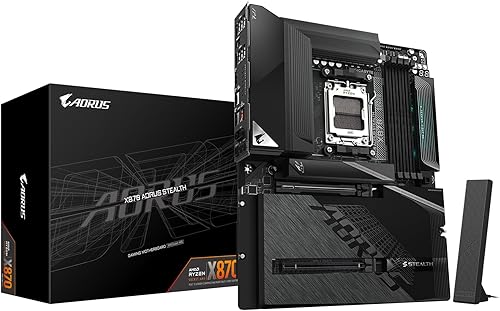
Gigabyte X870 AORUS Stealth
Bottom line: A reverse-connect X870 board that moves the connectors to the back, so a 9800X3D build in a compatible case looks wire-free.
Stealth boards use a reverse-connect design that moves the connectors to the back of the PCB, so cables disappear behind the motherboard tray. It is the neatest way to build a 9800X3D PC if you own the right case.
Pros & Cons
Pros- Reverse-connect layout hides power and USB cables behind the board
- Two PCIe 5.0 x4 M.2 slots among four total
- Thirteen rear USB ports, including two 40 Gbps USB4 ports
- Wi-Fi 7 and 5GbE LAN
- 16+2+2 power phases with VRM heatsinks
- Integrated I/O shield saves time during the build
- All-black look with no built-in RGB
- A white Stealth ICE version is available for light builds
Cons- It only works with reverse-connect (rear-connector) cases
- Audio is a middle-of-the-road solution
Why We Picked It
The Stealth does the hard parts of a clean build for you. The layout is easier to plug together, the all-black styling matches nearly any theme, and the specs hold up: four M.2 slots with two at PCIe 5.0 x4, USB4, Wi-Fi 7 and 5GbE.
Who It's For
You want a PC that looks like a render, with no cables running across the board and every plug tucked behind the panel. You already own, or are about to buy, a reverse-connect case.
The extra fuss of rear cabling is worth it to you, and you want modern X870 features at the same time.
Specs & Configurations
- Chipset
- AMD X870, ATX, reverse-connect
- Power
- 16+2+2 phases, 6-layer PCB
- Storage
- 4 M.2 slots, 2 of them PCIe 5.0 x4
- USB
- 13 rear ports, 2 of them USB4 at 40 Gbps
- Networking
- Wi-Fi 7 and 5GbE LAN
- Memory
- 4 DDR5 slots with EXPO support

6
Best for Small Form Factor 9800X3D PCs
ASRock B850I Lightning WiFi
Bottom line: A compact Mini-ITX B850 board with a 110A VRM and a PCIe 5.0 slot that lets a 9800X3D live in a tiny case at a fair price.
Mini-ITX B850 boards are rare and usually expensive, which makes the B850I Lightning stand out. It gives a 9800X3D a complete platform inside a case a fraction the size of a standard tower.
Pros & Cons
Pros- Fits compact Mini-ITX cases at 170x170mm
- 110A power stages handle flagship AM5 chips
- PCIe 5.0 x16 slot for the graphics card
- One PCIe 5.0 x4 and one PCIe 4.0 x4 M.2 slot
- HDMI and USB-C with DisplayPort alt mode for display output
- Wi-Fi 6E and Killer 2.5G LAN
- Neutral black PCB with purple Phantom Gaming accents
- Rival B850 Mini-ITX boards with Wi-Fi 7 and faster USB cost around $100 more
Cons- No USB4 ports
- Wi-Fi 6E rather than Wi-Fi 7
- Only two RAM slots and two M.2 slots
Why We Picked It
Small builds punish weak power delivery with heat, and this board does not skimp: ten 110A stages sit behind compact heatsinks. You get the same PCIe 5.0 graphics slot as full-size boards, a Gen5 M.2 slot for the boot drive and a second M.2 for games. Wi-Fi 6E and 2.5G LAN are plenty for gaming.
Who It's For
You are building a compact gaming PC for the desk or the living room and want a 9800X3D inside it. You already know the case, the cooler and the SFX power supply, and you need a board that holds a flagship CPU without a premium price.
You are fine with two M.2 slots and two RAM slots. One fast SSD and a pair of high-capacity DDR5 sticks cover most gaming builds.
Specs & Configurations
- Chipset
- AMD B850, Mini-ITX (170x170mm)
- Power
- 10+1+1 phases, 110A SPS
- Storage
- 1 PCIe 5.0 x4 M.2 and 1 PCIe 4.0 x4 M.2
- GPU slot
- PCIe 5.0 x16
- Networking
- Wi-Fi 6E and Killer 2.5G LAN
- Memory
- 2 DDR5 slots, 8200+ MT/s (OC)

7
Best for ASUS BIOS and Tuning Tools
ASUS TUF Gaming X870-PLUS WiFi
Bottom line: A tough X870 ATX board with 80A power stages, four M.2 slots and USB4 that pairs ASUS tuning tools with a 9800X3D.
TUF Gaming boards are ASUS's durable mainstream line, and the X870-PLUS WiFi packs the modern AM5 feature list into a no-nonsense ATX board.
Pros & Cons
Pros- 16+2+1 power phases with 80A stages on an 8-layer PCB
- Four M.2 slots for lots of storage
- USB4 at 40 Gbps plus a 20 Gbps USB-C port
- Wi-Fi 7 for a fast wireless link
- PCIe 5.0 graphics slot
- AEMP to enable your memory profile in one step
- Dynamic OC Switcher and PBO Enhancement for tuning a Ryzen CPU
- ProCool power connectors and alloy chokes for durability
Cons- 2.5Gb LAN is slower than the 5Gb ports found on some rivals
- It costs more than B850 boards that game just as fast
Why We Picked It
The board brings a stout 16+2+1 VRM, four M.2 slots and USB4, then wraps them in the ASUS BIOS that many builders already know. AEMP makes enabling a DDR5 memory profile simple, and features like Dynamic OC Switcher and PBO Enhancement give you tools to fine-tune a 9800X3D if you want to. It is a safe, mainstream choice from a brand with deep AM5 support.
Who It's For
You like the ASUS BIOS and you want a durable board that is easy to set up. You may tinker with PBO or memory settings and appreciate software that explains what each option does.
You are building an ATX gaming PC with a modern GPU and a couple of NVMe drives, and USB4 for a fast external drive is a nice bonus.
Specs & Configurations
- Chipset
- AMD X870, ATX
- Power
- 16+2+1 phases, 80A SPS, 8-layer PCB
- Storage
- 4 M.2 slots
- USB
- USB4 at 40 Gbps and USB-C at 20 Gbps
- Networking
- Wi-Fi 7 and 2.5Gb LAN
- Tuning
- AI Overclocking, AEMP, Dynamic OC Switcher, Core Flex, PBO Enhancement

8
Best for Dual USB4 and Front USB-C
Gigabyte X870E AORUS Elite X3D
Bottom line: An X870E ATX board with dual USB4, a 65W front USB-C header and four M.2 slots that gives a 9800X3D room to grow into a full-featured gaming rig.
The Elite X3D is Gigabyte's X870E mid-range board with a name pointing straight at X3D chips. It carries the ports and storage slots of a high-end build in a standard ATX size.
Pros & Cons
Pros- Two rear USB4 Type-C ports with DisplayPort Alt mode
- 65W front USB-C header for charging a phone or tablet
- Four M.2 slots, two of them PCIe 5.0
- Wi-Fi 7 with 5GbE wired LAN
- 16+2+2 power phases on an 8-layer PCB
- PCIe 5.0 x16 slot with reinforced armor
- Sensor Panel Link HDMI for an in-case display
- Integrated I/O shield for a faster build
Cons- It costs more than a B850 board that plays games the same
Why We Picked It
Where cheaper boards run out of connectivity, this one keeps going: two USB4 ports, a front USB-C header that supports 65W, four M.2 slots and a 5GbE port. The 16+2+2 power design sits on an 8-layer PCB, which is more than a 9800X3D needs. The graphics slot has reinforced armor for a heavy card.
Who It's For
You want to build once and not upgrade the board for years. A fast GPU, two Gen5 SSDs, USB4 devices and a case with a front USB-C port all work without compromise.
You also plan on a big graphics card, and the reinforced slot is built for it.
Specs & Configurations
- Chipset
- AMD X870E, ATX
- Power
- 16+2+2 phases, 8-layer PCB
- Storage
- 4 M.2 (2 PCIe 5.0, 2 PCIe 4.0)
- USB
- 2 USB4 Type-C with DP Alt, 65W front USB-C
- Networking
- Wi-Fi 7 and 5GbE LAN
- Memory
- 4 DDR5 slots with EXPO support
How to Choose a Motherboard for the Ryzen 7 9800X3D
Any AM5 board works
The 9800X3D uses the AM5 socket, which means B650, B850, X870 and X870E boards all fit it. Check that the board lists Ryzen 9000 support, and if it is an older B650 model, update the BIOS before you install the chip.
B850 or X870E?
B850 and B650 boards have fewer PCIe 5.0 lanes, usually enough for a graphics card and one or two fast SSDs. X870 and X870E boards add more fast ports, such as USB4 and extra Gen5 storage. Prices of the top B850 boards now sit close to some X870 models, so compare the two before you buy.
Pick the right size
ATX is the standard and fits most cases. Mini-ITX boards fit small cases but have fewer M.2 and RAM slots, and E-ATX boards need a big case.
Pay only for the ports you will use
Wi-Fi 7, 5GbE and USB4 are nice, but a gaming PC runs the same on a cheaper board. Count your SSDs and USB devices first, and spend the difference on a better GPU.
Which Is the Best Motherboard for the 9800X3D?
The MSI MAG B850 Tomahawk MAX WiFi II is the best motherboard for 9800X3D builds that want power, storage and networking without a flagship price. Choose the Gigabyte B650 AORUS Elite AX to cut costs, the ASRock X870E Challenger WiFi or the ASUS TUF Gaming X870-PLUS WiFi for USB4 and more PCIe lanes, and the Gigabyte X870E AERO X3D Wood for a showpiece build. Small and cable-free setups have their own picks in the ASRock B850I Lightning WiFi and the Gigabyte X870 AORUS Stealth. All of them will run a 9800X3D at full speed, so choose the one whose ports and looks match your build.