

A CPU that boosts for ten seconds and then backs off is often a paste problem, not a cooler problem. The best thermal paste fills the tiny gaps between your processor and cooler so heat can leave faster, and the right tube can shave a few degrees off a hot gaming PC for the price of a snack. These nine picks cover easy everyday tubes, long-life pastes, graphene and phase-change pads, and liquid metal for experts.
Best Thermal Paste in 2026: 9 Picks for Gaming PCs
GameCuki is reader-supported. When you buy through links on our site, we may earn an affiliate commission at no extra cost to you. As an Amazon Associate I earn from qualifying purchases. Learn more.
Our Top Picks
Best Overall
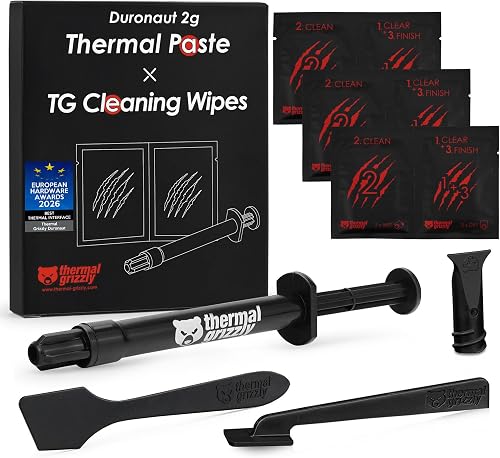
Thermal Grizzly Duronaut
Bottom line: The top performer for a gaming CPU you want to paste once and forget, as long as you will pay a little extra for it.
- Best cooling performance among traditional pastes
- Built for long-term stability, so it keeps working without hardening
- Resists pump-out, the slow squeeze-out that hurts older pastes
- Electrically non-conductive, so a stray smear will not short anything
- Cleaning wipes included, six wet and six dry
- Works on CPUs, GPUs and consoles
- Honored with a European Hardware Award for best thermal interface
- Costs more per gram than mainstream pastes
- The 2 g pack suits a few applications, not a whole shop's worth

Best for Everyday Gaming Builds
Arctic MX-6
Bottom line: The easy, cheap, top-tier tube for almost any gaming PC, with near-flagship cooling and zero short-circuit risk.
- Second-best cooling among traditional pastes
- Measurably lower thermal resistance than the MX-4
- Neither electrically conductive nor capacitive, so no short-circuit risk
- Easy to spread and easy to clean
- Thick enough for direct-die GPUs and console processors
- Great value for the performance
- Authenticity check verifies each tube
- Only a small gain over the MX-4 on most CPUs
- The 4 g tube is not enough for many repastes

Best Cheap Paste for Air Coolers
ID-Cooling Frost X45
Bottom line: The budget way to chase flagship cooling on an air-cooled CPU, if you can handle a thick paste.
- Best cooling result on an air-cooled CPU among the pastes compared
- 15.2 W/mK rated conductivity
- Metal-free and non-conductive, so no short-circuit risk
- Resists drying, cracking and separation over time
- Spreads into an even layer once warmed
- Often priced like a budget tube
- 4 g is plenty for a CPU repaste
- Very thick, so it can be hard to spread cold
- Quality can be slightly inconsistent from tube to tube

Best for a Long-Lasting Build
Noctua NT-H2
Bottom line: The set-and-forget paste with built-in cleanup wipes, for a gaming PC you plan to keep running for years.
- Rated for up to 5 years of use on the CPU
- Easy to apply, no need to spread before the cooler goes on
- Full cooling performance right away
- Non-conductive, so a mistake will not hurt your board
- Three cleaning wipes included
- 3.5 g covers around 3 to 20 applications depending on CPU size
- Works on CPUs, GPUs, laptops and consoles
- Slightly pricier than Arctic's tubes
- Harder to spread than some pastes

Best for First-Time Builders
Arctic MX-4
Bottom line: The no-fuss, low-cost paste that stays within a couple of degrees of pricier options, ideal for a first build.
- Easy to apply with a medium viscosity
- Spatula included in the box
- Metal-free and non-conductive, so it is forgiving
- Stays within a few degrees of far pricier pastes in real use
- Proven stable over long periods
- Very low cost per gram
- Easy to clean off with isopropyl alcohol
- Not the best choice for extreme overclocking
- Newer Arctic pastes edge it out slightly

Best for Overclocking
Thermal Grizzly Kryonaut
Bottom line: A proven high-conductivity paste for overclocked CPUs and GPUs, a long-time favorite of tweakers.
- 12.5 W/mK rated conductivity
- Built for overclocked and high-power systems
- Stays effective and does not dry out at 80°C
- Non-conductive, so it is safe to handle
- Syringe and spatula make spreading precise
- Widely used, so setup advice is easy to find
- Pricier per gram than MX-4 or MX-6
- The small tubes run out fast across several builds

Best for Ryzen Chips
Thermal Grizzly KryoSheet
Bottom line: A clean, reusable graphene pad that can beat every paste on a Ryzen 9 9950X, if you size it to your chip.
- Beat all traditional pastes on a Ryzen 9 9950X
- Performance close to liquid metal without the mess
- No spreading, no mess, no cleanup
- Does not dry out or cure over time
- Reusable
- Fixed 0.2 mm thickness for precise placement
- Stable through heat spikes
- Costs more than a tube of paste
- Needs high mounting pressure for best results
- Electrically conductive, so keep it off other components

Best for Laptops, GPUs and Consoles
Thermal Grizzly PhaseSheet PTM
Bottom line: A reusable, non-conductive phase-change pad that makes repasting laptops, GPUs and consoles cleaner, though it needs a burn-in.
- Strong cooling performance for a pad
- Reusable
- Electrically non-conductive, so it is safe around nearby parts
- Cuttable to fit CPUs, GPUs and consoles
- No spreading, no messy paste
- Takes the guesswork out of paste amount
- Cleaner for repasting devices you open often
- Needs several heat cycles before it reaches peak performance
- Needs high mounting pressure for best results
- Temperatures can look high the first time it heats up

Best Liquid Metal for Experts
be quiet! DC2 Pro
Bottom line: The liquid metal for delidded or heavily overclocked CPUs, strictly for experienced builders who can handle the risk.
- Extreme 80 W/mK conductivity
- Leads the pack in cooling performance on a hot Intel system
- One syringe covers more than 10 applications
- Cotton swabs included for application
- Priced below other liquid metals
- Great for delidded CPUs and direct-die setups
- Frees headroom under heavy power loads
- Electrically conductive, so a stray drop can kill a board
- Only for copper or nickel-plated surfaces, never aluminum
- Tricky to apply cleanly
Table of Contents
Best Thermal Paste: Our Picks in Detail
1
Best Overall
Thermal Grizzly Duronaut
Bottom line: The top performer for a gaming CPU you want to paste once and forget, as long as you will pay a little extra for it.
Thermal Grizzly built Duronaut around durability, mixing aluminum microparticles with zinc oxide nanoparticles for long-lasting performance.
Pros & Cons
Pros
- Best cooling performance among traditional pastes
- Built for long-term stability, so it keeps working without hardening
- Resists pump-out, the slow squeeze-out that hurts older pastes
- Electrically non-conductive, so a stray smear will not short anything
- Cleaning wipes included, six wet and six dry
- Works on CPUs, GPUs and consoles
- Honored with a European Hardware Award for best thermal interface
Cons
- Costs more per gram than mainstream pastes
- The 2 g pack suits a few applications, not a whole shop's worth
Why We Picked It
Duronaut is the best performing traditional paste in the large multi-paste comparisons, and it is made to stay put instead of drying out or pumping out from under the cooler. It is also non-conductive, which keeps first-time application stress-free. You pay a little more per gram, but one small tube covers a CPU and a GPU repaste.
Who It's For
You are building or refreshing a gaming PC and want the paste job to be the last one for years. You like the idea of squeezing out a dot, mounting the cooler and never thinking about temperatures again.
You also want the cleanup done properly. The included wipes take off old paste before you start, so the surface is clean and the new layer makes full contact.
Specs & Configurations
- Type
- non-conductive paste
- Formula
- aluminum microparticles and zinc oxide nanoparticles
- Pack
- 2 g with 12 cleaning wipes
- Pump-out
- designed to resist it
- Use
- CPU, GPU, consoles
Get It Now
Check Price on Amazon
2
Best for Everyday Gaming Builds
Arctic MX-6
Bottom line: The easy, cheap, top-tier tube for almost any gaming PC, with near-flagship cooling and zero short-circuit risk.
Arctic's MX-6 is the paste most builders reach for first, and the cooling numbers explain why.
Pros & Cons
Pros
- Second-best cooling among traditional pastes
- Measurably lower thermal resistance than the MX-4
- Neither electrically conductive nor capacitive, so no short-circuit risk
- Easy to spread and easy to clean
- Thick enough for direct-die GPUs and console processors
- Great value for the performance
- Authenticity check verifies each tube
Cons
- Only a small gain over the MX-4 on most CPUs
- The 4 g tube is not enough for many repastes
Why We Picked It
It sits just behind Duronaut among traditional pastes for cooling, yet costs a fraction as much per gram and spreads without a fight. Because it is not electrically conductive or capacitive, a slightly messy mount cannot hurt your board. The consistency also works for direct-die GPU and console repastes, so one tube can cover the whole house.
Who It's For
You are upgrading a CPU cooler, replacing dried-out stock paste or finishing a new build, and you want strong temperatures without researching for a week. A pea-sized dot in the middle of the CPU is all it takes.
If you also plan to repaste a GPU or a PlayStation or Xbox one day, the same tube will do that job too.
Specs & Configurations
- Type
- non-conductive paste
- Pack
- 4 g
- Improvement
- lower thermal resistance than MX-4
- Use
- CPU, GPU, laptops, consoles
- Viscosity
- suits direct-die cooling
Get It Now
Check Price on Amazon
3
Best Cheap Paste for Air Coolers
ID-Cooling Frost X45
Bottom line: The budget way to chase flagship cooling on an air-cooled CPU, if you can handle a thick paste.
ID-Cooling's Frost X45 punches far above its price, with a 15.2 W/mK rating and a metal-free, non-conductive formula.
Pros & Cons
Pros
- Best cooling result on an air-cooled CPU among the pastes compared
- 15.2 W/mK rated conductivity
- Metal-free and non-conductive, so no short-circuit risk
- Resists drying, cracking and separation over time
- Spreads into an even layer once warmed
- Often priced like a budget tube
- 4 g is plenty for a CPU repaste
Cons
- Very thick, so it can be hard to spread cold
- Quality can be slightly inconsistent from tube to tube
Why We Picked It
It gave the best result of any paste on an air-cooled CPU, and it costs about the same as a cheap tube. The paste is dense, so warming the tube in a cup of warm water for a few minutes before applying makes it much easier to work with.
Who It's For
You run a tower air cooler, not an AIO, and want the best temperatures your money can buy. A budget-minded gaming PC with a hot Ryzen or Core chip is the perfect home.
You do not mind a thick paste and will take the extra minute to warm it up. After that, it spreads into a clean layer and keeps working.
Specs & Configurations
- Type
- non-conductive paste
- Conductivity
- 15.2 W/mK
- Pack
- 4 g
- Metal-free
- yes
- Durability
- resists drying and cracking
Get It Now
Check Price on Amazon
4
Best for a Long-Lasting Build
Noctua NT-H2
Bottom line: The set-and-forget paste with built-in cleanup wipes, for a gaming PC you plan to keep running for years.
Noctua's second-generation paste is the one to buy if you hate repasting.
Pros & Cons
Pros
- Rated for up to 5 years of use on the CPU
- Easy to apply, no need to spread before the cooler goes on
- Full cooling performance right away
- Non-conductive, so a mistake will not hurt your board
- Three cleaning wipes included
- 3.5 g covers around 3 to 20 applications depending on CPU size
- Works on CPUs, GPUs, laptops and consoles
Cons
- Slightly pricier than Arctic's tubes
- Harder to spread than some pastes
Why We Picked It
Noctua rates NT-H2 for up to five years on the CPU, and it works at full performance as soon as you mount the cooler. The bundled wipes mean you do not need to track down alcohol pads and lint-free cloths before you start. One tube covers many CPU repastes, even on larger sockets.
Who It's For
You are putting together a gaming PC you want to leave alone for years, maybe next to a Noctua cooler already. You want a clean install without hunting down cleaning supplies.
You also like the reassurance of a well-known brand and a stable, non-conductive paste.
Specs & Configurations
- Type
- non-conductive paste
- Pack
- 3.5 g, about 3 to 20 applications
- Wipes
- 3 NA-CW1 cleaning wipes
- CPU life
- up to 5 years
- Storage
- up to 3 years
Get It Now
Check Price on Amazon
5
Best for First-Time Builders
Arctic MX-4
Bottom line: The no-fuss, low-cost paste that stays within a couple of degrees of pricier options, ideal for a first build.
The MX-4 has been the reference paste for years because it is easy to use and rarely lets anyone down.
Pros & Cons
Pros
- Easy to apply with a medium viscosity
- Spatula included in the box
- Metal-free and non-conductive, so it is forgiving
- Stays within a few degrees of far pricier pastes in real use
- Proven stable over long periods
- Very low cost per gram
- Easy to clean off with isopropyl alcohol
Cons
- Not the best choice for extreme overclocking
- Newer Arctic pastes edge it out slightly
Why We Picked It
Its carbon-microparticle formula is metal-free and non-conductive, so there is little that can go wrong, and the included spatula makes spreading simple. In side-by-side comparisons, most conventional pastes land within roughly 3 degrees Celsius of it, so you give up very little for the low price.
Who It's For
This is your first PC build or your first repaste, and you would rather spend your budget on the GPU. You want a tube that goes on easily and does not punish small mistakes.
It is also a smart pick if you swap coolers often and want inexpensive paste on hand.
Specs & Configurations
- Type
- non-conductive paste
- Conductivity
- 8.5 W/mK
- Pack
- 4 g with spatula
- Material
- carbon microparticles
- Metal-free
- yes
Get It Now
Check Price on Amazon
6
Best for Overclocking
Thermal Grizzly Kryonaut
Bottom line: A proven high-conductivity paste for overclocked CPUs and GPUs, a long-time favorite of tweakers.
Kryonaut is the name most overclockers still say first.
Pros & Cons
Pros
- 12.5 W/mK rated conductivity
- Built for overclocked and high-power systems
- Stays effective and does not dry out at 80°C
- Non-conductive, so it is safe to handle
- Syringe and spatula make spreading precise
- Widely used, so setup advice is easy to find
Cons
- Pricier per gram than MX-4 or MX-6
- The small tubes run out fast across several builds
Why We Picked It
With a 12.5 W/mK rating and a formula that stays put at high temperatures, it keeps pushed CPUs and GPUs in a safer range. It is non-conductive, and the syringe plus spatula give you control over how much goes on.
Who It's For
You run an overclocked Ryzen or Core chip, or a GPU you have tuned hard, and you want a paste with a long record behind it. You are happy to pay a bit more per gram for an extra edge.
You also like to experiment, and you have a trusted reference to compare against when you try a new cooler.
Specs & Configurations
- Type
- non-conductive paste
- Conductivity
- 12.5 W/mK
- Heat
- does not dry out at 80°C
- Included
- syringe and spatula
- Use
- CPU, GPU
Get It Now
Check Price on Amazon
7
Best for Ryzen Chips
Thermal Grizzly KryoSheet
Bottom line: A clean, reusable graphene pad that can beat every paste on a Ryzen 9 9950X, if you size it to your chip.
KryoSheet swaps the paste tube for a thin graphene pad, and on AMD's latest chips it outperformed every traditional paste.
Pros & Cons
Pros
- Beat all traditional pastes on a Ryzen 9 9950X
- Performance close to liquid metal without the mess
- No spreading, no mess, no cleanup
- Does not dry out or cure over time
- Reusable
- Fixed 0.2 mm thickness for precise placement
- Stable through heat spikes
Cons
- Costs more than a tube of paste
- Needs high mounting pressure for best results
- Electrically conductive, so keep it off other components
Why We Picked It
It beat every traditional paste on a Ryzen 9 9950X, with performance close to liquid metal and none of the mess. You place it, mount the cooler and it does not dry out. It is also reusable, which helps if you swap coolers. The 0.2 mm thickness never changes, so your results do not depend on spreading technique.
Who It's For
You run a hot Ryzen CPU, you want the lowest temperatures possible without liquid metal and you would like to skip the spreading step. This listing is the 33x33 mm size, so check it covers your chip, because the pad comes in sizes from 24x12 mm to 75x72 mm.
You are comfortable keeping a conductive pad clear of nearby components and mounting the cooler with firm, even pressure.
Specs & Configurations
- Type
- graphene thermal pad
- Thickness
- 0.2 mm
- Conductivity
- 8.5 W/mK
- Size here
- 33x33 mm
- Conductive
- yes, solid material
Get It Now
Check Price on Amazon
8
Best for Laptops, GPUs and Consoles
Thermal Grizzly PhaseSheet PTM
Bottom line: A reusable, non-conductive phase-change pad that makes repasting laptops, GPUs and consoles cleaner, though it needs a burn-in.
PhaseSheet is a solid that turns liquid under heat and pressure, then settles into a thin, steady layer.
Pros & Cons
Pros
- Strong cooling performance for a pad
- Reusable
- Electrically non-conductive, so it is safe around nearby parts
- Cuttable to fit CPUs, GPUs and consoles
- No spreading, no messy paste
- Takes the guesswork out of paste amount
- Cleaner for repasting devices you open often
Cons
- Needs several heat cycles before it reaches peak performance
- Needs high mounting pressure for best results
- Temperatures can look high the first time it heats up
Why We Picked It
Because it melts above 45°C, it fills the gaps between chip and cooler much like paste does, without the squeeze-out. It is non-conductive and cuttable, so one 50x40 mm sheet can cover a laptop CPU, a GPU or a console processor. Temperatures may spike on the first run and improve over a few heat cycles.
Who It's For
You open up gaming laptops, a GPU or a console and want a cleaner repaste than a smear of paste. You do not mind letting the pad burn in for a few sessions.
You want something safe to use near sensitive components, since the sheet is non-conductive and stays where you put it.
Specs & Configurations
- Type
- phase-change pad (PTM)
- Size
- 50x40 mm, cuttable
- Conductive
- no
- Conductivity
- 8.5 W/mK
- Phase change
- melts above 45°C
Get It Now
Check Price on Amazon
9
Best Liquid Metal for Experts
be quiet! DC2 Pro
Bottom line: The liquid metal for delidded or heavily overclocked CPUs, strictly for experienced builders who can handle the risk.
DC2 Pro is liquid metal, the most extreme thermal interface you can buy.
Pros & Cons
Pros
- Extreme 80 W/mK conductivity
- Leads the pack in cooling performance on a hot Intel system
- One syringe covers more than 10 applications
- Cotton swabs included for application
- Priced below other liquid metals
- Great for delidded CPUs and direct-die setups
- Frees headroom under heavy power loads
Cons
- Electrically conductive, so a stray drop can kill a board
- Only for copper or nickel-plated surfaces, never aluminum
- Tricky to apply cleanly
Why We Picked It
At 80 W/mK it pulls ahead of every traditional paste, and it costs far less than other liquid metals. One syringe covers more than ten applications, and cotton swabs are included. Because it conducts electricity, it demands careful application and a compatible cooler plate.
Who It's For
You have delidded your CPU, run direct-die cooling or push power limits hard, and you accept real risk for the last bit of thermal headroom. You have checked that your cooler base is copper or nickel-plated.
You are comfortable masking nearby components and applying a tiny amount with the swab.
Specs & Configurations
- Type
- liquid metal
- Conductivity
- 80 W/mK
- Use
- over 10 applications per syringe
- Included
- cotton swabs
- Conductive
- yes
Get It Now
Check Price on AmazonHow to Choose the Best Thermal Paste for Your CPU
Non-conductive is the safe default. Pastes like MX-6, MX-4 and NT-H2 are not electrically conductive, so a bit of squeeze-out will not short your motherboard. Liquid metal and graphene pads do conduct, so keep them off nearby parts.
Do not chase the biggest number. Some brands, including Arctic with MX-6, no longer publish conductivity, because real cooling depends on thermal resistance and how well the paste spreads. Most conventional pastes land within a few degrees of each other, so handling, price and lifespan often matter more than a spec sheet.
Check viscosity. Thin pastes spread easily but can pump out over time. Thick pastes last longer but are harder to apply. A medium viscosity suits most builds.
Match the type to your skill. Pastes are the easy choice. Pads like KryoSheet and PhaseSheet are cleaner but need strong mounting pressure. Liquid metal gives the biggest gains but suits only experienced builders and only on copper or nickel-plated surfaces.
Think about the device. For a laptop, GPU or console you open often, a phase-change pad or a thick paste suits repeated repastes. For a CPU in a tower, any good non-conductive paste works.
How to Apply Thermal Paste
Clean the old paste off the CPU and cooler with isopropyl alcohol, then place a pea-sized dot (or a rice-grain line on larger chips) in the center of the CPU’s heat spreader. Mount the cooler straight down and let the pressure spread the paste for you. Too much is worse than too little, and a small amount gives the best contact. If you are also looking at other PC cooling gear, our guide to the best gaming laptop cooling pad covers the laptop side.
Which Is the Best Thermal Paste to Buy?
For most gaming PCs, the best thermal paste is Arctic MX-6 if you want an easy win, or Thermal Grizzly Duronaut if you want maximum cooling and long life. Builders on a tight budget with an air cooler should grab the Frost X45, and anyone building their first PC will be happy with the MX-4. Save KryoSheet for hot Ryzen chips, PhaseSheet for laptops and consoles, and liquid metal for experienced overclockers who know the risks.