GameCuki is reader-supported. When you buy through links on our site, we may earn an affiliate commission at no extra cost to you. As an Amazon Associate I earn from qualifying purchases. Learn more.
A mini LED backlight is the closest thing an LCD gets to the deep blacks and punchy highlights of an OLED, without the burn-in worry, which is why the best mini LED gaming monitor is now a real shopping category instead of a spec-sheet curiosity. The catch is that a mini LED label covers very different screens: a 27-inch 1440p panel with a few hundred dimming zones and a 4K model with 1,152 zones are not the same experience. We sorted six monitors by resolution, refresh rate and dimming zones so you can match one to your GPU and your desk.
If you are still deciding on size or budget first, our guides to the best 27 inch 1440p gaming monitors, the best 32 inch gaming monitors and the best gaming monitors under $300 cover the wider field, and console players can start with the best gaming monitor for PS5.
How to Choose a Mini LED Gaming Monitor
Look at the dimming zones, not just the words “mini LED.” More zones let the backlight dim small areas independently, which means deeper blacks and less glow around bright objects such as a crosshair or a HUD on a dark screen. Models in this guide range from 336 zones to 1,152 zones, and the higher count generally shows less haloing.
Match resolution to your graphics card. A 1440p panel at 180Hz to 200Hz is far easier to drive than 4K. Some 4K mini LED monitors add a dual mode that drops to a lower resolution for a much higher refresh rate, which helps if you want 4K for single-player games and speed for shooters.
Check the HDR claim. HDR1000 means a much brighter peak than HDR600, so highlights stand out more in games that support HDR. Remember that local dimming works best with HDR content, and in bright scenes you may notice some blooming around small bright objects on any mini LED screen.
Pick the panel type for your habits. Fast IPS panels favor motion clarity and viewing angles. VA panels usually give stronger native contrast, with some dark-scene smearing in fast motion on certain units.
Best Mini LED Gaming Monitor: Our Picks in Detail
GameCuki may earn a commission if you buy through the links below. That never changes which products make the list or how they rank. Check the listing for your exact model and port needs before you order.

1
Best for a Budget 1440p HDR Upgrade
AOC Q27G3XMN
Bottom line: A 27-inch 1440p VA screen with 336 dimming zones and HDR1000, for players who want real mini LED contrast without paying 4K money.
AOC's Q27G3XMN is the entry point to mini LED gaming at 1440p and it is the cheapest way into this list.
Pros & Cons
Pros- Mini LED backlight with 336 dimming zones gives much deeper blacks than a standard LCD
- DisplayHDR 1000 certification makes highlights in HDR games noticeably brighter
- 180Hz at 1440p is easy for a mid-range GPU to feed
- 1ms GtG response time keeps fast action clear
- VA panel delivers strong native contrast for dark horror and open-world games
- Covers a wide 134% sRGB color gamut
- Works with Adaptive-Sync, and is listed for PS5, Xbox and Switch
- Three-year manufacturer warranty
Cons- The 180Hz mode needs the DisplayPort connection, so HDMI users get less
- VA panels can smear in dark, fast scenes more than Fast IPS
- 336 zones is fewer than the 1,152-zone models, so haloing is easier to spot
Why We Picked It
Mini LED is usually tied to premium pricing, and this model proves it does not have to be. It pairs a VA panel with a 336-zone backlight and an HDR1000 rating, a combination that gives dark games real depth. The 1440p resolution also keeps frame rates high on mid-range hardware.
Who It's For
You play story-driven and atmospheric games, such as horror and open-world titles, where a black sky should actually look black. You have a GPU in the mid range and prefer high frame rates at 1440p over struggling for frames at 4K.
You are upgrading from a basic IPS or VA monitor and want a visible jump in HDR and contrast, using a DisplayPort cable.
Specs & Configurations
- Size
- 27 inches
- Resolution
- 2560 x 1440
- Refresh rate
- 180Hz (overclocked via DisplayPort)
- Dimming zones
- 336
- HDR
- DisplayHDR 1000
- Panel
- VA

2
Best for Fast IPS Motion at 1440p
KTC M27T6S
Bottom line: A 27-inch 1440p Fast IPS panel with 1,152 dimming zones and 200Hz, for players who want strong HDR and quick motion in one screen.
KTC's M27T6S combines a dense backlight with a Fast IPS panel, a mix that is rare at this size.
Pros & Cons
Pros- 1,152 dimming zones is a big step up in local dimming precision for a 1440p monitor
- 1000 nits peak brightness makes HDR highlights stand out
- 200Hz refresh rate, with 210Hz overclock, suits fast shooters
- Fast IPS gives wide 178 degree viewing angles and sharp motion
- 1ms response time
- Supports FreeSync and G-Sync Compatible
- Height, tilt, swivel and pivot stand adjustment
- Two HDMI 2.0 ports plus DisplayPort 1.4
Cons- IPS panels have lower native contrast than VA, so the dimming zones do most of the work
- The HDMI 2.0 ports may cap the highest refresh rates, so use DisplayPort for 200Hz
- KTC is less established than Acer or MSI, so confirm warranty terms in the listing
Why We Picked It
Many 1440p mini LED screens stop at a few hundred zones. This one lists 1,152, which is the same zone count some 4K models use, and it pairs it with a 200Hz Fast IPS panel. That pairing is what makes it a strong all-rounder for people who play both competitive and cinematic games.
Who It's For
You split your time between shooters and big single-player games and do not want to pick between speed and picture quality. You want a high refresh rate at a resolution your GPU can run well.
You also plan to adjust the screen to your desk, whether that is height, tilt or a portrait pivot.
Specs & Configurations
- Size
- 27 inches
- Resolution
- 2560 x 1440
- Refresh rate
- 200Hz (210Hz overclock)
- Dimming zones
- 1,152
- HDR
- HDR1000, 1000 nits peak
- Panel
- Fast IPS

3
Best Dual Mode 4K for Mixed Use
KTC M27U6
Bottom line: A 27-inch 4K mini LED monitor that switches to FHD at 144Hz, for players who want sharp visuals for work and big games plus a fast mode for shooters.
The KTC M27U6 is built for players who want 4K sharpness some of the time and raw speed the rest of the time.
Pros & Cons
Pros- 4K resolution makes text and game detail very sharp at 27 inches
- Dual mode switches to FHD at 144Hz for fast games
- 1,152 dimming zones and 1000 nits peak brightness for strong HDR
- Quantum dot Fast IPS covers 148% sRGB for rich color
- 1ms MPRT keeps motion clear
- Adaptive Sync support against tearing
- Tilt, swivel, pivot and height adjustment
- Three-year warranty
Cons- 4K is limited to 72Hz, so it is not a 4K high-refresh monitor
- The fast mode drops to FHD, so it is softer than native 4K
- Only DisplayPort 1.4 and two HDMI 2.0 inputs, so check your cables for the highest modes
Why We Picked It
Driving 4K at very high frame rates takes a top-tier GPU. KTC solves this with two modes: a sharp 4K screen for work, creative apps and slower games, and a switch to FHD at 144Hz when frame rate matters. Combined with a quantum dot backlight with 1,152 zones, it is a flexible monitor for a single desk.
Who It's For
You use your monitor for both gaming and productivity, and you want a sharp 4K image for documents, photos and video. You still want 144Hz when a competitive match starts.
Your GPU is capable but not flagship level, so a pure 4K high-refresh panel would be wasted.
Specs & Configurations
- Size
- 27 inches
- Resolution
- 3840 x 2160 (4K at 72Hz)
- Dual mode
- FHD at 144Hz
- Dimming zones
- 1,152
- HDR
- HDR1000, 1000 nits peak
- Panel
- Fast IPS with quantum dot
4
Best 4K for High Refresh Mode
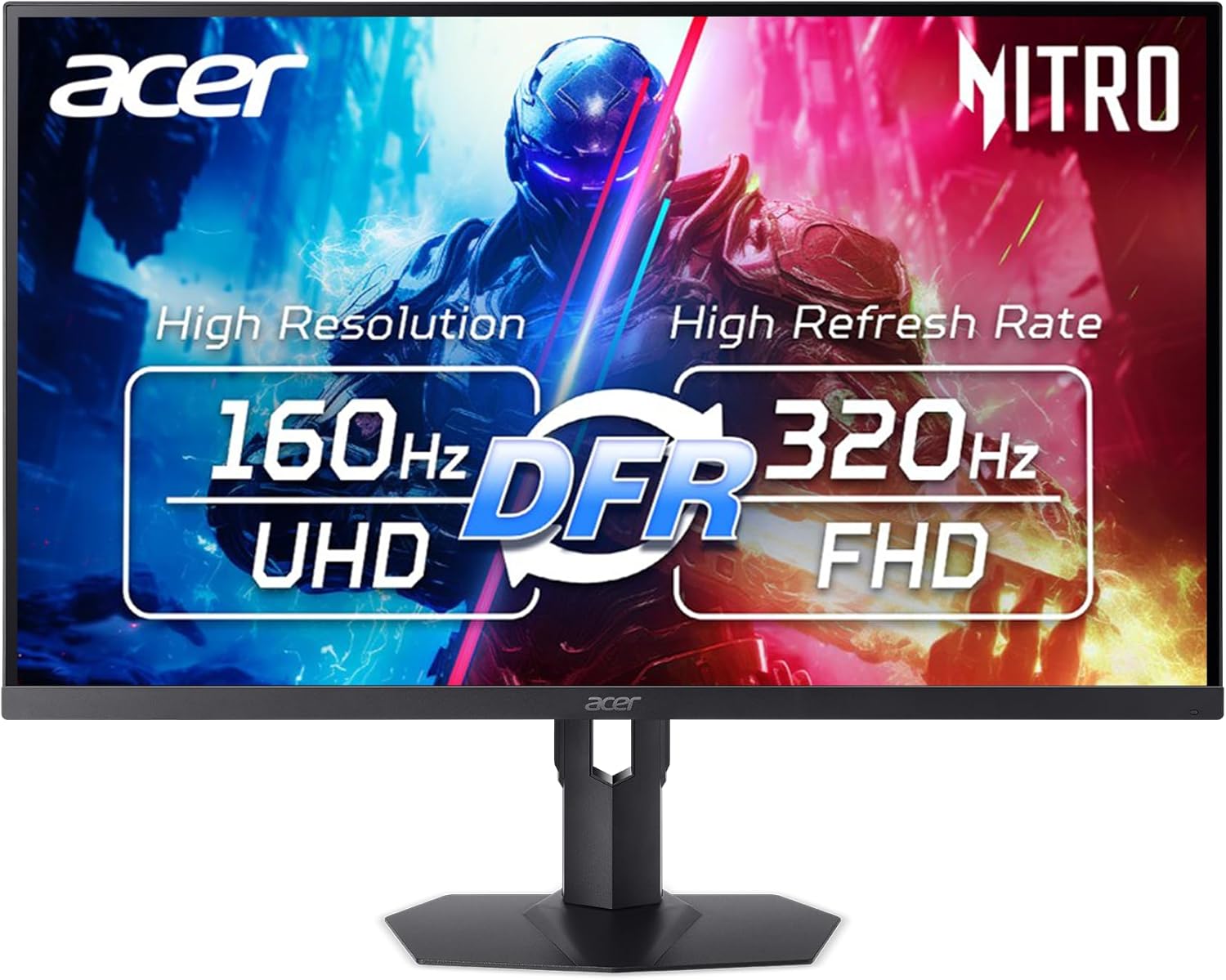
Acer Nitro XV275K
Bottom line: A 27-inch 4K mini LED screen with 1,152 zones and a dual frequency mode up to 320Hz, for players who want to swap between sharp images and extreme speed.
Acer's Nitro XV275K is a 4K screen that can trade resolution for refresh rate when a game needs it.
Pros & Cons
Pros- 4K IPS panel with 1,152 local dimming zones and up to 1000 nits
- DisplayHDR 1000 certification
- Dual frequency mode raises the refresh rate to 320Hz when you choose speed over resolution
- 0.5ms GtG response time
- FreeSync Premium to reduce tearing
- Covers a wide color gamut with matte finish against glare
- Height, pivot, swivel and tilt adjustment
- Includes an HDMI cable and a three-year parts and labor warranty
Cons- The 320Hz mode comes at a lower resolution, not native 4K
- Only DisplayPort and HDMI inputs, with no USB-C listed
- It is a heavy monitor at 12.1 pounds, so check your desk or arm
Why We Picked It
The XV275K is for players who want to stay flexible. At native 4K it delivers dense local dimming and HDR1000, and the dual frequency mode gives a route to 320Hz for fast titles. The mix of a deep-contrast panel and a speed option sets it apart from the plain 4K mini LED crowd.
Who It's For
You have a strong GPU and play recent AAA games at 4K, yet you still enjoy fast competitive modes. You want one screen that can change roles without buying a second monitor.
You value brightness for HDR and want a matte surface for a bright room.
Specs & Configurations
- Size
- 27 inches
- Resolution
- 3840 x 2160
- Refresh rate
- 160Hz, up to 320Hz in DFR mode
- Dimming zones
- 1,152
- HDR
- DisplayHDR 1000
- Response time
- 0.5ms GtG

5
Best for 4K at 320Hz
MSI MPG 274URDFW E16M
Bottom line: A 27-inch 4K Rapid IPS mini LED monitor rated up to 320Hz with 1,152 zones, for players with a high-end GPU who want speed and sharpness together.
MSI's MPG 274URDFW E16M targets players who refuse to pick between 4K and very high refresh rates.
Pros & Cons
Pros- 4K resolution with a refresh rate of up to 320Hz
- 1,152 zone full-array local dimming for deeper blacks
- Quantum dot Rapid IPS panel with wide color coverage
- 0.5ms GtG response time
- AMD FreeSync Premium Pro and G-SYNC Compatible support
- AI Dual Mode adjusts the refresh rate automatically when resolution changes
- AI Menu can apply game profiles automatically
- White finish and a matte screen suit bright desks
Cons- A high-end GPU is needed to take advantage of the top refresh rates at 4K
- The listing names tilt adjustment only, so check height and pivot options before buying
Why We Picked It
Few monitors pair a 1,152-zone backlight with a 4K panel that reaches 320Hz. MSI adds AI Dual Mode, which handles the switch between resolution and speed for you, plus quantum dot color. For people building a top-end rig, it sits near the top of the category.
Who It's For
You own a current high-end graphics card and want a monitor that will not hold it back. You play fast games and cinematic games on the same screen.
You like a clean white setup and are fine adding a monitor arm if the stand does not fit your desk.
Specs & Configurations
- Size
- 27 inches
- Resolution
- 3840 x 2160
- Refresh rate
- Up to 320Hz
- Dimming zones
- 1,152
- Panel
- Rapid IPS with quantum dot
- Response time
- 0.5ms GtG

6
Best for a Larger 32-Inch Screen
TCL 32G64
Bottom line: A 32-inch 1440p QD mini LED monitor with 336 zones, PIP/PBP and a built-in KVM switch, for players who want a bigger canvas and a multi-PC desk.
The TCL 32G64 brings a quantum dot mini LED backlight to a 32-inch screen with extras for people who run more than one PC.
Pros & Cons
Pros- 32-inch screen gives a large, immersive picture
- Quantum dot mini LED backlight with 336 dimming zones
- 180Hz native refresh rate
- 1ms GTG response time
- AMD FreeSync and NVIDIA G-SYNC Compatible support
- Built-in KVM switch lets one keyboard and mouse control two computers
- PIP and PBP show two sources at once
- HVA panel with a listed 3500:1 contrast ratio
Cons- HDR600 is a step below the HDR1000 of other picks, so highlights are less bright
- 1440p on 32 inches looks less sharp than 4K
- It has one HDMI port and a one-year manufacturer warranty
Why We Picked It
Most mini LED gaming monitors stop at 27 inches. This one gives you a larger panel with a lighter load on your GPU than a 32-inch 4K screen, and it adds a KVM switch and picture-by-picture for desks with a work laptop and a gaming PC.
Who It's For
You sit a bit further back, want a big image for immersive games and prefer high frame rates at 1440p to a heavy 4K load.
You switch between a gaming PC and a laptop and want one keyboard and mouse for both.
Specs & Configurations
- Size
- 32 inches
- Resolution
- 2560 x 1440
- Refresh rate
- 180Hz
- Dimming zones
- 336
- HDR
- HDR600
- Extras
- PIP/PBP and KVM
Which Mini LED Gaming Monitor Should You Buy?
The best mini LED gaming monitor depends on your graphics card and how you play. Choose the AOC Q27G3XMN for dark, cinematic games on a budget, or the KTC M27T6S for the same 1440p resolution with a denser backlight and faster Fast IPS motion. If you want 4K, the KTC M27U6 and the Acer Nitro XV275K both give you a lower-resolution fast mode, while the MSI MPG 274URDFW E16M suits owners of a high-end GPU who want 4K at very high refresh rates. For a larger screen and a multi-PC desk, the TCL 32G64 is the one to look at. Whichever you pick, use DisplayPort for the top refresh rates.

