

A 32-inch screen fills more of your view than a 27-inch one, and at 4K it keeps the detail sharp, which is why so many players now shop for the best 32 inch gaming monitor before a 27-inch model. These 12 picks run from a 1440p 180Hz curved screen to 4K OLED panels with 240Hz and a 480Hz mode, so there is a fit for a mid-range card and for a flagship one. Below the picks, a short guide explains how resolution, panel type and refresh rate change what you see.
Best 32 Inch Gaming Monitors in 2026: 12 Picks for Every Budget
GameCuki is reader-supported. When you buy through links on our site, we may earn an affiliate commission at no extra cost to you. As an Amazon Associate I earn from qualifying purchases. Learn more.
Our Top Picks

Best Overall for 4K OLED Gaming
MSI MPG 321URX QD-OLED
Bottom line: A 4K QD-OLED with 240Hz, 0.03ms response and 90W USB-C, for players who want one screen that handles games, work and a console.
- 240Hz at full 4K keeps fast motion smooth
- 0.03ms gray-to-gray response for very little blur
- 99% DCI-P3 color gamut with Delta E of 2 or lower
- VESA DisplayHDR True Black 400 certification
- 90W USB-C connection can charge a laptop over one cable
- KVM switch, picture-in-picture and console mode
- 4-way adjustable stand
- OLED Care 2.0 features to limit burn-in risk
- Static HUDs and taskbars can raise burn-in risk on any OLED, so vary what stays on screen
- Needs a strong graphics card to use 240Hz at 4K
- DisplayPort 1.4a is older than the 2.1 ports on some rivals

Best for Bright Rooms
Samsung Odyssey OLED G8 G80SD
Bottom line: A glare-free 4K QD-OLED with 240Hz and a heat-pipe cooling system, for players whose screen faces a window or lamp.
- Glare-free coating cuts reflections from windows and lamps
- 240Hz at 4K with HDMI 2.1 and DisplayPort
- 0.03ms gray-to-gray response
- Pulsating heat pipe cooling to limit burn-in risk
- Logo and taskbar detection lowers brightness on static images
- Screen saver dims the panel after 10 minutes idle
- G-Sync compatible
- Sleek metal design with a 3-year warranty
- 250 nits typical brightness is modest next to some rivals
- Burn-in protection dims static areas, which some players notice
- 240Hz at 4K needs a strong graphics card

Best for Burn-In Coverage
ASUS ROG Swift PG32UCDM
Bottom line: A 4K QD-OLED with 240Hz and a 3-year warranty that covers burn-in, for players who want peace of mind with their OLED.
- 3-year warranty includes burn-in coverage
- 240Hz at 4K with 0.03ms response
- 99% DCI-P3 and true 10-bit color with Delta E under 2
- VESA DisplayHDR 400 True Black compliance
- Custom heatsink and graphene film for heat management
- 90W USB-C power delivery for single-cable use
- G-SYNC Compatible
- Optional uniform brightness setting
- Uniform brightness mode lowers peak brightness while it is on
- 240Hz at 4K needs a high-end graphics card
- OLED still needs sensible habits with static desktop elements

Best for Dual Mode 4K and 480Hz
ASUS ROG Strix XG32UCWMG
Bottom line: A glossy WOLED that runs 4K at 240Hz or full HD at 480Hz, for players who split time between cinematic games and esports.
- Dual mode switches between 4K at 240Hz and FHD at 480Hz
- TrueBlack Glossy panel gives a zero-haze, sharp image
- Neo Proximity Sensor blanks the screen when you leave to reduce burn-in risk
- 99% DCI-P3 and Delta E under 2
- VESA DisplayHDR 400 True Black compliance
- 3-year warranty with burn-in coverage
- G-SYNC Compatible
- HDMI 2.1 for consoles
- Glossy finish shows reflections in bright rooms
- USB-C supplies only 15W, not enough to charge most laptops
- Fastest mode drops to full HD resolution

Best for Brightness and DisplayPort 2.1
LG UltraGear 32GX870A-B
Bottom line: A bright 4K OLED with DisplayPort 2.1 and a 480Hz full HD mode, for players who want punchy HDR highlights.
- Dual mode: 4K at 240Hz or full HD at 480Hz
- Micro Lens Array+ raises brightness to 275 nits typical
- 1300 nits peak brightness for HDR highlights
- 0.03ms gray-to-gray response
- VESA DisplayHDR True Black 400 with 1.5M:1 contrast
- G-SYNC Compatible and AMD FreeSync Premium Pro
- DisplayPort 2.1 and USB-C
- LG's brightest UltraGear OLED
- Peak 1300 nits only applies to small bright areas in HDR
- 480Hz needs the lower full HD mode
- OLED burn-in care still matters for static elements

Best for Built-In Screen Audio
LG UltraGear evo 32GS95UE
Bottom line: A 4K OLED with dual mode and Pixel Sound that sends audio from the panel itself, for players who want a clean desk without extra speakers.
- First VESA-certified dual mode: 4K at 240Hz or full HD at 480Hz
- Pixel Sound emits audio from behind the panel
- Anti-glare, low-reflection screen
- 0.03ms gray-to-gray response
- VESA DisplayHDR True Black 400 and 1.5M:1 contrast
- G-SYNC Compatible and AMD FreeSync Premium Pro
- HDMI 2.1 and DisplayPort 1.4 both reach 240Hz
- Tilt, height and swivel stand
- Only a 2-year limited warranty, shorter than some rivals
- Pixel Sound is no replacement for a headset or a real speaker setup

Best for Scratch Resistance and KVM
GIGABYTE MO32U24
Bottom line: A 4K QD-OLED with a scratch-resistant ObsidianShield film and a Type-C KVM, for players who share the screen between two computers.
- 240Hz at 4K with 0.03ms response
- ObsidianShield film deepens blacks up to 40% and resists scratches
- Type-C KVM lets one keyboard and mouse control two computers
- AI-based OLED Care to limit burn-in risk
- Graphene thermal film and fanless design
- AMD FreeSync Premium Pro and NVIDIA G-SYNC Compatible
- HDMI 2.1 for consoles
- Height, tilt, swivel and pivot stand
- OLED Care features run in the background and may dim static areas
- 240Hz at 4K needs a powerful graphics card
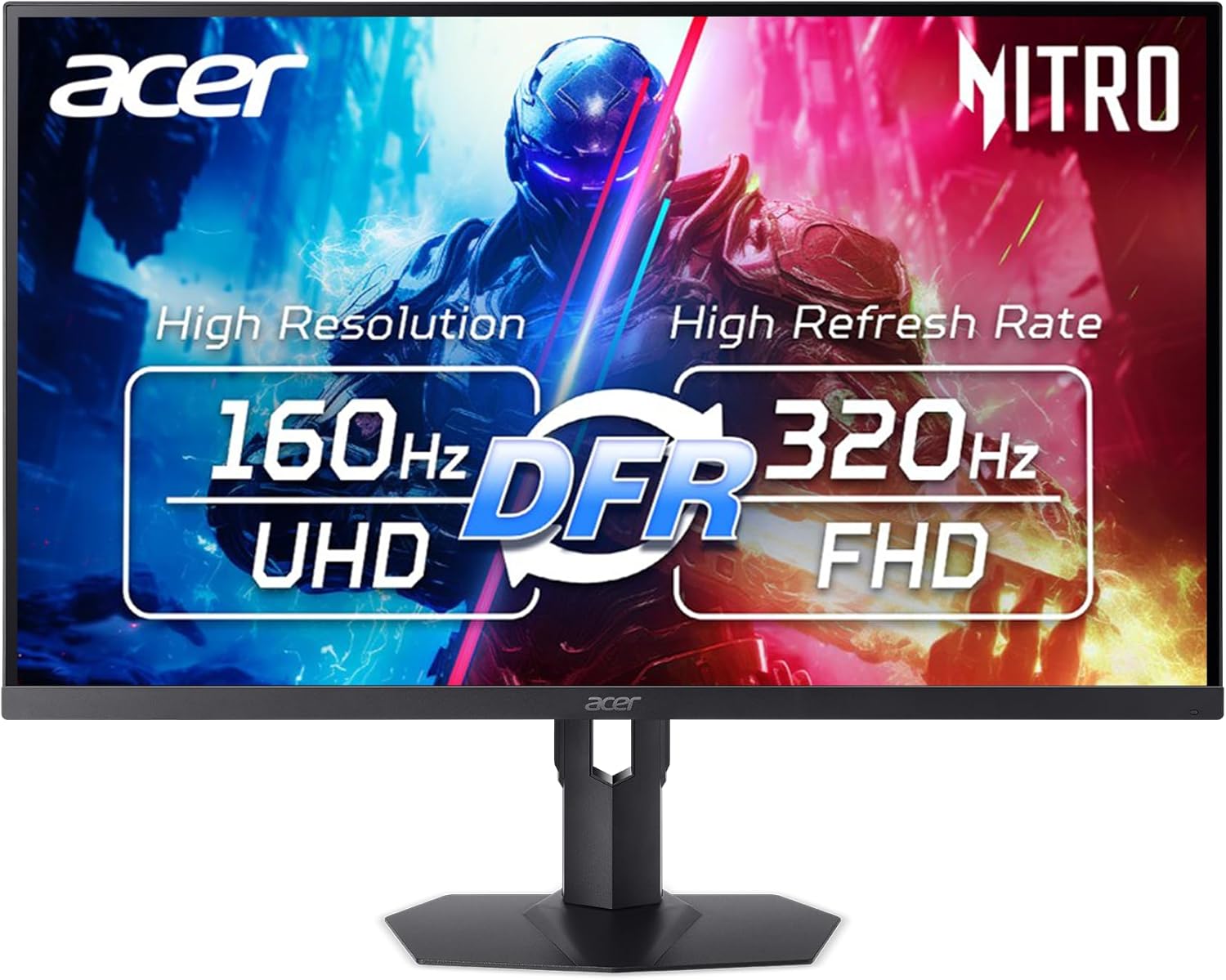
Best 4K Mini-LED Without OLED Burn-In
Acer Nitro XV325QK
Bottom line: A 4K Mini-LED with 1152 dimming zones and DisplayHDR 1000, for players who want strong HDR without managing burn-in.
- 1152 local dimming zones for strong contrast
- Up to 1000 nits brightness for HDR highlights
- VESA DisplayHDR 1000 certification
- 0.5ms gray-to-gray response
- Dynamic refresh rate switches between higher resolution and higher refresh rate
- AMD FreeSync Premium
- No OLED burn-in routine to manage
- Local dimming zones can show some blooming around bright objects
- Not as fast or as black as OLED
- 160Hz at 4K is below the 240Hz OLED panels

Best Curved 4K Screen
Samsung Odyssey Neo G8 G85NB
Bottom line: A 1000R curved 4K Mini-LED with 240Hz and a matte screen, for players who want an immersive wraparound view.
- 1000R curve wraps the view around you
- 240Hz at 4K with 1ms response
- Quantum Mini-LED gives a 1,000,000:1 contrast ratio
- 2,000 nit peak brightness for HDR
- Matte display absorbs room light
- AMD FreeSync Premium Pro with NVIDIA support
- Older design than the OLED models in this list
- Curved screens can look odd for work that needs straight lines
- Mini-LED zones can bloom around bright objects

Best Budget Curved 1440p
GIGABYTE GS32QCA
Bottom line: A 180Hz 1440p curved VA screen with 1ms response, for players who want a larger screen without a high price.
- 180Hz refresh rate for smooth motion
- 1ms MPRT response
- 1500R curve for a more immersive view
- 3500:1 contrast ratio and 120% sRGB gamut
- AMD FreeSync support
- Game Assist tools: OSD Sidekick, timer and crosshairs
- Black Equalizer reveals detail in dark areas
- 3-year warranty
- 1440p on a 31.5-inch screen is about 93 pixels per inch, less sharp than 4K
- VA panels can smear dark scenes more than OLED
- HDR is a basic HDR10 Ready label, not a certified tier

Best for Entry-Level 1440p
LG UltraGear 32G600A-B
Bottom line: A 180Hz 1440p curved UltraGear with a full tilt, height and swivel stand, for players who want an easy step up.
- 180Hz refresh rate for smooth motion
- 1ms gray-to-gray response
- 1000R curve for an immersive view
- HDR10 support
- Up to 99% sRGB color coverage
- AMD FreeSync for tear-free play
- Tilt, height and swivel stand
- HDMI and DisplayPort inputs
- 1440p at 32 inches is less sharp than 4K
- HDR10 support is basic without local dimming
- Up to 99% sRGB coverage is narrower than the DCI-P3 range on the OLED picks

Best for AI Crosshair and Sniper Tools
ASUS ROG Swift PG32UCDP
Bottom line: A dual mode WOLED with AI crosshair and sniper tools plus anti-flicker tech, for players who want help in competitive shooters.
- Dual mode: 4K at 240Hz or FHD at 480Hz
- ROG anti-flicker technology reduces flicker when refresh rate changes
- AI Crosshair, AI Sniper and AI Visual functions
- 99% DCI-P3 with true 10-bit color
- Custom heatsink for passive cooling
- 3-year warranty with burn-in coverage
- 90W USB-C power delivery
- G-SYNC Compatible
- AI tools help in some games and can feel gimmicky in others
- Fastest mode drops to full HD resolution
- WOLED needs burn-in care for static desktop elements
Table of Contents
Best 32 Inch Gaming Monitors: Our Picks in Detail
1
Best Overall for 4K OLED Gaming
MSI MPG 321URX QD-OLED
Bottom line: A 4K QD-OLED with 240Hz, 0.03ms response and 90W USB-C, for players who want one screen that handles games, work and a console.
A 31.5-inch QD-OLED that pairs 4K sharpness with a 240Hz refresh rate and a full set of connections.
Pros & Cons
Pros
- 240Hz at full 4K keeps fast motion smooth
- 0.03ms gray-to-gray response for very little blur
- 99% DCI-P3 color gamut with Delta E of 2 or lower
- VESA DisplayHDR True Black 400 certification
- 90W USB-C connection can charge a laptop over one cable
- KVM switch, picture-in-picture and console mode
- 4-way adjustable stand
- OLED Care 2.0 features to limit burn-in risk
Cons
- Static HUDs and taskbars can raise burn-in risk on any OLED, so vary what stays on screen
- Needs a strong graphics card to use 240Hz at 4K
- DisplayPort 1.4a is older than the 2.1 ports on some rivals
Why We Picked It
This is the screen that covers the widest range of habits. The QD-OLED panel gives deep blacks and wide color, 240Hz suits shooters, and the USB-C port with 90W of power delivery plus KVM support turns it into a laptop dock on work days. Console Mode and HDMI 2.1 mean a PlayStation or Xbox can use it too.
Who It's For
Players who run a modern graphics card, play in a dim or moderately lit room and want a single 32-inch monitor for games, streaming and the occasional work-from-home day. If your desk also holds a laptop, the one-cable USB-C connection saves clutter.
Specs & Configurations
- Size
- 31.5 inches
- Resolution
- 3840x2160
- Refresh rate
- 240Hz
- Panel
- QD-OLED
- Response
- 0.03ms GtG
- Ports
- HDMI 2.1, DisplayPort 1.4a, USB-C
Get It Now
Check Price on Amazon
2
Best for Bright Rooms
Samsung Odyssey OLED G8 G80SD
Bottom line: A glare-free 4K QD-OLED with 240Hz and a heat-pipe cooling system, for players whose screen faces a window or lamp.
A 32-inch 4K QD-OLED built to fight glare and heat, with 240Hz for fast play.
Pros & Cons
Pros
- Glare-free coating cuts reflections from windows and lamps
- 240Hz at 4K with HDMI 2.1 and DisplayPort
- 0.03ms gray-to-gray response
- Pulsating heat pipe cooling to limit burn-in risk
- Logo and taskbar detection lowers brightness on static images
- Screen saver dims the panel after 10 minutes idle
- G-Sync compatible
- Sleek metal design with a 3-year warranty
Cons
- 250 nits typical brightness is modest next to some rivals
- Burn-in protection dims static areas, which some players notice
- 240Hz at 4K needs a strong graphics card
Why We Picked It
Glossy OLED screens can look like mirrors in a bright room. This one uses a glare-free finish that keeps blacks looking black when light hits the panel. Samsung adds a pulsating heat pipe, brightness control for logos and taskbars, and an idle screen saver, all aimed at the burn-in worry that holds many players back from OLED.
Who It's For
Players whose desk sits near a window or under a bright ceiling light and who still want OLED contrast. It also fits anyone who leaves the monitor on for long sessions and wants the maker to build in as many wear safeguards as possible.
Specs & Configurations
- Size
- 32 inches
- Resolution
- 3840x2160
- Refresh rate
- 240Hz
- Panel
- QD-OLED, glare-free
- Response
- 0.03ms GtG
- Brightness
- 250 nits typical
Get It Now
Check Price on Amazon
3
Best for Burn-In Coverage
ASUS ROG Swift PG32UCDM
Bottom line: A 4K QD-OLED with 240Hz and a 3-year warranty that covers burn-in, for players who want peace of mind with their OLED.
A QD-OLED monitor from ASUS that backs its panel with a warranty covering burn-in.
Pros & Cons
Pros
- 3-year warranty includes burn-in coverage
- 240Hz at 4K with 0.03ms response
- 99% DCI-P3 and true 10-bit color with Delta E under 2
- VESA DisplayHDR 400 True Black compliance
- Custom heatsink and graphene film for heat management
- 90W USB-C power delivery for single-cable use
- G-SYNC Compatible
- Optional uniform brightness setting
Cons
- Uniform brightness mode lowers peak brightness while it is on
- 240Hz at 4K needs a high-end graphics card
- OLED still needs sensible habits with static desktop elements
Why We Picked It
Burn-in is the most common reason players hesitate on OLED, and ASUS answers it with a 3-year warranty that includes burn-in coverage. The monitor also uses a custom heatsink and graphene film to keep temperatures down, and DisplayWidget Center gives mouse-driven access to the OLED Care settings.
Who It's For
Players who want 4K OLED and want a warranty to lean on while they learn how the panel behaves with their games. The 90W USB-C port also suits a desk where a laptop shares the screen.
Specs & Configurations
- Size
- 32 inches
- Resolution
- 3840x2160
- Refresh rate
- 240Hz
- Panel
- QD-OLED
- Response
- 0.03ms GtG
- Warranty
- 3 years with burn-in coverage
Get It Now
Check Price on Amazon
4
Best for Dual Mode 4K and 480Hz
ASUS ROG Strix XG32UCWMG
Bottom line: A glossy WOLED that runs 4K at 240Hz or full HD at 480Hz, for players who split time between cinematic games and esports.
A 4K glossy WOLED with a hotkey-style dual mode for 240Hz sharpness or 480Hz speed.
Pros & Cons
Pros
- Dual mode switches between 4K at 240Hz and FHD at 480Hz
- TrueBlack Glossy panel gives a zero-haze, sharp image
- Neo Proximity Sensor blanks the screen when you leave to reduce burn-in risk
- 99% DCI-P3 and Delta E under 2
- VESA DisplayHDR 400 True Black compliance
- 3-year warranty with burn-in coverage
- G-SYNC Compatible
- HDMI 2.1 for consoles
Cons
- Glossy finish shows reflections in bright rooms
- USB-C supplies only 15W, not enough to charge most laptops
- Fastest mode drops to full HD resolution
Why We Picked It
Most players do not play every game the same way. Dual mode lets you keep 4K at 240Hz for story games, then drop to FHD at 480Hz for a ranked shooter session. The glossy TrueBlack panel looks crisp, and the proximity sensor handles a chunk of burn-in care for you.
Who It's For
Players who split their evenings between big single-player worlds and competitive matches, and who play in a room where light can be controlled. If your graphics card can push very high frame rates at low resolution, the 480Hz mode is the draw.
Specs & Configurations
- Size
- 32 inches
- Resolution
- 3840x2160 (FHD at 480Hz)
- Refresh rate
- 240Hz (480Hz in FHD mode)
- Panel
- TrueBlack Glossy WOLED
- Response
- 0.03ms
- Ports
- DisplayPort 1.4 DSC, HDMI 2.1, USB-C
Get It Now
Check Price on Amazon
5
Best for Brightness and DisplayPort 2.1
LG UltraGear 32GX870A-B
Bottom line: A bright 4K OLED with DisplayPort 2.1 and a 480Hz full HD mode, for players who want punchy HDR highlights.
A 32-inch OLED that adds Micro Lens Array brightness to 4K at 240Hz.
Pros & Cons
Pros
- Dual mode: 4K at 240Hz or full HD at 480Hz
- Micro Lens Array+ raises brightness to 275 nits typical
- 1300 nits peak brightness for HDR highlights
- 0.03ms gray-to-gray response
- VESA DisplayHDR True Black 400 with 1.5M:1 contrast
- G-SYNC Compatible and AMD FreeSync Premium Pro
- DisplayPort 2.1 and USB-C
- LG's brightest UltraGear OLED
Cons
- Peak 1300 nits only applies to small bright areas in HDR
- 480Hz needs the lower full HD mode
- OLED burn-in care still matters for static elements
Why We Picked It
OLED brightness is where earlier 4K panels held back, and this LG leans on a Micro Lens Array to lift typical brightness to 275 nits with peaks up to 1300 nits. DisplayPort 2.1 gives it a modern connection, and the dual mode adds a 480Hz full HD option.
Who It's For
Players who like HDR games with bright explosions and sunlit scenes and who have a graphics card with DisplayPort 2.1 or plan to buy one. It also suits a desk where mixed lighting makes a brighter panel useful.
Specs & Configurations
- Size
- 32 inches
- Resolution
- 3840x2160 (FHD at 480Hz)
- Refresh rate
- 240Hz (480Hz in FHD mode)
- Panel
- OLED with Micro Lens Array+
- Brightness
- 275 nits typical, 1300 nits peak
- Ports
- DisplayPort 2.1, USB-C
Get It Now
Check Price on Amazon
6
Best for Built-In Screen Audio
LG UltraGear evo 32GS95UE
Bottom line: A 4K OLED with dual mode and Pixel Sound that sends audio from the panel itself, for players who want a clean desk without extra speakers.
A 32-inch 4K OLED with an anti-glare finish and sound that comes from the screen.
Pros & Cons
Pros
- First VESA-certified dual mode: 4K at 240Hz or full HD at 480Hz
- Pixel Sound emits audio from behind the panel
- Anti-glare, low-reflection screen
- 0.03ms gray-to-gray response
- VESA DisplayHDR True Black 400 and 1.5M:1 contrast
- G-SYNC Compatible and AMD FreeSync Premium Pro
- HDMI 2.1 and DisplayPort 1.4 both reach 240Hz
- Tilt, height and swivel stand
Cons
- Only a 2-year limited warranty, shorter than some rivals
- Pixel Sound is no replacement for a headset or a real speaker setup
Why We Picked It
This model introduced the dual mode idea that later 32-inch OLEDs copied, so it already has a track record on the market. The anti-glare finish handles room light, and Pixel Sound is a neat extra for desks where you want audio without adding speakers.
Who It's For
Players who want the dual mode feature and an anti-glare screen and care about a tidy setup. It also fits a gamer who wants a sensible OLED option without the newest model's features.
Specs & Configurations
- Size
- 32 inches
- Resolution
- 3840x2160 (FHD at 480Hz)
- Refresh rate
- 240Hz (480Hz in FHD mode)
- Panel
- OLED, anti-glare
- Response
- 0.03ms GtG
- Ports
- HDMI 2.1, DisplayPort 1.4
Get It Now
Check Price on Amazon
7
Best for Scratch Resistance and KVM
GIGABYTE MO32U24
Bottom line: A 4K QD-OLED with a scratch-resistant ObsidianShield film and a Type-C KVM, for players who share the screen between two computers.
A QD-OLED monitor from GIGABYTE that adds a scratch-resistant film and a Type-C KVM.
Pros & Cons
Pros
- 240Hz at 4K with 0.03ms response
- ObsidianShield film deepens blacks up to 40% and resists scratches
- Type-C KVM lets one keyboard and mouse control two computers
- AI-based OLED Care to limit burn-in risk
- Graphene thermal film and fanless design
- AMD FreeSync Premium Pro and NVIDIA G-SYNC Compatible
- HDMI 2.1 for consoles
- Height, tilt, swivel and pivot stand
Cons
- OLED Care features run in the background and may dim static areas
- 240Hz at 4K needs a powerful graphics card
Why We Picked It
The ObsidianShield film is a practical touch on a screen you will wipe and move over the years, and the KVM makes it simple to jump from a gaming PC to a work laptop. Height, tilt, swivel and pivot adjustments round out a stand that suits most desks.
Who It's For
Players who keep a gaming PC and a work laptop on one desk and want to swap between them without cable swaps. It also suits players who want a pivot stand for reading long documents on a rotated screen.
Specs & Configurations
- Size
- 31.5 inches
- Resolution
- 3840x2160
- Refresh rate
- 240Hz
- Panel
- QD-OLED
- Response
- 0.03ms GtG
- Ports
- HDMI 2.1, DisplayPort, USB-C KVM
Get It Now
Check Price on Amazon
8
Best 4K Mini-LED Without OLED Burn-In
Acer Nitro XV325QK
Bottom line: A 4K Mini-LED with 1152 dimming zones and DisplayHDR 1000, for players who want strong HDR without managing burn-in.
A 31.5-inch 4K IPS Mini-LED screen built for bright HDR and fast switching between modes.
Pros & Cons
Pros
- 1152 local dimming zones for strong contrast
- Up to 1000 nits brightness for HDR highlights
- VESA DisplayHDR 1000 certification
- 0.5ms gray-to-gray response
- Dynamic refresh rate switches between higher resolution and higher refresh rate
- AMD FreeSync Premium
- No OLED burn-in routine to manage
Cons
- Local dimming zones can show some blooming around bright objects
- Not as fast or as black as OLED
- 160Hz at 4K is below the 240Hz OLED panels
Why We Picked It
Mini-LED is the answer for players who want high contrast and brightness and are uneasy about OLED wear. The 1152 dimming zones and DisplayHDR 1000 certification let bright scenes stand out, and the dynamic refresh rate feature allows a jump to a higher refresh rate at a lower resolution.
Who It's For
Players who leave their monitor on for work all day and game on it at night, and want HDR without caring about static desktop elements. It also fits anyone who sits in a bright room where an OLED would look dim.
Specs & Configurations
- Size
- 31.5 inches
- Resolution
- 3840x2160
- Refresh rate
- 160Hz (320Hz in dual mode)
- Panel
- IPS with Mini-LED backlight
- Response
- 0.5ms GtG
- HDR
- VESA DisplayHDR 1000
Get It Now
Check Price on Amazon
9
Best Curved 4K Screen
Samsung Odyssey Neo G8 G85NB
Bottom line: A 1000R curved 4K Mini-LED with 240Hz and a matte screen, for players who want an immersive wraparound view.
A 32-inch curved 4K Mini-LED monitor with a matte finish and 240Hz.
Pros & Cons
Pros
- 1000R curve wraps the view around you
- 240Hz at 4K with 1ms response
- Quantum Mini-LED gives a 1,000,000:1 contrast ratio
- 2,000 nit peak brightness for HDR
- Matte display absorbs room light
- AMD FreeSync Premium Pro with NVIDIA support
Cons
- Older design than the OLED models in this list
- Curved screens can look odd for work that needs straight lines
- Mini-LED zones can bloom around bright objects
Why We Picked It
The 1000R curve fills your peripheral vision, which suits racing, flight and open-world games. Quantum Mini-LED backlighting pushes peak brightness to 2,000 nits, and the matte screen keeps light reflections low so HDR still looks right.
Who It's For
Players who want an immersive curved view and bright HDR in a room with unpredictable light. It fits a desk where you sit close and want the screen edges to wrap toward you.
Specs & Configurations
- Size
- 32 inches
- Resolution
- 3840x2160
- Refresh rate
- 240Hz
- Panel
- Quantum Mini-LED, 1000R curve
- Response
- 1ms GtG
- HDR
- Quantum HDR 2000
Get It Now
Check Price on Amazon
10
Best Budget Curved 1440p
GIGABYTE GS32QCA
Bottom line: A 180Hz 1440p curved VA screen with 1ms response, for players who want a larger screen without a high price.
A budget 31.5-inch VA monitor with a 180Hz refresh rate and a gentle curve.
Pros & Cons
Pros
- 180Hz refresh rate for smooth motion
- 1ms MPRT response
- 1500R curve for a more immersive view
- 3500:1 contrast ratio and 120% sRGB gamut
- AMD FreeSync support
- Game Assist tools: OSD Sidekick, timer and crosshairs
- Black Equalizer reveals detail in dark areas
- 3-year warranty
Cons
- 1440p on a 31.5-inch screen is about 93 pixels per inch, less sharp than 4K
- VA panels can smear dark scenes more than OLED
- HDR is a basic HDR10 Ready label, not a certified tier
Why We Picked It
It brings 180Hz and 1ms response to a 32-inch size for a modest price, and a 1440p resolution is easy for a mid-range graphics card to drive. The 3-year warranty is a nice extra at this level.
Who It's For
Players on a mid-range PC who want a bigger screen than 27 inches and still hit high frame rates. It also suits a first monitor upgrade from a 24-inch screen.
Specs & Configurations
- Size
- 31.5 inches
- Resolution
- 2560x1440
- Refresh rate
- 180Hz
- Panel
- VA, 1500R curve
- Response
- 1ms MPRT
- Color
- 120% sRGB
Get It Now
Check Price on Amazon
11
Best for Entry-Level 1440p
LG UltraGear 32G600A-B
Bottom line: A 180Hz 1440p curved UltraGear with a full tilt, height and swivel stand, for players who want an easy step up.
A 32-inch QHD curved monitor with 180Hz, 1ms response and an adjustable stand.
Pros & Cons
Pros
- 180Hz refresh rate for smooth motion
- 1ms gray-to-gray response
- 1000R curve for an immersive view
- HDR10 support
- Up to 99% sRGB color coverage
- AMD FreeSync for tear-free play
- Tilt, height and swivel stand
- HDMI and DisplayPort inputs
Cons
- 1440p at 32 inches is less sharp than 4K
- HDR10 support is basic without local dimming
- Up to 99% sRGB coverage is narrower than the DCI-P3 range on the OLED picks
Why We Picked It
Height, tilt and swivel adjustment is not always included at this level, and it helps a large screen sit at eye level. The 1000R curve and 180Hz refresh rate keep the look and feel of a gaming monitor in a price range that stays friendly.
Who It's For
Players who want a large 1440p screen for mid-range hardware and a stand that adjusts to their desk. It is a simple way to move up to 32 inches without paying for 4K.
Specs & Configurations
- Size
- 32 inches
- Resolution
- 2560x1440
- Refresh rate
- 180Hz
- Panel
- Curved, 1000R
- Response
- 1ms GtG
- Color
- up to 99% sRGB
Get It Now
Check Price on Amazon
12
Best for AI Crosshair and Sniper Tools
ASUS ROG Swift PG32UCDP
Bottom line: A dual mode WOLED with AI crosshair and sniper tools plus anti-flicker tech, for players who want help in competitive shooters.
A 4K WOLED from ASUS with dual mode and aiming tools built into the monitor.
Pros & Cons
Pros
- Dual mode: 4K at 240Hz or FHD at 480Hz
- ROG anti-flicker technology reduces flicker when refresh rate changes
- AI Crosshair, AI Sniper and AI Visual functions
- 99% DCI-P3 with true 10-bit color
- Custom heatsink for passive cooling
- 3-year warranty with burn-in coverage
- 90W USB-C power delivery
- G-SYNC Compatible
Cons
- AI tools help in some games and can feel gimmicky in others
- Fastest mode drops to full HD resolution
- WOLED needs burn-in care for static desktop elements
Why We Picked It
The anti-flicker technology targets a known OLED complaint, brightness flicker when the frame rate swings. AI Crosshair and AI Sniper add overlay tools for shooters, and the 3-year burn-in warranty matches ASUS's other OLED lines.
Who It's For
Players who spend most of their time in competitive shooters and want a monitor that offers overlays and a 480Hz mode, but who still want 4K for everything else.
Specs & Configurations
- Size
- 32 inches
- Resolution
- 3840x2160 (FHD at 480Hz)
- Refresh rate
- 240Hz (480Hz in FHD mode)
- Panel
- WOLED
- Color
- 99% DCI-P3, true 10-bit
- Warranty
- 3 years with burn-in coverage
Get It Now
Check Price on AmazonHow to Choose a 32 Inch Gaming Monitor
Resolution: 4K Is Sharp, 1440p Is Easier to Run
At 31.5 inches, a 4K screen packs roughly 140 pixels per inch, while 1440p works out to about 93. That gap is why 4K looks crisper for text and fine detail, and why 1440p can look slightly soft on a 32-inch panel. The trade-off is that 4K asks a lot more of your graphics card. If your PC struggles to hold 100 frames per second at 4K, a 1440p screen is the safer choice. For a smaller footprint, our best 27 inch 1440p gaming monitor list is a good next stop.
Panel Type: OLED, Mini-LED or VA
OLED gives the deepest blacks and the fastest response, but static HUDs and taskbars can wear the panel over time, so look for care features and a burn-in warranty. Mini-LED IPS or VA screens reach higher peak brightness with no burn-in worry, though bright objects can bloom on dark backgrounds. A VA panel is the budget route and gives strong contrast for the price. Our best OLED gaming monitor guide goes deeper on the OLED side.
Refresh Rate and Dual Mode
A higher refresh rate only helps when your PC can produce the frames. 180Hz suits a mid-range card at 1440p, 240Hz at 4K suits a flagship card, and the 480Hz modes on dual mode OLEDs run at full HD resolution for competitive play. Dual mode lets you pick sharpness or speed with one hotkey.
Ports and Sync
Check the inputs before you buy. HDMI 2.1 is the one to look for if you also use a console, DisplayPort 2.1 matters for the highest refresh rates, and a USB-C port with power delivery can charge a laptop. FreeSync or G-SYNC compatibility keeps tearing away.
Which 32 Inch Gaming Monitor Should You Buy?
Our pick for the best 32 inch gaming monitor is the MSI MPG 321URX, since it mixes 4K sharpness, 240Hz and a USB-C connection in one OLED. Go for the Samsung G80SD if your room is bright, the ASUS PG32UCDM if burn-in coverage matters, and the Acer Nitro XV325QK if you want high HDR brightness without OLED care. Players on a tighter budget can start with the GIGABYTE GS32QCA or LG 32G600A and still get a big screen at 180Hz.