GameCuki is reader-supported. When you buy through links on our site, we may earn an affiliate commission at no extra cost to you. As an Amazon Associate I earn from qualifying purchases. Learn more.
Buy the wrong mic for an Xbox and you get a silent party chat and a return label. The best microphone for Xbox is not the one with the fanciest capsule, it is the one built to reach the console through the controller’s 3.5mm jack or a receiver made for Xbox. These six picks cover desk and boom-arm mics, clip-on options for headphones you already own, and a wireless earpiece for casual chat.
Compatibility is the whole story here, so every pick below names how it connects to the console. If you would rather have audio and voice in one device, our best headset for Xbox Series X guide is the simpler route, and the best Xbox Series X accessories roundup covers the rest of the setup.
Can You Use Any Microphone With an Xbox?
No. Xbox does not officially support most generic USB desktop microphones, which is the biggest trap for new buyers. A mic that is plug-and-play on Windows can show up as nothing on an Xbox, and “works over USB” on a product page is a different claim from “works on Xbox.” Workarounds that route a USB mic through a PC or a splitter exist, but they tend to add echo and crackle, so they are not what we recommend.
What does work is the 3.5mm headset jack on the Xbox Wireless Controller. Newer Xbox controllers have the jack built in, while older Xbox One controllers need Microsoft’s headset adapter. A mic that terminates in a 3.5mm plug, or one that includes a cable for that jack, connects the way a wired headset does. Some makers also sell a wireless receiver designed for Xbox.
One more thing to know before you buy: a mic on the controller jack handles your voice, but you still need a separate way to hear game audio, such as the TV speakers or headphones. That is why several picks below are mic-only gear that pair with headphones you already own.
Best Microphone for Xbox: Our Picks in Detail

1
Best Desk Mic for Xbox and PC
ZealSound BD9S
Bottom line: A boom-arm condenser that connects to the Xbox controller with its included 3.5mm cable and switches to USB-C for a PC, so one mic covers both setups.
ZealSound's BD9S is one of the few desk-style mics that lists Xbox support as a headline feature, not an afterthought.
Pros & Cons
Pros- Built for Xbox Series X, Series S and Xbox One party chat through the controller jack
- Dedicated Xbox mode with a rechargeable battery that lasts up to 35 hours with lights off
- Cardioid pattern focuses on your voice instead of controller clicks and keyboard noise
- Gain and headphone volume knobs on the front work without any software
- Headphone jack lets you hear your own voice with minimal delay
- Boom arm, desk clamp, 3.5mm cable and USB cable all come in the box
- Same mic works on a PC, Mac and PlayStation over USB-C
Cons- Xbox mode needs the mic powered on before you plug it into the controller
- Charging while playing needs a wall outlet, not a computer USB port
- Boom arm and clamp take desk space, so it is a poor fit for a couch setup
Why We Picked It
Most USB desk mics do not talk to an Xbox at all. The BD9S solves that with a built-in battery and a 3.5mm output that plugs into the controller, so you get a boom-arm condenser without a PC in the chain. The front-panel gain knob and monitor jack are the controls console players actually miss when they try to use a headset mic.
Who It's For
You play at a desk with an Xbox, and you are tired of a thin headset mic that makes your callouts sound like a phone call. A boom arm that pulls the mic close to your mouth and folds out of the way is a bigger upgrade than any capsule spec.
You also own a PC and want one microphone for both, switching between the controller cable and USB-C when you change platforms.
Specs & Configurations
- Capsule
- Cardioid condenser
- Xbox connection
- Included 3.5mm cable to controller jack
- PC connection
- USB-C with USB-A adapter cable
- Audio
- 192kHz/24-bit
- Battery
- 800mAh, up to 35 hours with RGB off
- Boom arm
- Extends up to 15.4 inches

2
Best Xbox-Only Boom Mic
TONOR TCX3+
Bottom line: A wireless-battery boom mic made only for Xbox controllers, with mute and volume controls on the body and a 30-hour battery when the lights are off.
TONOR built the TCX3+ for a single job: getting a boom-arm mic onto an Xbox controller without extra boxes.
Pros & Cons
Pros- Made specifically for Xbox controllers with no splitter or power supply
- Up to 30 hours of use with the lights off
- Five minutes of fast charging gives about an hour of play
- One-tap mute on top of the mic
- Volume knob and gain control on the body
- Monitoring lets you hear your own voice
- Boom arm and 3.5mm cable are included
Cons- Xbox only, it does not work with PC, phones, PlayStation or Switch
- The mic cannot be used while it is charging
- RGB mode cuts battery life to around 10 hours
Why We Picked It
The appeal is how little setup it asks for. The listing says it connects straight to the Xbox controller and needs no extra splitters, audio cables or power supply. Because it is battery powered, you charge it and forget about it, and the fast-charge top-up covers a surprise session when the battery runs low.
Who It's For
You play on a console and nothing else, and you want a mic that does one thing without a manual or a PC. A boom arm near your mouth and a mute tap you can hit mid-match are what make chat sound clearer.
You prefer a dedicated gaming mic over clipping something onto your headphones, and you do not need it to work anywhere else.
Specs & Configurations
- Connection
- 3.5mm cable to Xbox controller
- Battery
- Up to 30 hours lights off, 10 hours with RGB
- Fast charge
- 5 minutes adds about 1 hour
- Controls
- Tap mute, volume knob, gain control
- Mount
- 3/8 and 5/8 inch threads, boom arm included
- Compatibility
- Xbox only

3
Best for Turning Your Headphones Into an Xbox Headset
Antlion Audio ModMic Uni 2+
Bottom line: A clip-on boom mic that adds voice chat to the wired headphones you already like, using a Y adapter into the Xbox controller's 3.5mm jack.
The ModMic Uni 2+ is a mic that attaches to headphones, and Antlion says its 3.5mm ModMics work on consoles with a Y adapter.
Pros & Cons
Pros- Keeps the wired headphones you already own and adds a mic to them
- Works with newer Xbox controllers through a TRRS Y adapter
- Unidirectional capsule with noise-cancelling design
- In-line analog mute switch
- Magnetic clamp lets you flip the mic out of the way
- Hard case, spare clasps and adhesives come in the box
- Same mic moves to a PC without changes
Cons- A TRRS Y adapter is a separate purchase for console use
- Wired headphones are required
- Older Xbox One controllers need an extra stereo adapter
Why We Picked It
Antlion's own compatibility note says any TRRS type Y adapter will work: plug the headphones and the mic into the adapter, then plug the adapter into the controller. The same note says the USB and wireless ModMic versions are not compatible with any Xbox console, so the 3.5mm Uni model is the right one to buy. That kind of specific guidance is rare in this category.
Who It's For
You own a pair of wired headphones with sound you love, and the idea of replacing them with a gaming headset feels like a downgrade. You play on a couch with a controller and want a clean cable to the jack.
You value a mute switch on the cable and a mic you can move between a console and a PC.
Specs & Configurations
- Connection
- 3.5mm
- Capsule
- Unidirectional, noise-cancelling
- Controls
- In-line mute switch
- Cable
- 2 meter integrated cable
- Xbox use
- TRRS Y adapter required, sold separately
- Included
- Hard case, magnetic clasps, spare adhesives, cable clips

4
Best Detachable Boom Cable for Xbox
V-MODA BoomPro
Bottom line: A detachable boom mic cable with a mute button and volume wheel that lists Xbox One controller support right on the product.
The BoomPro swaps into your headphones' cable port and gives them a boom mic, a mute button and a volume wheel.
Pros & Cons
Pros- Lists Xbox One and PlayStation 4 console support along with phones and PCs
- Updated Xbox controllers with the 3.5mm jack need no adapter
- Mute button and volume wheel clip onto your shirt
- Flexible boom lets you position the mic near your mouth
- Reinforced but lightweight cable resists tangles
- Detachable, so you can leave it behind when you only listen
- Fits V-MODA Crossfade and other 3.5mm input headphones
Cons- Headphone compatibility varies by model, so check the maker's list
- Original Xbox One controllers need Microsoft's headset adapter
- It is a cable mic, so it adds a wire between you and the controller
Why We Picked It
The product lists Updated Xbox One controllers with the 3.5mm jack as needing no adapter, and it notes that original Xbox One controllers need the official Microsoft headset adapter. That level of specificity beats most generic mic cables. The clip-on mute and volume controls matter on a console, where there is no desktop app to adjust things mid-game.
Who It's For
You own headphones with a compatible 3.5mm input and want a quick way to add voice chat for Xbox. A detachable boom you can pop off when you are just listening suits a living room player who goes back and forth between music and multiplayer.
You like physical controls on your chest rather than menu settings.
Specs & Configurations
- Connection
- 3.5mm plug
- Controls
- Clip-on mute button and volume wheel
- Mic
- Flexible boom, unidirectional
- Connector
- 24-carat gold-plated
- Xbox use
- Updated Xbox One controller with 3.5mm jack needs no adapter
5
Best Wireless Earpiece Mic for Xbox
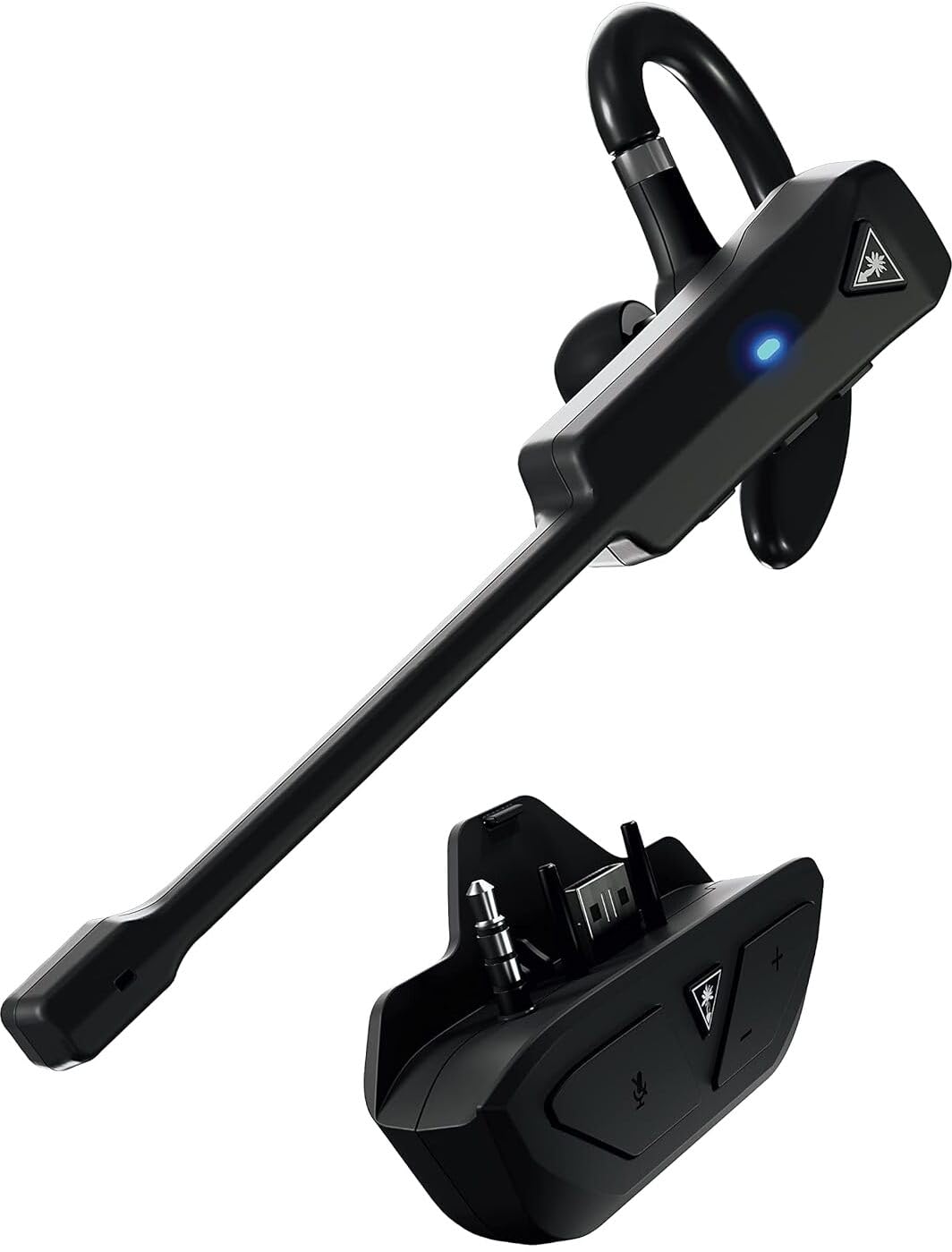
Turtle Beach Recon Air
Bottom line: A wireless chat communicator with a noise-cancelling mic and a transmitter for Xbox Series X and S, for players who want voice without a headset on their head.
Recon Air is a one-ear communicator built for chat, and it ships with a transmitter made for Xbox.
Pros & Cons
Pros- Wireless transmitter connection for Xbox Series X and S and Xbox One
- Gaming-tuned, noise-cancelling microphone
- Up to 10 hours of battery life
- USB-C quick charging
- Reversible ear hook and three eartip sizes
- Controls on both the earpiece and the transmitter
- Bluetooth 5.1 also covers phones, PC and Mac
Cons- Single earpiece, so it is a chat tool and not a full gaming headset
- Eartips must fit your ear canal or sound and call quality suffer
- Ten hours of battery means a recharge between long sessions
Why We Picked It
It solves the problem of a mic with no cable at all. The transmitter handles the Xbox connection, and Bluetooth lets the same earpiece move to a phone or PC. For players who find over-ear headsets hot or heavy, a small earpiece with a boom-free mic is a real alternative.
Who It's For
You want to talk to friends while the game audio plays through your TV or speakers, and you do not want anything on your head. Late-night play with a roommate nearby is a good example, since the game stays on the speakers and your voice stays in the earpiece.
You also take calls on a phone and like a single wireless piece for both.
Specs & Configurations
- Connection
- Wireless transmitter for Xbox Series X and S and Xbox One
- Also pairs over
- Bluetooth 5.1
- Mic
- Gaming-tuned, noise-cancelling
- Battery
- Up to 10 hours
- Charging
- USB-C
- Fit
- Reversible ear hook with 3 eartip sizes

6
Best Cheap Mic for Casual Xbox Chat
3.5mm Mini Microphone for Xbox Controller
Bottom line: A tiny omnidirectional 3.5mm dongle sold for Xbox controllers, enough for casual chat when you only want to talk to a friend and not sound like a studio.
This is the budget route: a small plug-in mic for the controller jack.
Pros & Cons
Pros- Sold as a mic replacement for Xbox controllers
- 3.5mm TRRS plug, no battery or charging
- Tiny 0.78 inch body fits in a pocket
- Omnidirectional condenser picks up your voice from different seats
- Detachable design is easy to swap or replace
- Cheapest way on this list to get any mic on the controller
- Works with phones and tablets that have a 3.5mm port
Cons- Omnidirectional pickup also captures room noise and TV sound
- Basic sound quality, not suited to streaming or competitive chat
- It is a mic only, so you need separate headphones or speakers for game audio
Why We Picked It
It earns a place because it is the lowest-effort way to give a controller a mic. The listing frames it as a replacement for Xbox controllers, and the 3.5mm TRRS plug is the same connector the other cable-based picks use. It will not match a boom-arm mic, but it gets you talking.
Who It's For
You want a cheap backup mic for the controller, or a friend's console needs one for a night. You play in a quiet room and do not mind a basic sound.
You do not stream and do not need the mic to hold up against a noisy room.
Specs & Configurations
- Connection
- 3.5mm TRRS plug
- Capsule
- Omnidirectional condenser
- Frequency range
- 50Hz to 16kHz
- Size
- 0.78 inch
- Detachable plug
How to Choose a Microphone for Xbox
Check How It Connects to the Console
Start with the connection. A mic that ends in a 3.5mm plug for the controller jack, or ships with a receiver made for Xbox, is the safe path. A USB-only desk mic is the risky one, because Xbox does not officially support generic USB microphones.
Pick the Right Form Factor
Boom-arm mics sit close to your mouth and sound the clearest, but they need desk space. Clip-on and cable mics turn headphones you already own into a headset. An earpiece communicator suits players who do not want a headband.
Plan for Game Audio
A controller-jack mic carries your voice, not the game sound. Decide whether the game plays through the TV, a soundbar or headphones before you buy.
Look for Physical Controls
There is no desktop app on a console. A mute button, a gain knob and a volume control on the mic itself are worth more than extra capsule specs.
Check the Controller You Own
Newer Xbox controllers include the 3.5mm jack. Original Xbox One controllers need Microsoft’s headset adapter before a 3.5mm mic will work.
Which Is the Best Microphone for Xbox for You?
If you play at a desk, a boom-arm mic like the ZealSound BD9S or the TONOR TCX3+ makes the biggest difference to how clear your voice sounds in party chat. If you already own a pair of wired headphones you love, the ModMic Uni 2+ or the BoomPro adds a mic without replacing them. Players who want no cable at all can look at the Recon Air earpiece. Whichever you choose, the best microphone for Xbox is the one that connects the way the console expects and sits close to your mouth.