GameCuki is reader-supported. When you buy through links on our site, we may earn an affiliate commission at no extra cost to you. As an Amazon Associate I earn from qualifying purchases. Learn more.
Teammates stop hearing callouts the moment your voice turns thin and echoey, and the DualSense’s built-in mic only goes so far. The best microphone for PS5 plugs into a USB port, shows up as an input device and makes party chat sound like you are in the same room. These eight picks cover plug-and-play USB mics, dynamic mics for noisy rooms, and one clip-on option that runs through the controller’s 3.5mm jack.
Everything below works on the console itself, so you do not need a PC in the chain. If you also stream, our best USB microphone for streaming list covers PC-first mics, and the best headset for PS5 guide is the better route if you want audio and voice in one device.
Does a USB Microphone Work on PS5?
Yes. The PS5 has USB-A and USB-C ports, and a USB mic that follows standard class-compliant audio shows up as an input device with no driver install. Plug it in, press the PS button to open the control center, choose Mic, then set the Input Device to the new mic. Sony’s mic menu also has a level meter: speak normally and raise the level until the bar sits in the Good range.
For party chat, open Game Base, go to the Parties tab and select Start Party. The same mic carries into party voice chat and in-game chat. Not every USB device behaves, though. Some mics expose extra features through PC software, and that software does not run on a console, so settings like RGB effects or EQ presets may only be changeable on a computer. If a mic stays silent, try a different USB port, check that it is not muted on the mic itself and restart the console.
Two other routes exist. The DualSense has a built-in mic, which is fine for casual chat but picks up button clicks and room noise. And the controller’s 3.5mm jack accepts a wired headset or a clip-on mic, which is the setup the last pick below uses.
Best Microphone for PS5: Our Picks in Detail

1
Best for Plug-and-Play PS5 Chat
HyperX SoloCast
Bottom line: PS5 support is listed right on the product, so you plug in one USB-C cable, tap to mute and start party chat without hunting for settings.
HyperX built the SoloCast as a small, simple USB mic, and it is one of the few that lists PS5 on its own spec sheet.
Pros & Cons
Pros- Listed for PS5, PS4, PC and Mac so there is no compatibility guesswork
- Single USB-C cable with a long 6.6 ft run to a console shelf
- Tap-to-mute sensor with an LED that shows when you are live
- Cardioid pattern favors your voice over keyboard and room sound
- Adjustable stand swivels and fits under a monitor
- 3/8 and 5/8 inch threads accept a boom arm later
- Compact body leaves desk room for a controller and drink
Cons- Only one pickup pattern
- Full 24-bit/96kHz recording needs a firmware update done on a computer
- Stand is a basic swivel design, so a boom arm is a separate purchase
Why We Picked It
Most mics on this list work on PS5 because they use standard USB audio. The SoloCast is the one that says so up front, which matters when you just want a mic that behaves on the first try. The tap-to-mute sensor and LED are the features you actually use mid-match, and the cardioid capsule keeps your voice forward in the mix.
Who It's For
You play on a console in a living room or bedroom and want better voice than the controller mic without learning anything about audio. A single cable, a mute tap and a stand that can swivel is the whole setup.
You use a headset for game sound but a separate mic for chat, or you want a cheap upgrade path to a boom arm later.
Specs & Configurations
- Capsule
- 14mm electret condenser
- Pickup pattern
- Cardioid
- Connection
- USB-C to USB-A, 6.6 ft cable
- Resolution
- Up to 24-bit/96kHz
- Mount
- Stand with 3/8 and 5/8 inch threads

2
Best Compact Mic for Small PS5 Desks
RØDE NT-USB Mini
Bottom line: A small condenser with a built-in pop filter and zero-latency headphone monitoring, ideal if your console sits on a TV stand or a cramped desk.
The NT-USB Mini trims RØDE's studio USB mic down to something you can set next to a console.
Pros & Cons
Pros- Works with PS5 over USB with direct headphone monitoring
- Hardware volume control for your headphone mix on the mic body
- Built-in pop filter tames plosives without extra gear
- Magnetic stand pops off and mounts to any standard arm
- Condenser capsule is tuned for voice, calls and streams
- Plug-and-play with no interface or drivers
- Small footprint suits shelves and entertainment centers
Cons- Output can run quieter on PS5, so raise the mic level in settings
- Condenser capsule will pick up more room noise than a dynamic mic
- Desk-stand design needs a separate arm to move it closer to your mouth
Why We Picked It
The headphone jack on the mic is the standout for console players. It lets you hear your own voice with no delay, so you stop shouting without realizing it, and the volume dial sits right on the mic. The magnetic stand also makes it easy to move the mic between a desk and an arm. If it sounds a little low at first, the PS5's microphone level setting in the control center fixes it.
Who It's For
You play near a TV with limited desk space and want a mic that does not look like a broadcast rig. You wear wired headphones plugged into the mic, so you hear game sound and your own voice without latency.
You want a reliable brand name and a simple USB-C connection rather than RGB or extra pickup patterns.
Specs & Configurations
- Capsule
- Condenser
- Connection
- USB-C
- Monitoring
- Zero-latency headphone output with volume control
- Stand
- Magnetic desk stand, detaches for arms
- Pop filter
- Built in

3
Best for Premium Voice Quality on PS5
RØDE NT-USB+
Bottom line: A studio-grade condenser with a high-power headphone output that gives PS5 players the cleanest-sounding voice on this list, if you have the desk room.
The NT-USB+ is RØDE's flagship USB mic, and it works on PS5 as a standard USB input.
Pros & Cons
Pros- Works over USB on PS5 with direct headphone monitoring
- Studio-grade condenser capsule and low-noise preamp
- High-power headphone output with zero-latency monitoring
- Detachable pop filter and desk stand come in the box
- USB-C connection with 24-bit audio
- APHEX processing is available when you also use a computer
- Solid build that stays put during intense matches
Cons- Larger and heavier than the compact picks at about 1.2 lb
- APHEX processing is set up on a computer, not on the console
- A condenser mic needs a quiet room to avoid picking up keyboard and fan noise
Why We Picked It
If audio quality is the priority, this is the step up from the compact mics. The capsule and preamp are built for studio voice work, and the headphone output is strong enough to drive most wired headphones. Because the pop filter and stand come in the box, you can set it up the moment it arrives.
Who It's For
You run a dedicated console desk and want the voice you share with friends or a stream to sound as close to broadcast quality as a USB mic gets. You also own a PC or laptop, so you can use RØDE Central there to set up the processing.
You have room for a larger mic and a quiet space for it.
Specs & Configurations
- Capsule
- Studio-grade condenser
- Connection
- USB-C
- Resolution
- 48kHz/24-bit
- Processing
- APHEX via RØDE Central
- Weight
- About 1.2 lb
- Included
- Detachable pop filter and desk stand
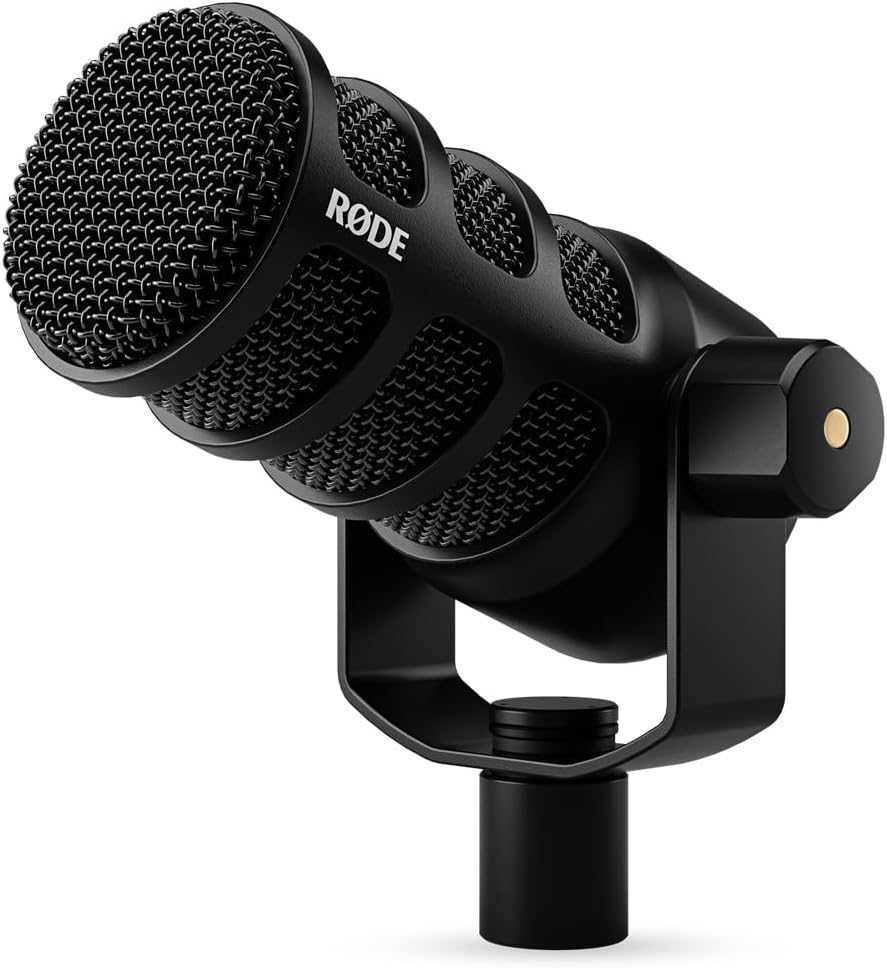
4
Best Dynamic Mic for Noisy PS5 Rooms
RØDE PodMic USB
Bottom line: A broadcast dynamic capsule rejects keyboard clatter and room echo, so it suits PS5 players who share a room or play with a noisy fan running.
The PodMic USB takes a podcast-style dynamic mic and gives it a USB-C cable, which is a good fit for consoles.
Pros & Cons
Pros- Works on PS5 over USB with direct headphone monitoring
- Dynamic capsule rejects keyboard clatter and room echo
- Both USB-C and XLR connections, so it grows with your setup
- On-board APHEX processing adds presence over USB
- Headphone jack on the mic for zero-latency monitoring
- Swing mount, USB-C cable and pouch come in the box
- Built for speech, which suits party chat and commentary
Cons- Heavy at 1.9 lb, so it needs a sturdy stand or boom arm
- Stand or arm is not included
- Dynamic mics work best when you speak close to them
Why We Picked It
Dynamic mics reject sound from the sides and back far better than most condensers, so a fan, a TV or a mechanical keyboard sounds quieter to the people you are talking to. Because it also has an XLR connection, you can keep it if you later move to an audio interface on a PC. The built-in processing runs on the mic itself, so you do not need software on PS5 to sound polished.
Who It's For
Your PS5 lives in a loud room: a shared apartment, a living room with a TV on or a desk with a loud fan. You are comfortable holding the mic a few inches from your mouth on an arm.
You want the mic to hold value if you add a PC setup down the line.
Specs & Configurations
- Capsule
- Dynamic broadcast
- Connection
- USB-C and XLR
- Processing
- On-board APHEX DSP over USB
- Monitoring
- Zero-latency headphone jack
- Weight
- 1.9 lb
- Included
- Swing mount, USB-C cable, pouch

5
Best for PS5 and PC on One Mic
FIFINE AmpliGame AM8
Bottom line: A dynamic USB and XLR mic that FIFINE positions for PS5 voice chat and PC streaming at the same time, with a headphone jack and gain knob built in.
FIFINE markets the AM8 for PS5 players who also use a PC, and the dual USB and XLR connections are the reason.
Pros & Cons
Pros- Plugs into PS5 over USB for party chat
- Dynamic cardioid capsule rejects off-axis noise
- XLR output for PC or an audio interface gives an upgrade path
- Headphone jack with volume control for hearing your voice
- Mic gain knob and tap-to-mute sit on the body
- RGB ring with its own control key
- Built-in 3/8 and 5/8 inch threads fit most arms
Cons- XLR cable and boom arm are not included
- Heavy at about 1.7 lb, so use a sturdy stand or arm
- Frequency range tops out at 16kHz
Why We Picked It
The AM8 gives you a dynamic capsule, a gain knob and a headphone jack in one body. Plug it into the console over USB for party chat, and use the XLR connection with an audio interface for studio-grade sound on a PC. That flexibility is why it fits households that share the mic between a console and a computer.
Who It's For
You play on PS5 but also use a PC for streaming or recording, and you want one mic that serves both without swapping gear. You like lighting that matches the rest of your setup and a gain knob you can reach without opening menus.
You want a dynamic mic that tolerates a noisy room.
Specs & Configurations
- Capsule
- Dynamic cardioid
- Connection
- USB-C to USB-A (6.6 ft) and XLR
- Frequency range
- 50Hz-16kHz
- Controls
- Tap-to-mute, gain knob, monitor volume
- Mount
- Built-in 3/8 and 5/8 inch threads

6
Best Budget Mic with RGB for PS5
FIFINE AmpliGame A6V
Bottom line: A budget condenser that lists PS4 and PS5 support, adds a gain knob, tap-to-mute and a shock mount, and brings RGB lighting to a console desk.
The A6V keeps the feature list short and gives you the controls you use most.
Pros & Cons
Pros- Listed for PS4 and PS5 with no extra software
- Tap-to-mute with an RGB indicator that turns off when muted
- Gain knob on the body adjusts level without menus
- Shock mount absorbs desk vibration from keyboard and mouse
- Detachable pop filter reduces plosives
- Tripod stand with rubber feet stays put
- 6.6 ft detachable USB-C cable
Cons- Condenser capsule picks up more room noise than a dynamic mic
- Tripod stand takes up desk space
- RGB lighting is mostly cosmetic and does nothing for sound
Why We Picked It
Console players often want mute and gain on the mic itself, because the PS5 has no desktop app for adjustments. The A6V puts both on the body, and the shock mount and pop filter in the box make it sound cleaner than a bare mic. It lists PS5 support right in the product details.
Who It's For
You want a simple USB upgrade over the controller mic and prefer a setup with some color on the desk. You mostly play in a quiet room and do not need a dynamic capsule.
You like controls on the mic itself, such as a mute tap and a gain dial.
Specs & Configurations
- Capsule
- Condenser
- Connection
- USB-C, 6.6 ft cable
- Controls
- Tap-to-mute, gain knob
- Lighting
- Gradient RGB
- Included
- Tripod stand, shock mount, pop filter

7
Best Boom Arm Kit for PS5 Players
FIFINE AmpliGame A6T Boom Arm Kit
Bottom line: A complete USB mic kit with a desk-clamp boom arm, shock mount and pop filter, so you can pull the mic close to your mouth without buying extras.
The A6T pairs the same style of mic with a boom arm, which is the setup most chat-focused players want.
Pros & Cons
Pros- Lists PS5 and PS4 compatibility
- Boom arm brings the mic close to your mouth and folds away
- Shock mount reduces vibration from the desk
- Detachable pop filter keeps plosives down
- Long 8.2 ft cable reaches a console across the room
- Touch-mute and a volume knob on the body
- Clamp fits desks up to 2 inches thick
Cons- Clamp needs a desk edge, so it will not work on a thick shelf
- Boom arm takes more space than a standalone stand
- Condenser capsule picks up background noise at higher gain
Why We Picked It
Distance from your mouth matters more than price for voice quality. A boom arm lets you set the mic a few inches from your face and fold it away when you stop playing. The kit includes the clamp, shock mount and pop filter, so you are not buying separate accessories to get the right position.
Who It's For
You play at a desk, not on a couch, and want the mic close enough to sound clear without leaning forward. You would rather buy one kit than match an arm, a shock mount and a pop filter on your own.
You play with the console wired to a monitor and have a clamp-friendly desk edge.
Specs & Configurations
- Capsule
- Condenser cardioid
- Connection
- USB-C to USB-A/C, 8.2 ft cable
- Controls
- Touch-mute, volume knob
- Boom arm
- Roughly 180 degrees of rotation
- Included
- C-clamp, shock mount, pop filter

8
Best for the Controller's 3.5mm Jack
Antlion ModMic Uni 2+
Bottom line: A clip-on boom mic that turns the wired headphones you already own into a headset for the DualSense 3.5mm jack, with an in-line mute switch.
The ModMic Uni 2+ is the odd one out on this list: it is not a USB mic, it is a clip-on boom for the headphones you already own.
Pros & Cons
Pros- Keeps your favorite wired headphones and adds a mic to them
- Plugs into the 3.5mm jack through a TRRS Y adapter
- In-line analog mute switch
- Unidirectional capsule is noise-cancelling
- Attaches to headphones or other flat surfaces
- Hardshell travel case, spare clasps and adhesives included
- No USB port or desk space needed
Cons- Console use needs a TRRS Y adapter that is sold separately
- Wired headphones are required
- Adhesive clasp needs careful placement and may not suit every headphone shape
Why We Picked It
Plenty of players have great open-back or studio headphones with no mic. The ModMic attaches to them, then connects to the DualSense through a Y adapter, so you keep the sound you like and add voice chat. Antlion says any TRRS Y adapter will work, so you can pick one up cheaply.
Who It's For
You already own wired headphones you love and do not want to replace them with a gaming headset. You play with a controller on a couch and prefer a cable to the controller jack over a USB mic on a table.
You value a mute switch on the cable more than a desk mic's gain knob.
Specs & Configurations
- Connection
- 3.5mm
- Capsule
- Unidirectional, noise-cancelling
- Controls
- In-line mute switch
- Console use
- TRRS Y adapter required (sold separately)
- Included
- Hardshell case, 2 base clasps, 2 extra adhesives, 5 cable clips
How to Choose a Microphone for PS5
Condenser or Dynamic
Condensers are sensitive and sound detailed, which suits quiet rooms. Dynamic mics reject more side and rear sound, so they suit noisy rooms and TVs, but they work best when you speak close to them. If your console sits near a TV or fan, the PodMic USB or AM8 are the safer picks.
USB or 3.5mm
USB mics are the simplest route because the PS5 treats them as an input device. The 3.5mm route through the controller keeps your existing headphones, but you need a TRRS Y adapter and you give up USB-style gain controls.
Controls on the Mic
Console players cannot rely on desktop apps, so look for a physical mute tap, a gain dial and a headphone jack for hearing yourself. Several picks above have all three.
Mounting
A boom arm puts the mic close to your mouth, which improves clarity more than any capsule upgrade. Check for 3/8 or 5/8 inch threads if you plan to add an arm later.
Using a Microphone With PS Remote Play
If you play your PS5 through PlayStation Remote Play on a PC or Mac, voice chat needs a microphone on that computer, not on the console. Sony’s setup page uses the computer’s built-in mic as its example, and a USB mic set as the computer’s input device is the usual upgrade from there. Our guide to connecting a PS5 controller to PC covers the controller side of that setup.
Which Microphone for PS5 Should You Buy?
For most players, the HyperX SoloCast is the easiest first step: PS5 is on the spec sheet, and a mute tap and one cable are all you manage. If your room is loud, the RØDE PodMic USB or FIFINE AM8 will sound cleaner than a condenser. The ModMic Uni 2+ is the answer when you would rather keep your headphones than add a desk mic. Whichever you choose, the best microphone for PS5 is the one that sits close to your mouth and has a mute you can hit without looking.

