

Rocket League asks for thousands of tiny corrections every match, so stick feel and consistency matter far more than flashy extras. The best controller for Rocket League on PC has precise, predictable sticks, comfortable triggers for feathering throttle and boost, and ideally a couple of extra buttons so your thumb never leaves the right stick for air roll. These 11 range from the PlayStation pads that dominate the game’s community to drift-resistant Hall effect and TMR controllers with back paddles.
Best Controller for Rocket League on PC in 2026
GameCuki is reader-supported. When you buy through links on our site, we may earn an affiliate commission at no extra cost to you. As an Amazon Associate I earn from qualifying purchases. Learn more.
Our Top Picks
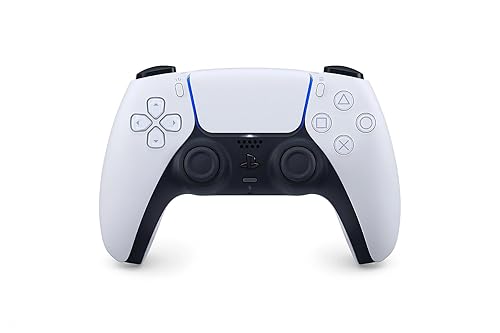
Best Overall
Sony DualSense Wireless Controller
Bottom line: The best Rocket League controller for most players, with the consistent stick control and comfort that long ranked sessions demand.
- Comfortable PlayStation shape for long sessions
- Controlled, predictable stick feel
- Works easily on PC over Bluetooth or USB-C
- Native Steam Input support
- Adaptive triggers and haptic feedback
- Built-in touchpad, mic and 3.5mm jack
- No back buttons
- Sticks can drift with heavy use

Best Xbox-Style Controller
GameSir G7 Pro
Bottom line: The best Xbox-style pick for Rocket League, with drift-resistant sticks you can tune and extra buttons for jump and boost.
- Drift-resistant TMR sticks with adjustable curves in the Nexus app
- 1000Hz on PC, wired or wireless
- Four extra buttons for jump, boost or air roll
- 2.4G adapter or wired on PC, Bluetooth on Android
- Hall effect triggers with micro-switch trigger stops
- Charging station included
- Officially licensed Xbox controller
- Wired only if you also play on Xbox

Best Premium
Sony DualSense Edge
Bottom line: The premium choice for serious players, since back buttons let you air roll without leaving the right stick.
- Back buttons for jump and boost without leaving the sticks
- Replaceable stick modules extend its life
- Quick-swap profiles for different binds
- Adjustable trigger travel
- Three stick cap styles
- Carrying case included
- Very expensive
- Shorter battery life than most controllers
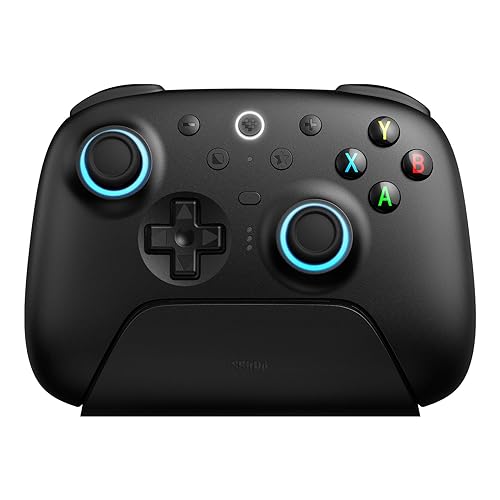
Best Value With Paddles
8BitDo Ultimate 2 Wireless
Bottom line: Pro-controller features like back paddles and a dock at a mid-range price, if you're fine with Xbox-style sticks.
- Paddles and extra bumpers for under pro-controller money
- 1000Hz 2.4G connection with low latency
- Charging dock and long battery life
- TMR sticks resist drift
- Triggers switch between Hall effect pulls and tactile clicks
- Two back paddles plus L4/R4 bumpers
- Xbox-style offset sticks, not a PlayStation shape
- Settings app runs on Windows and macOS only
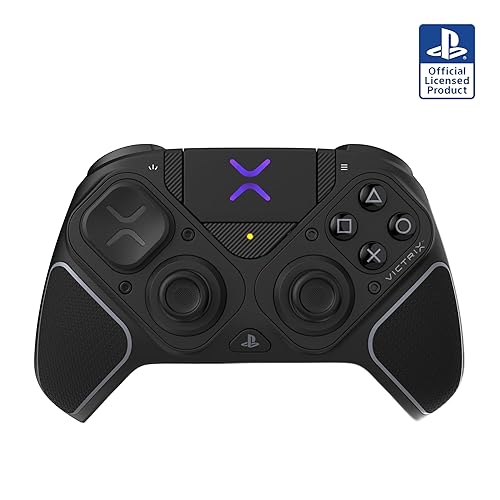
Best for Competitive Play
Victrix Pro BFG Reloaded
Bottom line: The most adaptable controller for competitive play, letting you rebuild the layout and replace worn sticks.
- Swappable modules let you change the layout
- Hall effect sticks resist drift and can be swapped out
- Highly adjustable triggers and four extra buttons
- Works on PS5, PS4 and PC
- Five-stop clutch triggers with hair-trigger mode
- Up to 20 hours per charge
- Six-button fightpad module
- Expensive
- Lots of parts to learn and set up

Best Premium Xbox-Style
Nacon Revolution X Unlimited
Bottom line: The pick if you want a button for every bind, with six extra buttons and settings on a built-in screen.
- Six extra buttons for every bind you need
- Change settings right on the LCD screen
- Lots of physical customization
- Triggers switch to short micro-switch clicks
- 1ms wired and 2ms wireless latency in PC mode
- Weights, stick heads and D-pads to tune the feel
- Charging station included
- Companion software can be clunky
- Battery life is short for a premium controller

Best Adjustable Sticks
Flydigi Vader 5 Pro
Bottom line: The best choice if you want to tune how stiff your steering feels, as long as you play on PC.
- Adjustable stick tension for steering feel
- Eight extra buttons
- Low latency wired and wireless
- FORCEFLEX tension from 40gf to 100gf
- Triggers switch between micro and linear Hall effect modes
- Four vibration motors
- Doesn't work with Xbox or PlayStation consoles
- Clicky face buttons take getting used to

Best Standard Xbox Controller
Xbox Wireless Controller
Bottom line: The easiest plug-and-play option on a Windows PC, though heavy boost use can wear out the bumpers.
- Plug-and-play on Windows PCs
- Comfortable, familiar shape
- Textured grips and headset jack
- Works with Xbox Series X/S, Xbox One and Windows
- Hybrid D-pad and Share button
- Bluetooth or USB-C connection
- Bumpers can wear out under heavy boost use

Best Long Battery Life
Xbox Elite Series 2 Core
Bottom line: The premium pick with by far the longest battery, as long as you're fine buying the paddles separately.
- Adjustable stick tension and hair-trigger locks
- Up to 40 hours of battery life
- Wrap-around rubberized grip
- Three on-board profiles
- Includes D-pad, two thumbsticks, USB-C cable and adjustment tool
- Connects over Xbox Wireless, Bluetooth or USB-C
- Paddles aren't included in the Core version

Best Budget
EasySMX X15
Bottom line: The best budget controller for Rocket League, with drift-resistant sticks and back buttons for air roll.
- Drift-resistant Hall effect sticks and triggers
- Two back buttons and a 2.4G connection
- Long battery life
- Up to 20 hours of battery
- 1000Hz polling
- Turbo and RGB lighting you can turn off
- 2.4G, Bluetooth or USB-C
- No headset jack or gyro
- Build doesn't feel premium

Best Ultra-Budget
PXN P5
Bottom line: An ultra-budget controller with four back buttons and features you usually pay much more for.
- Four back buttons at a very low price
- Hall effect sticks and two-stage triggers
- Up to 40 hours of battery
- 2.4G, Bluetooth or USB-C connection
- 6-axis motion
- Phone app for remapping and sensitivity
- Two-stage triggers switch between hair trigger and linear pull
- Companion app is phone-only
- Bumpers are on the small side
Table of Contents
- Our Top Picks
- Does a Better Controller Make You Better at Rocket League?
- Best Controller for Rocket League on PC: Our Picks in Detail
- What Matters in a Rocket League Controller
- Best Controller Settings for Rocket League
- Are Pro Controllers Worth It for Rocket League?
- Tips for Making Your Controller Last
- FAQ
- Final Thoughts
Does a Better Controller Make You Better at Rocket League?
Only up to a point. A controller with drifting sticks, a loose bumper or a shape that tires your hands will hold you back, so replacing it can make a real difference. But past a solid, well-built controller, most of your improvement comes from settings, practice and mechanics, not hardware. Extra paddles and trigger stops help if you actually use them, and they won’t fix inconsistent touches on their own. Buy for comfort, stick feel and durability first.
Best Controller for Rocket League on PC: Our Picks in Detail
1
Best Overall
Sony DualSense Wireless Controller
Bottom line: The best Rocket League controller for most players, with the consistent stick control and comfort that long ranked sessions demand.
The DualSense is the controller we'd recommend to most Rocket League players on PC. PlayStation-style pads have long been a favorite in the Rocket League community, and the DualSense is the modern version of that shape.
Pros & Cons
Pros
- Comfortable PlayStation shape for long sessions
- Controlled, predictable stick feel
- Works easily on PC over Bluetooth or USB-C
- Native Steam Input support
- Adaptive triggers and haptic feedback
- Built-in touchpad, mic and 3.5mm jack
Cons
- No back buttons
- Sticks can drift with heavy use
Why We Picked It
Rocket League rewards consistent stick control more than anything, and the DualSense delivers it in a shape that stays comfortable through long ranked sessions. Its symmetrical sticks feel balanced for steering and air roll, the build feels solid and premium, and it connects to a PC over Bluetooth or a USB-C cable. If you launch the game through Steam, Steam Input supports it natively (see our guide to the best game controller for PC Steam for more on that). It's also a great all-rounder for the rest of your library, which makes it the best controller for Rocket League on PC for most players.
Who It's For
A Rocket League player on PC who prefers the PlayStation layout and long ranked sessions. The symmetrical sticks feel balanced for steering and air roll, the build is solid and premium, and it connects over Bluetooth or a USB-C cable.
It is also a comfortable, reliable all-rounder for the rest of the library without paying for pro extras.
Specs & Configurations
- Layout
- symmetrical sticks (PlayStation style)
- Connection
- Bluetooth or USB-C
- PC support
- Windows and Mac, native Steam Input support
- Triggers
- adaptive triggers
- Extras
- haptic feedback, built-in mic, speaker, 3.5mm jack, touchpad
Get It Now
Check Price on Amazon
2
Best Xbox-Style Controller
GameSir G7 Pro
Bottom line: The best Xbox-style pick for Rocket League, with drift-resistant sticks you can tune and extra buttons for jump and boost.
The GameSir G7 Pro is the pick for PC players who prefer an Xbox shape. It packs TMR sticks, 1000Hz polling and four extra buttons into an officially licensed Xbox controller.
Pros & Cons
Pros
- Drift-resistant TMR sticks with adjustable curves in the Nexus app
- 1000Hz on PC, wired or wireless
- Four extra buttons for jump, boost or air roll
- 2.4G adapter or wired on PC, Bluetooth on Android
- Hall effect triggers with micro-switch trigger stops
- Charging station included
- Officially licensed Xbox controller
Cons
- Wired only if you also play on Xbox
Why We Picked It
The G7 Pro's TMR sticks are drift-resistant by design, and GameSir's Nexus app lets you adjust stick curves, which helps you dial in steering feel. On PC it polls at 1000Hz over its 2.4G adapter or a cable, its Hall effect triggers give you a smooth analog pull for throttle, and the L5/R5 bumpers plus two lockable back buttons are perfect for jump, boost or directional air roll. A charging station is included, too. Its optical micro-switch face buttons are crisp and consistent, but the clicky feel takes some getting used to.
Who It's For
An Xbox-layout fan on PC who wants modern sticks, extra buttons and wireless play. L5/R5 bumpers plus two lockable back buttons land jump, boost or directional air roll under the fingers, and the Nexus app lets them dial in stick curves for steering feel.
The Hall effect triggers give a smooth analog pull for throttle.
Specs & Configurations
- Layout
- Xbox style (offset sticks)
- Connection
- 2.4G or wired on PC, wired on Xbox, Bluetooth on Android
- Polling rate
- 1000Hz on PC
- Sticks
- GameSir Mag-Res TMR
- Triggers
- Hall effect with micro-switch trigger stops
- Extra buttons
- L5/R5 bumpers + 2 lockable back buttons
- Battery
- 1200mAh, charging station included
Get It Now
Check Price on Amazon
3
Best Premium
Sony DualSense Edge
Bottom line: The premium choice for serious players, since back buttons let you air roll without leaving the right stick.
The DualSense Edge is the upgrade for players who love the DualSense but want back buttons, and it's the best PlayStation-style pad for Rocket League.
Pros & Cons
Pros
- Back buttons for jump and boost without leaving the sticks
- Replaceable stick modules extend its life
- Quick-swap profiles for different binds
- Adjustable trigger travel
- Three stick cap styles
- Carrying case included
Cons
- Very expensive
- Shorter battery life than most controllers
Why We Picked It
Back buttons are the Edge's biggest Rocket League advantage. Mapping jump or boost to them means you can keep your right thumb on the stick for air roll and aerial control. You can also shorten trigger travel, swap between profiles on the fly and replace a worn stick module instead of buying a whole new controller, which matters in a game that's hard on sticks. It keeps the same comfortable shape and stick feel as the standard DualSense.
Who It's For
A dedicated Rocket League player who already knows their binds and wants paddles on a PlayStation-shaped controller. Mapping jump or boost to the back buttons keeps the right thumb on the stick for air roll and aerial control, and the same comfortable shape and stick feel carry over.
Specs & Configurations
- Layout
- symmetrical sticks (PlayStation style)
- Connection
- Bluetooth or USB-C
- Extra buttons
- 2 swappable sets of back buttons
- Triggers
- adjustable travel
- Sticks
- replaceable stick modules, 3 cap styles
- Extras
- control profiles, carrying case
Get It Now
Check Price on Amazon
4
Best Value With Paddles
8BitDo Ultimate 2 Wireless
Bottom line: Pro-controller features like back paddles and a dock at a mid-range price, if you're fine with Xbox-style sticks.
The 8BitDo Ultimate 2 Wireless is the best value if you want back paddles without paying premium-controller prices.
Pros & Cons
Pros
- Paddles and extra bumpers for under pro-controller money
- 1000Hz 2.4G connection with low latency
- Charging dock and long battery life
- TMR sticks resist drift
- Triggers switch between Hall effect pulls and tactile clicks
- Two back paddles plus L4/R4 bumpers
Cons
- Xbox-style offset sticks, not a PlayStation shape
- Settings app runs on Windows and macOS only
Why We Picked It
It brings most of the features of a pro controller at a much lower price. TMR sticks resist drift, the triggers switch between smooth Hall effect pulls for throttle and short tactile clicks, and two back paddles plus L4/R4 bumpers give you plenty of spots for jump, boost and air roll. It runs at 1000Hz over its 2.4G adapter or a cable, and the included charging dock keeps it topped up. It's also a strong all-rounder for racing games, platformers and the rest of your PC library.
Who It's For
A PC player on a sensible budget who wants paddles, modern sticks and wireless play. Back paddles and L4/R4 bumpers give plenty of spots for jump, boost and air roll, and the 1000Hz 2.4G adapter plus the charging dock keep it ready to go.
It is also a strong all-rounder for racing games, platformers and the rest of the PC library.
Specs & Configurations
- Layout
- Xbox style
- Connection
- 2.4G adapter, Bluetooth or USB-C
- Polling rate
- 1000Hz (2.4G and wired)
- Sticks
- TMR
- Triggers
- switchable Hall effect or tactile
- Extra buttons
- 2 back paddles + L4/R4 bumpers
- Battery
- 1000mAh, about 20 hours on 2.4G
- Extras
- charging dock
Get It Now
Check Price on Amazon
5
Best for Competitive Play
Victrix Pro BFG Reloaded
Bottom line: The most adaptable controller for competitive play, letting you rebuild the layout and replace worn sticks.
The Victrix Pro BFG Reloaded is Gfinity's pick for competitive Rocket League, and it's built for players who want to tune every detail.
Pros & Cons
Pros
- Swappable modules let you change the layout
- Hall effect sticks resist drift and can be swapped out
- Highly adjustable triggers and four extra buttons
- Works on PS5, PS4 and PC
- Five-stop clutch triggers with hair-trigger mode
- Up to 20 hours per charge
- Six-button fightpad module
Cons
- Expensive
- Lots of parts to learn and set up
Why We Picked It
Its modular design lets you swap stick and face-button modules, so you can rearrange the layout and replace a worn stick module instead of the whole controller. The Hall effect sticks resist drift, the triggers have five stop positions including a hair-trigger mode, and four mappable quick-action buttons cover jump, boost and air roll. It works on PS5, PS4 and PC, plays wired or wireless and lasts up to 20 hours per charge.
Who It's For
A serious competitive player who wants to rebuild the layout and tune every detail. Swappable stick and face-button modules let them rearrange the controller, and four mappable quick-action buttons cover jump, boost and air roll.
It plays wired or wireless on PS5, PS4 and PC.
Specs & Configurations
- Platforms
- PS5, PS4 and PC
- Connection
- wireless or wired
- Sticks
- Hall effect, in swappable modules
- Triggers
- 5-stop clutch triggers with hair-trigger mode
- Extra buttons
- 4 mappable quick-action buttons
- Battery
- up to 20 hours
- Extras
- 6-button fightpad module, 3.5mm jack with Sony 3D Audio, 11 interchangeable parts
Get It Now
Check Price on Amazon
6
Best Premium Xbox-Style
Nacon Revolution X Unlimited
Bottom line: The pick if you want a button for every bind, with six extra buttons and settings on a built-in screen.
The Nacon Revolution X Unlimited is one of the best Xbox-style controllers for Rocket League, and it's one of the most customizable Xbox-style controllers you can buy.
Pros & Cons
Pros
- Six extra buttons for every bind you need
- Change settings right on the LCD screen
- Lots of physical customization
- Triggers switch to short micro-switch clicks
- 1ms wired and 2ms wireless latency in PC mode
- Weights, stick heads and D-pads to tune the feel
- Charging station included
Cons
- Companion software can be clunky
- Battery life is short for a premium controller
Why We Picked It
The RXU gives you six mappable shortcut buttons, so you can put air roll, boost and jump exactly where you want them, and you can change mappings and settings right on its built-in LCD screen. Hall effect sticks and triggers resist drift, the instant triggers switch to short micro-switch clicks, and Nacon rates PC latency at 1ms wired and 2ms wireless. Weights, stick heads and D-pads let you tune the feel, and a charging station is included.
Who It's For
An Xbox-layout player who wants a button for every bind. Six mappable shortcut buttons put air roll, boost and jump exactly where they want them, and mappings change right on the built-in LCD screen.
Hall effect sticks and triggers resist drift, and weights, stick heads and D-pads tune the feel.
Specs & Configurations
- Platforms
- Xbox and PC
- Connection
- wireless or wired (1ms wired, 2ms wireless in PC mode)
- Sticks
- Hall effect
- Triggers
- Hall effect with instant micro-switch mode
- Extra buttons
- 6 mappable shortcut buttons
- Battery
- up to 10 hours, charging station included
- Extras
- LCD screen, 3 weight sets, swappable stick heads and D-pads
Get It Now
Check Price on Amazon
7
Best Adjustable Sticks
Flydigi Vader 5 Pro
Bottom line: The best choice if you want to tune how stiff your steering feels, as long as you play on PC.
The Flydigi Vader 5 Pro is the pick for players who want to fine-tune exactly how the sticks feel, and Flydigi pads are a popular choice in the Rocket League community.
Pros & Cons
Pros
- Adjustable stick tension for steering feel
- Eight extra buttons
- Low latency wired and wireless
- FORCEFLEX tension from 40gf to 100gf
- Triggers switch between micro and linear Hall effect modes
- Four vibration motors
Cons
- Doesn't work with Xbox or PlayStation consoles
- Clicky face buttons take getting used to
Why We Picked It
Its FORCEFLEX sticks let you set tension from 40gf to 100gf, so you can go light for fast flicks or tighter for smoother, more controlled steering. Flydigi rates latency at 3ms wired and 4ms wireless, the triggers switch between a fast micro mode and a linear Hall effect mode for throttle, and eight extra buttons give you more binding options than almost anything else here.
Who It's For
A PC player who wants to set exactly how stiff the steering feels. Go light for fast flicks or tighter for smoother control, and use the eight extra buttons, including four detachable back buttons, for more binding options than almost anything else.
It plays on PC, Switch and Android.
Specs & Configurations
- Platforms
- PC, Switch, Android (not Xbox or PlayStation)
- Latency
- 3ms wired, 4ms wireless (per Flydigi)
- Sticks
- Hall effect with FORCEFLEX tension adjustment (40gf to 100gf)
- Triggers
- FORCESWITCH micro or Hall effect linear mode
- Extra buttons
- C and Z buttons, 2 mini shoulder buttons, 4 detachable back buttons
- Extras
- 4 vibration motors
Get It Now
Check Price on Amazon
8
Best Standard Xbox Controller
Xbox Wireless Controller
Bottom line: The easiest plug-and-play option on a Windows PC, though heavy boost use can wear out the bumpers.
The standard Xbox Wireless Controller is the easiest choice if you already own one or just want the controller Windows supports out of the box.
Pros & Cons
Pros
- Plug-and-play on Windows PCs
- Comfortable, familiar shape
- Textured grips and headset jack
- Works with Xbox Series X/S, Xbox One and Windows
- Hybrid D-pad and Share button
- Bluetooth or USB-C connection
Cons
- Bumpers can wear out under heavy boost use
Why We Picked It
It works on a Windows PC with no extra software, over Bluetooth or a USB-C cable, and its shape is comfortable for long sessions. Textured grips keep it from slipping, and a headset jack lets you plug in for voice chat. The main Rocket League caveat is the bumpers. Many players bind boost to the right bumper, and that kind of heavy use can wear it out, so consider keeping boost on a face button or another input.
Who It's For
An Xbox owner or anyone who wants a simple, reliable controller with no setup on Windows. It works over Bluetooth or a USB-C cable with no extra software, and the comfortable shape and textured grips hold up through long sessions.
Specs & Configurations
- Layout
- Xbox style
- Connection
- Bluetooth or USB-C
- Power
- 2 AA batteries
- Extras
- textured grips, hybrid D-pad, Share button, 3.5mm jack
- Works with
- Xbox Series X/S, Xbox One, Windows
Get It Now
Check Price on Amazon
9
Best Long Battery Life
Xbox Elite Series 2 Core
Bottom line: The premium pick with by far the longest battery, as long as you're fine buying the paddles separately.
The Xbox Elite Series 2 Core is a good premium Xbox option for players who want adjustable sticks and very long battery life.
Pros & Cons
Pros
- Adjustable stick tension and hair-trigger locks
- Up to 40 hours of battery life
- Wrap-around rubberized grip
- Three on-board profiles
- Includes D-pad, two thumbsticks, USB-C cable and adjustment tool
- Connects over Xbox Wireless, Bluetooth or USB-C
Cons
- Paddles aren't included in the Core version
Why We Picked It
The Elite Series 2 lets you adjust stick tension, shorten the triggers with hair-trigger locks and save three profiles on the controller. Its wrap-around rubber grip is comfortable, and its battery is rated for up to 40 hours, by far the longest of the premium picks here. It connects to a PC over Xbox Wireless, Bluetooth or USB-C. Keep in mind that the Core version doesn't include back paddles, which come in the Complete Component Pack sold separately.
Who It's For
An Xbox-layout player who wants adjustable sticks and battery life that lasts for weeks of play. Stick tension and hair-trigger locks tune to their style, three profiles save on the controller, and the wrap-around rubber grip stays comfortable.
Specs & Configurations
- Layout
- Xbox style
- Connection
- Xbox Wireless, Bluetooth or USB-C
- Sticks
- adjustable tension
- Triggers
- shorter hair-trigger locks
- Profiles
- 3 on-board
- Battery
- up to 40 hours
- In the box
- controller, USB-C cable, D-pad, 2 standard thumbsticks, adjustment tool
Get It Now
Check Price on Amazon
10
Best Budget
EasySMX X15
Bottom line: The best budget controller for Rocket League, with drift-resistant sticks and back buttons for air roll.
The EasySMX X15 is the best budget pick, and it's the cheapest way to get Hall effect sticks, back buttons and 2.4G wireless in one controller.
Pros & Cons
Pros
- Drift-resistant Hall effect sticks and triggers
- Two back buttons and a 2.4G connection
- Long battery life
- Up to 20 hours of battery
- 1000Hz polling
- Turbo and RGB lighting you can turn off
- 2.4G, Bluetooth or USB-C
Cons
- No headset jack or gyro
- Build doesn't feel premium
Why We Picked It
For a budget controller, the X15 covers the things that matter for Rocket League. Hall effect sticks and triggers resist drift, two programmable back buttons free up your thumbs for air roll, and it connects over a 2.4G adapter, Bluetooth or a cable with 1000Hz polling. Battery life is rated at up to 20 hours, and its RGB lighting can be switched off.
Who It's For
A budget player on PC who wants drift-resistant sticks and back buttons. Two programmable back buttons free up the thumbs for air roll, and the 2.4G adapter, Bluetooth or cable all run with 1000Hz polling.
Specs & Configurations
- Layout
- Xbox style
- Connection
- 2.4G, Bluetooth or USB-C
- Polling rate
- 1000Hz
- Sticks
- Hall effect
- Triggers
- Hall effect
- Extra buttons
- 2 programmable back buttons
- Battery
- 1000mAh, up to 20 hours
- Extras
- RGB lighting (can be turned off), turbo
Get It Now
Check Price on Amazon
11
Best Ultra-Budget
PXN P5
Bottom line: An ultra-budget controller with four back buttons and features you usually pay much more for.
The PXN P5 is Gfinity's budget pick, and it packs a surprising amount into one of the cheapest controllers you can buy.
Pros & Cons
Pros
- Four back buttons at a very low price
- Hall effect sticks and two-stage triggers
- Up to 40 hours of battery
- 2.4G, Bluetooth or USB-C connection
- 6-axis motion
- Phone app for remapping and sensitivity
- Two-stage triggers switch between hair trigger and linear pull
Cons
- Companion app is phone-only
- Bumpers are on the small side
Why We Picked It
The P5 gives you Hall effect sticks, two-stage Hall triggers that switch between a short hair trigger and a full linear pull, and four back buttons, features you usually pay much more for. It connects over 2.4G, Bluetooth or USB-C, its battery is rated for up to 40 hours and a phone app lets you remap buttons and adjust sensitivity. It's an easy recommendation for new players or as a second controller.
Who It's For
A new player, or someone who wants a second controller, and wants paddles and drift-resistant sticks for very little money. Four back buttons cover jump, boost and air roll, and a phone app handles remapping and sensitivity.
Specs & Configurations
- Layout
- Xbox style
- Connection
- 2.4G, Bluetooth or USB-C
- Sticks
- Hall effect
- Triggers
- two-stage Hall effect
- Extra buttons
- 4 customizable back buttons
- Battery
- 1000mAh, up to 40 hours
- Extras
- 6-axis motion, phone app for remapping and sensitivity
Get It Now
Check Price on AmazonWhat Matters in a Rocket League Controller
Stick Feel and Precision
Rocket League is a game of tiny analog corrections, so the sticks matter most. Look for sticks that return to center predictably and feel consistent from match to match. Hall effect and TMR sticks use magnets instead of physical contacts, so they resist the drift that can ruin aerials and dribbles.
Shape and Layout
Symmetrical sticks, like on the DualSense, feel balanced for steering and air roll, and PlayStation-style pads have long been popular with Rocket League players. If you grew up on Xbox, an offset layout may feel more natural. Pick the shape your hands already know.
Triggers
You’re constantly feathering throttle and brake, so smooth analog triggers matter. Many controllers here let you switch to short micro-switch clicks, which suit boost and fast inputs, but keep full analog travel if you rely on throttle control.
Back Paddles and Extra Buttons
Paddles let you jump or boost without moving your thumbs off the sticks, which makes aerial control and recoveries smoother. They’re a big help once you learn them, but they’re not required to rank up.
Wired vs. Wireless
A wired connection rules out battery and interference worries. If you prefer wireless, a 2.4G adapter with a high polling rate, like on the GameSir G7 Pro or 8BitDo Ultimate 2, is a better choice than Bluetooth for competitive play.
Durability
Rocket League is hard on sticks and bumpers, especially the boost bumper. Replaceable stick modules, like on the DualSense Edge and Victrix Pro BFG, and magnetic sticks help a controller last longer.
Best Controller Settings for Rocket League
Settings can matter as much as hardware. Here’s where to start:
- Bindings: Many players move air roll to a bumper or a back paddle so they can keep their thumb on the right stick. If you have paddles, try jump or boost on them too.
- Steering and aerial sensitivity: Popular guides suggest starting somewhere between about 1.0 and 1.6, and keeping steering and aerial sensitivity close to each other so your inputs feel consistent.
- Controller deadzone: Keep it as low as your controller allows without unwanted movement. Drift-resistant Hall effect and TMR sticks let you go lower than worn standard sticks.
- Dodge deadzone: A range of about 0.50 to 0.70 is a common starting point, so flips only trigger when you mean them to.
- Vibration: Most players turn it off because it adds distraction rather than useful feedback.
Change one setting at a time and play several matches before judging it, so you can tell what actually helped.
Are Pro Controllers Worth It for Rocket League?
For most players, no. A standard controller with good sticks and sensible settings does the job, and premium extras like trigger stops and swappable parts are built as much for shooters as for Rocket League. A pro controller makes sense if you already know your binds and will use back buttons every match, you play enough that comfort and replaceable parts pay off, or you want one premium controller for several competitive games. If you’re still experimenting with your layout, start with a standard pad or a budget controller with paddles.
Tips for Making Your Controller Last
- Wipe the controller down regularly so sweat and grime don’t build up around the sticks and buttons.
- Store it somewhere safe instead of tossing it in a bag, and don’t bend or yank the cable.
- Watch for early signs of drift and check your deadzone before it starts costing you touches.
- If you boost with a bumper and it starts wearing out, move boost to another button or a paddle.
- Retire a controller once its sticks no longer center properly.
FAQ
What is the best controller for Rocket League on PC?
The best controller for Rocket League on PC for most players is the Sony DualSense. Its comfortable PlayStation shape and controlled sticks suit Rocket League well, and it connects easily over Bluetooth or USB-C. If you want an Xbox shape with extra buttons, the GameSir G7 Pro is our top alternative. Weighing it against 8BitDo’s pad? See our GameSir G7 Pro vs 8BitDo Ultimate 2 comparison.
Is a controller better than a keyboard and mouse for Rocket League?
For most players, yes. Analog sticks give you smoother, more precise steering and aerial control than keys, which is why a controller is generally the preferred way to play.
Is the DualSense or DualShock 4 better for Rocket League?
Both work well and share a similar symmetrical layout. The DualSense has a more modern shape and build, while the DualShock 4 is older and harder to find new, so the DualSense is the easier one to buy today.
Is wired or wireless better for Rocket League?
Wired is the safest choice, with no batteries or interference to worry about. If you want wireless, use a 2.4G adapter instead of Bluetooth for the most consistent connection.
Are back paddles useful in Rocket League?
Yes. Putting jump or boost on a paddle lets you keep your thumbs on the sticks during aerials and recoveries. They take some practice, but they can make advanced mechanics more consistent.
Final Thoughts
The best controller for Rocket League on PC is the one that feels natural in your hands and stays consistent match after match. For most players, that’s the Sony DualSense. If you prefer an Xbox shape with extra buttons, get the GameSir G7 Pro, and if you want paddles on a budget, the 8BitDo Ultimate 2 Wireless or EasySMX X15 is a smart buy.