

Stretching for the bumpers on an Xbox pad isn’t a technique problem. Most standard controllers are built around larger adult hands, so smaller hands end up cramped or tired within an hour. The best PC controller for small hands has shorter grips, closer sticks and a lighter body, and these five all work on Windows PC, with their real dimensions and weights compared against a standard Xbox controller.
Best PC Controller for Small Hands
GameCuki is reader-supported. When you buy through links on our site, we may earn an affiliate commission at no extra cost to you. As an Amazon Associate I earn from qualifying purchases. Learn more.
Our Top Picks

Best Overall
8BitDo Ultimate Mini Wired Controller for Xbox
Bottom line: The best PC controller for small hands, a full-featured Xbox-licensed pad built specifically for smaller players.
- Made specifically for smaller hands
- Hall effect sticks resist drift
- Every standard Xbox input, including impulse triggers
- Plugs into Windows with no setup
- 3.5mm headphone jack and 2.5m cable
- Wired only
- RGB lights are bright out of the box

Smallest Xbox-Licensed
HyperX Clutch Tanto Mini
Bottom line: The smallest, lightest pick with full controls, perfect for young kids and the smallest adult hands.
- Smallest and lightest pick with full controls
- Officially licensed for Xbox
- Snappy buttons and low latency
- Keeps both triggers and rumble motors
- Works with PC, Steam Deck and Android
- Standard sticks can drift over time
- Wired only
Best Wireless
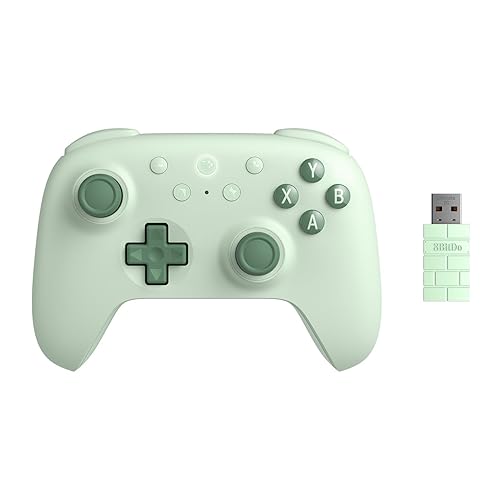
8BitDo Ultimate 2C Wireless
Bottom line: The best wireless choice for small-to-average hands, much lighter than an Xbox pad, though only slightly smaller.
- Much lighter than a standard Xbox controller
- Hall effect sticks and triggers
- Extra bumpers you can map without software
- 2.4GHz dongle with 1000Hz polling
- Slim body and shorter grips
- Only slightly smaller than an Xbox controller
- Feels a bit light and plasticky

Best Compact Retro
8BitDo SN30 Pro
Bottom line: A tiny, pocketable retro pad that's great for 2D games, though it's not built for shooters or racing.
- Lightest controller with full analog sticks here
- Excellent D-pad
- Small enough for a pocket
- Hall effect sticks on the latest version
- Bluetooth or USB-C to PC, Steam Deck, Mac and more
- Flat shape with no grips
- Short triggers aren't ideal for shooters or racing games

Best PlayStation-Style
Sony DualShock 4
Bottom line: The best PlayStation-style option for small hands, slimmer and lighter than the DualSense.
- Smaller and lighter than the DualSense
- Side-by-side PlayStation stick layout
- Works natively in Steam
- Touchpad, motion sensors and headphone jack
- Bluetooth or micro-USB connection
- Standard sticks can drift
- Older micro-USB charging port
Table of Contents
What to Look for in a PC Controller for Small Hands
Overall size matters, but a few specific measurements matter more.
- Grip length and thickness: Shorter, slimmer grips let smaller hands wrap around the controller instead of holding its front edge with your fingertips.
- Stick spacing: When the sticks sit far apart, your thumbs have to stretch outward. Closer sticks keep your thumbs in a natural position.
- Reach to the triggers and bumpers: Your index fingers should rest on the triggers without reaching forward. A deep controller forces you to move your whole grip.
- Weight: A lighter controller is less tiring to hold, especially for long sessions or for kids.
- Stick layout: Offset Xbox-style sticks and side-by-side PlayStation-style sticks put your thumbs in different places. If one layout has always felt awkward, try the other.
Best PC Controller for Small Hands: Our Picks in Detail
1
Best Overall
8BitDo Ultimate Mini Wired Controller for Xbox
Bottom line: The best PC controller for small hands, a full-featured Xbox-licensed pad built specifically for smaller players.
The 8BitDo Ultimate Mini is the best PC controller for small hands because it shrinks the full Xbox controller layout without dropping any features.
Pros & Cons
Pros
- Made specifically for smaller hands
- Hall effect sticks resist drift
- Every standard Xbox input, including impulse triggers
- Plugs into Windows with no setup
- 3.5mm headphone jack and 2.5m cable
Cons
- Wired only
- RGB lights are bright out of the box
Why We Picked It
8BitDo designed the Ultimate Mini for teenagers, kids and players with smaller hands. It's 20% smaller and 10% lighter than the company's standard Ultimate C, and at 189.6g it weighs about a third less than a standard Xbox controller. You still get every Xbox input, including impulse triggers with their own rumble, plus a 3.5mm headphone jack. Its sticks and triggers use Hall effect sensors, so they're much less likely to drift than standard sticks. It's officially licensed by Xbox, so it plugs straight into a Windows PC as an Xbox controller with no setup, and you can update it with 8BitDo's Ultimate Software X.
Who It's For
You're an adult with small hands, a teen or a kid who wants a full Xbox-style pad at the PC desk. It's about a third lighter than a standard Xbox controller, keeps every input including impulse triggers, and plugs straight into Windows as an Xbox controller with no setup.
Specs & Configurations
- Size
- 135.2 x 95.4 x 58.6mm
- Weight
- 189.6g
- Connection
- wired USB, 2.5m cable
- Sticks
- Hall effect
- Triggers
- Hall effect with impulse trigger vibration
- Extras
- 3.5mm headphone jack, RGB stick rings
- Works with
- Windows 10 and 11, Xbox Series X/S, Xbox One
Get It Now
Check Price on Amazon
2
Smallest Xbox-Licensed
HyperX Clutch Tanto Mini
Bottom line: The smallest, lightest pick with full controls, perfect for young kids and the smallest adult hands.
The HyperX Clutch Tanto Mini is the smallest and lightest full-featured controller on this list.
Pros & Cons
Pros
- Smallest and lightest pick with full controls
- Officially licensed for Xbox
- Snappy buttons and low latency
- Keeps both triggers and rumble motors
- Works with PC, Steam Deck and Android
Cons
- Standard sticks can drift over time
- Wired only
Why We Picked It
HyperX calls it the world's lightest wired mini controller licensed for Xbox, at 165g without its cable. It's also the narrowest pick here, at 130.3mm across, so it suits young kids and the smallest adult hands best. Despite its size, it keeps every standard Xbox button, both triggers and rumble motors. Its latency is extremely low, and its buttons and sticks feel snappy, with tactile feedback. Its sticks are standard analog sticks, not Hall effect, so drift is more likely over years of heavy use than on the 8BitDo picks.
Who It's For
You have very small hands, or you're buying for a young child who still wants every Xbox button. At 165g without the cable and 130.3mm across, it's easy to hold, and the low latency and tactile buttons keep PC and Steam Deck play responsive.
Specs & Configurations
- Size
- 130.3 x 92.5 x 46.1mm
- Weight
- 165g (without cable)
- Connection
- wired, USB-C to USB-A cable
- Sticks
- standard analog
- Rumble
- yes
- Works with
- Windows PC, Steam Deck, Xbox Series X/S, Xbox One, Android
Get It Now
Check Price on Amazon
3
Best Wireless
8BitDo Ultimate 2C Wireless
Bottom line: The best wireless choice for small-to-average hands, much lighter than an Xbox pad, though only slightly smaller.
The Ultimate 2C is the best wireless pick for smaller hands, mostly because it's light and slim.
Pros & Cons
Pros
- Much lighter than a standard Xbox controller
- Hall effect sticks and triggers
- Extra bumpers you can map without software
- 2.4GHz dongle with 1000Hz polling
- Slim body and shorter grips
Cons
- Only slightly smaller than an Xbox controller
- Feels a bit light and plasticky
Why We Picked It
It isn't a mini controller. At 147mm wide, it's only slightly narrower than a standard Xbox controller. But its slim body and shorter grips suit small-to-average hands, and at 217.5g it's much lighter than an Xbox pad, which makes a real difference over long sessions. It's one of the best controllers for small hands overall. It has Hall effect sticks and triggers, two extra bumpers you can map without software and a 2.4GHz dongle that runs at 1000Hz on PC. Compare it with another budget favorite in our 8BitDo Ultimate 2C vs GameSir Nova Lite guide.
Who It's For
You have small-to-average hands and want to play on a PC without a cable. At 217.5g it's much lighter than an Xbox pad, which helps over long sessions, and the slim body and shorter grips are easy to reach around. The 2.4GHz dongle runs at 1000Hz for quick input.
Specs & Configurations
- Size
- 147 x 103 x 61.4mm
- Weight
- 217.5g
- Connection
- 2.4GHz wireless dongle, Bluetooth (Android), wired USB
- Polling rate
- 1000Hz (2.4GHz and wired)
- Sticks
- Hall effect
- Triggers
- Hall effect
- Extra buttons
- L4 and R4 bumpers
- Works with
- Windows 10 and above, Android 9 and above
Get It Now
Check Price on Amazon
4
Best Compact Retro
8BitDo SN30 Pro
Bottom line: A tiny, pocketable retro pad that's great for 2D games, though it's not built for shooters or racing.
The SN30 Pro is the smallest controller here that still has two analog sticks.
Pros & Cons
Pros
- Lightest controller with full analog sticks here
- Excellent D-pad
- Small enough for a pocket
- Hall effect sticks on the latest version
- Bluetooth or USB-C to PC, Steam Deck, Mac and more
Cons
- Flat shape with no grips
- Short triggers aren't ideal for shooters or racing games
Why We Picked It
Its SNES-inspired shape is only 63.5mm tall and 33mm thick, and it weighs just 114g, so smaller hands can reach every button easily. The latest version has Hall effect sticks, and it adds motion controls, rumble and a great D-pad. It connects over Bluetooth or USB-C to a Windows PC, Steam Deck, Mac and more. The trade-off is its flat body. It has no grips, which is fine for retro games, emulators, indies and 2D platformers but less comfortable in long 3D games, and its short triggers aren't great for shooters.
Who It's For
You have small hands and mostly play retro games, emulators, indies and 2D platformers. At 114g and about 63.5mm tall it slips into a pocket, every button is within easy reach, and the D-pad suits classic games. It pairs over Bluetooth or USB-C with a PC, Steam Deck, Mac and more.
Specs & Configurations
- Size
- 144 x 63.5 x 33mm
- Weight
- 114g
- Connection
- Bluetooth, USB-C wired
- Sticks
- Hall effect
- Extras
- motion controls, rumble, turbo
- Battery
- rechargeable
- Works with
- Windows, Steam Deck, Apple, Android, Switch, Switch 2, Raspberry Pi
Get It Now
Check Price on Amazon
5
Best PlayStation-Style
Sony DualShock 4
Bottom line: The best PlayStation-style option for small hands, slimmer and lighter than the DualSense.
The DualShock 4 is the best choice if you prefer PlayStation's side-by-side sticks.
Pros & Cons
Pros
- Smaller and lighter than the DualSense
- Side-by-side PlayStation stick layout
- Works natively in Steam
- Touchpad, motion sensors and headphone jack
- Bluetooth or micro-USB connection
Cons
- Standard sticks can drift
- Older micro-USB charging port
Why We Picked It
The PS5's DualSense has long, flared grips that are too big for many small hands. The older DualShock 4 is slimmer, with a lighter 210g body and shorter grips, which makes it a natural fit for PC players with smaller hands who don't like Xbox-style controllers. Steam supports it natively, so you can connect it over Bluetooth or a micro-USB cable and remap it in Steam Input. It has a touchpad, motion sensors and a headphone jack. Its sticks are standard analog sticks, so they can drift over time.
Who It's For
You play on PC with small hands and prefer PlayStation's side-by-side sticks to Xbox's offset layout. The slimmer 210g body and shorter grips are easier to hold than a DualSense, and Steam supports it natively over Bluetooth or micro-USB with remapping in Steam Input.
Specs & Configurations
- Size
- 162 x 98 x 52mm
- Weight
- 210g
- Connection
- Bluetooth, micro-USB wired
- Sticks
- standard analog
- Extras
- touchpad, motion controls, built-in speaker, 3.5mm headphone jack
- Works with
- Windows PC (with Steam Input), PS4
Get It Now
Check Price on AmazonSize and Weight Compared
Here’s how our picks compare with a standard Xbox Wireless Controller, using each maker’s published dimensions.
| Controller | Size (width x depth x thickness) | Weight | Sticks |
|---|---|---|---|
| HyperX Clutch Tanto Mini | 130.3 x 92.5 x 46.1mm | 165g | Standard |
| 8BitDo Ultimate Mini | 135.2 x 95.4 x 58.6mm | 189.6g | Hall effect |
| 8BitDo SN30 Pro | 144 x 63.5 x 33mm | 114g | Hall effect |
| 8BitDo Ultimate 2C | 147 x 103 x 61.4mm | 217.5g | Hall effect |
| Sony DualShock 4 | 162 x 98 x 52mm | 210g | Standard |
| Xbox Wireless Controller (for reference) | 153 x 102 x 61mm | About 280g with batteries | Standard |
The Tanto Mini and Ultimate Mini are the only true mini controllers here, both clearly smaller than an Xbox pad in every direction. The Ultimate 2C and DualShock 4 are close to full size, but they’re much lighter. If you have very small hands, start with the two minis.
Controllers to Avoid If You Have Small Hands
- Sony DualSense: The PS5 controller’s wide, flared grips are longer than most, and it’s often too big for kids and adults with smaller hands.
- Xbox Wireless Controller: It has some of the longest grips and widest stance of any first-party controller, which is great for big hands and awkward for small ones.
- Most premium pro controllers: Enthusiast controllers are usually built bigger and heavier, so paying more often gets you a larger controller.
How to Make Any Controller Fit Better
You don’t always need a new controller.
- Use shorter stick caps: Shorter caps reduce how far your thumbs travel. Some controllers come with several stick heights.
- Hold it deeper in your palms: Many people with small hands hold a controller by its front edge with their fingertips, which adds strain. Seating it deeper in your palms often helps more than you’d expect.
- Remap hard-to-reach inputs: If clicking a stick or pressing a far face button is a stretch, move that action to a bumper or back button in Steam Input or the controller’s software.
- Check the fit when it arrives: Hold the controller naturally and try every input. If you have to shift your hand to reach a bumper or click a stick, it’s too big for you.
For more full-size options, see our guide to the best PC controllers.
FAQ
What is the best PC controller for small hands?
The 8BitDo Ultimate Mini is our top pick. It’s 20% smaller than 8BitDo’s standard Ultimate C, has Hall effect sticks and triggers and works on PC as an officially licensed Xbox controller.
What is the smallest controller that works on PC?
Among full-featured controllers, the HyperX Clutch Tanto Mini is the smallest and lightest pick here at 130.3mm wide and 165g. The 8BitDo SN30 Pro is lighter at 114g, but it uses a flat SNES-style shape without grips.
Is a PlayStation or Xbox controller better for small hands?
The DualShock 4 is smaller and lighter than both the DualSense and the Xbox Wireless Controller. Neither the DualSense nor the Xbox Wireless Controller is designed for small hands, so a mini controller is usually a better fit.
Are mini controllers good for adults?
Yes. Mini controllers like the 8BitDo Ultimate Mini and HyperX Clutch Tanto Mini keep every standard button, so they work well for adults with small hands, not just kids.
Do mini controllers work with Steam?
Yes. Xbox-licensed controllers like the Ultimate Mini and Tanto Mini show up as standard Xbox controllers in Windows and Steam, so they work in almost every PC game.