GameCuki is reader-supported. When you buy through links on our site, we may earn an affiliate commission at no extra cost to you. As an Amazon Associate I earn from qualifying purchases. Learn more.
Shopping for the best gaming PC under 2000 is easier than it used to be, because that budget buys a current-generation graphics card, 1440p performance and enough memory to last a few years, with no need for compromises. The catch is that two PCs at the same price can differ a lot in GPU memory, RAM and warranty. This guide compares seven prebuilt desktops from MSI, Skytech, Acer and CyberPowerPC.
We compared each machine’s exact configuration (CPU, GPU, RAM, storage, cooling, connectivity and warranty) and matched it to the kind of player it suits. The picks run from a budget RTX 4060 build to an RX 9070 XT tower, and the listed specs are the exact configurations we compare.
The Best Gaming PC Under $2000: Our Picks in Detail

1
Best Overall
MSI Codex Z2 (Ryzen 7 8700F, RTX 5070)
Bottom line: The balanced pick for most players, pairing an RTX 5070 with 32GB of DDR5 and a 2TB SSD so nothing in the build holds the GPU back.
The MSI Codex Z2 is built around a 12GB GeForce RTX 5070 and an 8-core Ryzen 7 8700F, with 32GB of DDR5 and a 2TB NVMe SSD. That combination is rare at this budget, because most competitors cut either RAM or storage to afford the GPU.
Pros & Cons
Pros- RTX 5070 on NVIDIA's Blackwell architecture with DLSS 4 support
- 8-core, 16-thread Ryzen 7 8700F handles streaming and background apps
- 32GB of DDR5 gives real multitasking headroom
- 2TB NVMe SSD holds a large game library
- Four case fans (three front, one rear) keep airflow steady
- USB Type-C and VR-ready out of the box
- MSI Center software and a button for RGB lighting control
Cons- Air cooling only, so no liquid-cooled option
- Standard one-year warranty, with no longer coverage included
- Ryzen 7 8700F has no integrated graphics for a backup display
Why We Picked It
The RTX 5070 is the strongest graphics card in this price bracket that still comes with a fully balanced build around it. The Ryzen 7 8700F does not bottleneck it for 1440p gaming, 32GB of DDR5 leaves room for a browser, Discord and a game running together, and the 2TB drive means you will not be deleting games after a few installs. Four system fans and an ARGB air cooler keep the case airflow simple and quiet in daily use.
Who It's For
You want one PC that plays today's games at high settings on a 1440p monitor and does not need upgrading in year one. You would rather spend on the GPU than on case lighting or a liquid cooler, and you value a roomy SSD out of the box.
Specs & Configurations
- GPU
- NVIDIA GeForce RTX 5070 12GB
- CPU
- AMD Ryzen 7 8700F (8 cores, 16 threads, up to 5.0 GHz)
- Memory
- 32GB DDR5
- Storage
- 2TB NVMe SSD
- Cooling
- ARGB air cooler + 4 case fans
- Warranty
- 1 year manufacturer limited
2
Best for 16GB of Video Memory
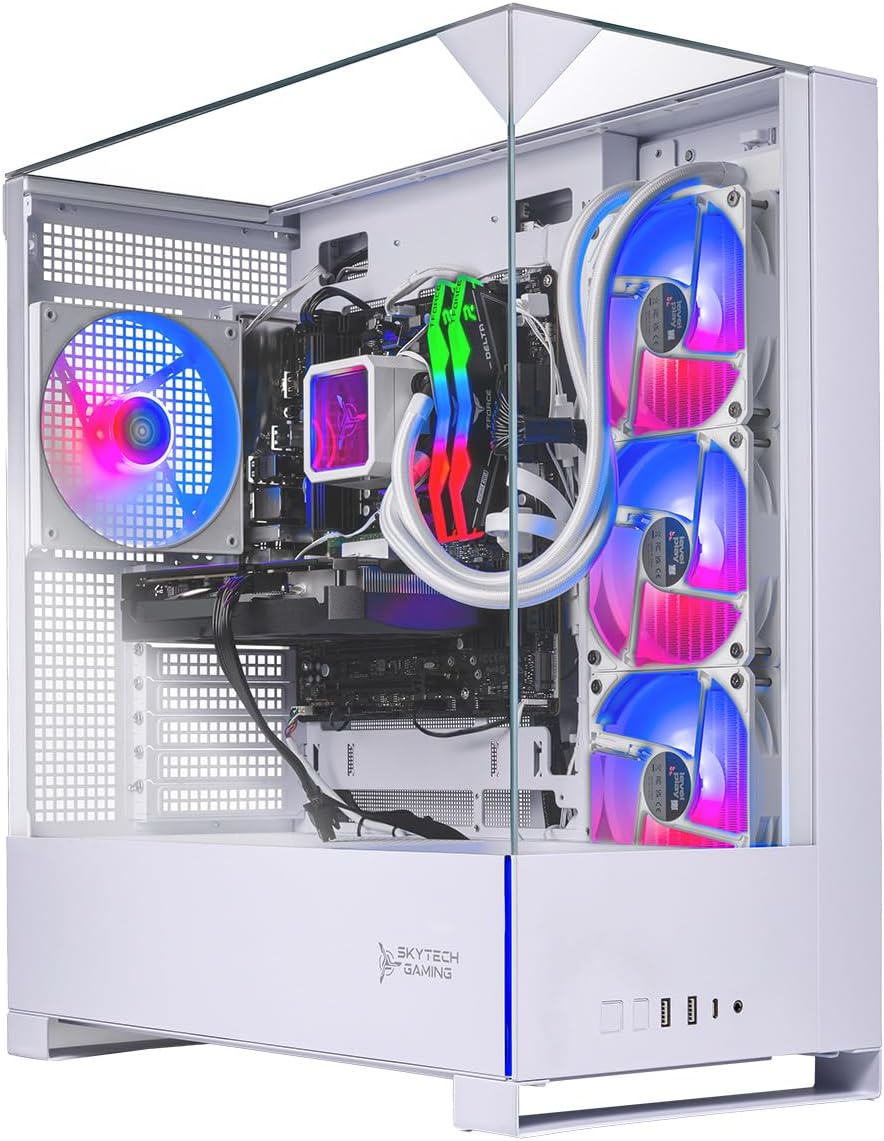
Skytech Archangel 5 (Ryzen 7 9700X, RX 9070)
Bottom line: The pick for players who want a 16GB Radeon, a newer Ryzen 7 and a 360mm liquid cooler without leaving the $2000 budget.
The Skytech Archangel 5 pairs an RX 9070 with 16GB of video memory and a Ryzen 7 9700X, then adds a white case, a 360mm AIO cooler and 32GB of DDR5-6000. It is one of the few builds here that gives you liquid cooling and a 16GB GPU together.
Pros & Cons
Pros- 16GB of video memory leaves room for high texture settings
- Ryzen 7 9700X is a newer-generation CPU than most picks here
- 32GB of DDR5-6000 RAM
- 360mm AIO liquid cooler with ARGB fans
- 750W Gold power supply
- Keyboard and mouse included
- Lifetime technical support with a 1-year parts and labor warranty
- No preinstalled bloatware
Cons- Wi-Fi is 802.11ac, so use Ethernet for the best connection
- 1TB SSD fills up fast with big modern games
- GPU brand can vary by unit
Why We Picked It
Video memory is the spec that decides how long a GPU stays comfortable at high texture settings, and 16GB is more than the 12GB on the RTX 5070 builds. Skytech backs that with a Ryzen 7 9700X, fast DDR5-6000 and a 360mm radiator, which is more cooling than the air-cooled towers in this guide. The included keyboard and mouse and the lifetime technical support make it easy to set up.
Who It's For
You play at 1440p, want a GPU with lots of video memory for new releases and like a clean white build with a big liquid cooler. You are comfortable plugging in an Ethernet cable and adding a second SSD later.
Specs & Configurations
- GPU
- AMD Radeon RX 9070 16GB GDDR6
- CPU
- AMD Ryzen 7 9700X (up to 5.5 GHz)
- Memory
- 32GB DDR5-6000 RGB
- Storage
- 1TB Gen4 NVMe SSD
- Cooling
- 360mm ARGB AIO liquid cooler
- Power supply
- 750W 80+ Gold
- Connectivity
- Wi-Fi (802.11ac)
- Warranty
- 1 year parts and labor + lifetime technical support

3
Best for Wi-Fi 7 and Easy Upgrades
Acer Nitro 85 (Core Ultra 7 265F, RTX 5070)
Bottom line: The Intel option with an RTX 5070, Wi-Fi 7 and 2.5GbE, best for players who want fast networking and a PC they can add memory to later.
The Acer Nitro 85 pairs an RTX 5070 with Intel's Core Ultra 7 265F, Wi-Fi 7 and 2.5GbE, in a case with a curved glass panel and ARGB fans. Memory is the one area Acer held back, but it leaves plenty of room to add more.
Pros & Cons
Pros- RTX 5070 with 12GB of GDDR7 and DLSS 4
- Core Ultra 7 265F has 20 cores for gaming and streaming
- Wi-Fi 7 and 2.5GbE for low-latency online play
- Memory expandable up to 128GB
- Curved glass front and side panel with Reverse-Ring ARGB fans
- Front USB 3.2 Type-C and Type-A ports
- Keyboard and mouse included, Windows 11 preinstalled
Cons- 16GB of RAM is the minimum for new games and will want an upgrade
- Memory speed is 4800 MHz, slower than the DDR5-6000 on other picks
- Air-cooled CPU only
Why We Picked It
The Nitro 85 is the best fit if connectivity matters, because Wi-Fi 7 and 2.5 gigabit Ethernet are rare at this price. The 265F has 20 cores, which suits players who stream or edit video while gaming. Acer lists support for up to 128GB of DDR5, so the 16GB it ships with is easy to double once you want more headroom.
Who It's For
You want an Intel and NVIDIA build with modern networking and a showpiece case. You are happy to add a second memory kit yourself and want a big-brand desktop with a clean Windows 11 setup.
Specs & Configurations
- GPU
- NVIDIA GeForce RTX 5070 12GB GDDR7
- CPU
- Intel Core Ultra 7 265F (20 cores, up to 5.3 GHz)
- Memory
- 16GB DDR5 (expandable to 128GB)
- Storage
- 1TB PCIe 4.0 NVMe SSD
- Cooling
- ARGB air CPU cooler
- Connectivity
- Wi-Fi 7, 2.5GbE
- Warranty
- 1 year parts and labor

4
Best for Raw GPU Power
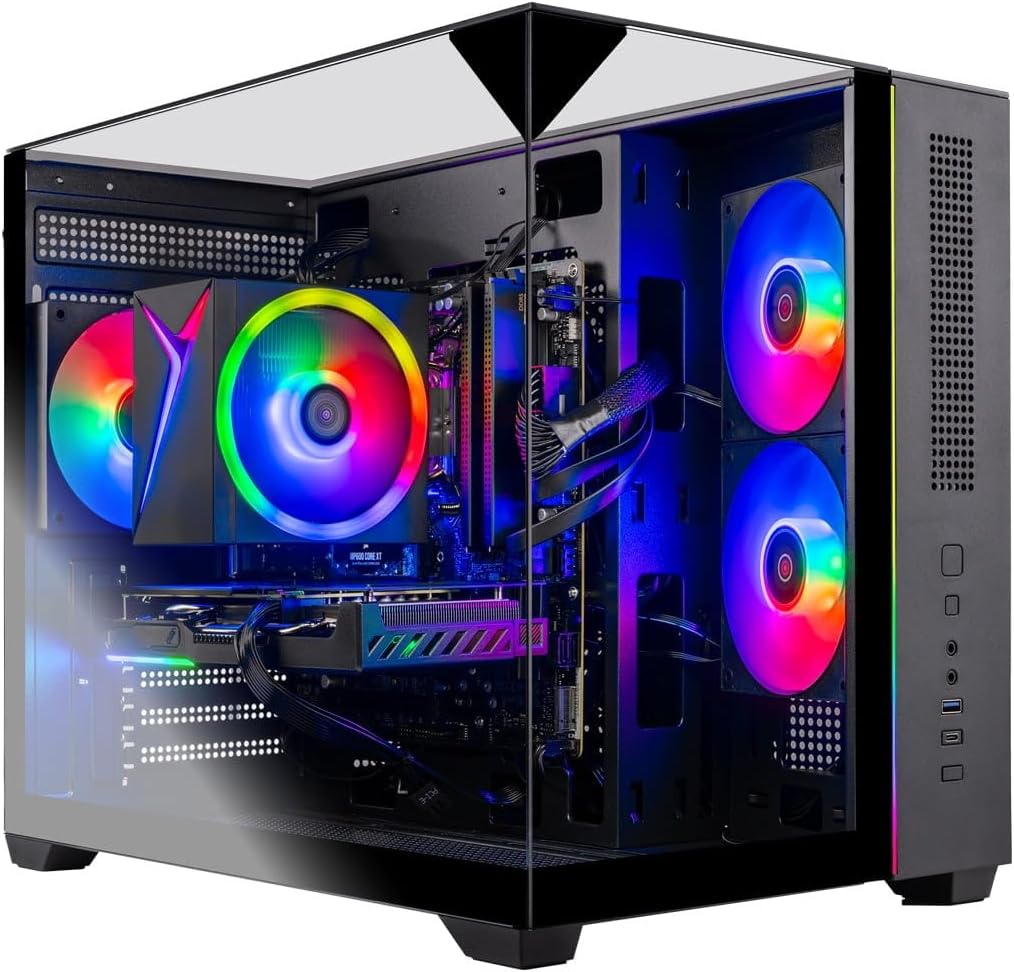
Skytech Rampage (Ryzen 7 7700, RX 9070 XT)
Bottom line: The strongest graphics card on this list for the money, as long as you are willing to add RAM later.
The Skytech Rampage is the one to look at if graphics performance matters most. It uses an RX 9070 XT with 16GB of video memory and a Ryzen 7 7700 in a mesh-front case built for airflow.
Pros & Cons
Pros- Radeon RX 9070 XT is a step above the RX 9070 and RTX 5070 builds
- 16GB of video memory
- Ryzen 7 7700 pairs well with it for 1440p
- DDR5 memory and an NVMe SSD
- Black mesh front for airflow with ARGB fans
- Keyboard and mouse included
- Lifetime technical support
- Assembled in the USA
Cons- Only 16GB of system RAM, which most buyers will want to upgrade
- Wi-Fi is 802.11ac
- Air cooler instead of liquid cooling
Why We Picked It
The RX 9070 XT sits above the RTX 5070 and RX 9070 in the same budget, so this build puts more of the money into frame rates than any other pick here. Skytech balances that with a capable Ryzen 7 7700 and an air cooler with ARGB fans. RAM is the compromise: 16GB works today but is the first thing to upgrade.
Who It's For
You care most about frame rates at 1440p and are comfortable swapping in a second memory kit. You want the fastest GPU available in a prebuilt in this range and do not need liquid cooling.
Specs & Configurations
- GPU
- AMD Radeon RX 9070 XT 16GB GDDR6
- CPU
- AMD Ryzen 7 7700 (up to 5.3 GHz)
- Memory
- 16GB DDR5-5200
- Storage
- 1TB NVMe SSD
- Cooling
- High-performance air cooler with ARGB fans
- Connectivity
- Wi-Fi (802.11ac)
- Warranty
- 1 year parts and labor + lifetime technical support
5
Best for 1080p High Refresh
Skytech Crystal (Ryzen 7 7700, RTX 5060 Ti)
Bottom line: A well-rounded RTX 5060 Ti machine with 32GB of RAM, best for 1080p and light 1440p gaming at a lower cost.
The Skytech Crystal pairs an RTX 5060 Ti with a Ryzen 7 7700 and 32GB of DDR5, inside a case with three tempered glass panels. It costs less than the RTX 5070 builds and leaves room in the budget for a monitor or peripherals.
Pros & Cons
Pros- 32GB of DDR5-5600 RAM at a lower budget
- Ryzen 7 7700 gives 8 cores for gaming and multitasking
- RTX 5060 Ti supports DLSS 4
- Triple tempered glass case shows off the build
- Keyboard and mouse included
- Lifetime technical support
- No preinstalled bloatware
Cons- 8GB of video memory limits max settings in new games at 1440p
- Wi-Fi is 802.11ac
- 1TB SSD fills up quickly
Why We Picked It
Most RTX 5060 Ti systems ship with 16GB of RAM, but this one has 32GB, which helps with multitasking and newer games. Skytech's Ryzen 7 7700 is a solid match for the GPU, and the three-panel glass case looks more premium than the price suggests.
Who It's For
You play esports and popular titles at 1080p or light 1440p with a high-refresh monitor, and want to keep money back for a display or accessories. You prefer a clean, glass-heavy case over bare-bones design.
Specs & Configurations
- GPU
- NVIDIA GeForce RTX 5060 Ti 8GB GDDR7
- CPU
- AMD Ryzen 7 7700 (up to 5.3 GHz)
- Memory
- 32GB DDR5-5600
- Storage
- 1TB NVMe SSD
- Cooling
- High-performance air cooler with ARGB fans
- Connectivity
- Wi-Fi (802.11ac)
- Warranty
- 1 year parts and labor + lifetime technical support

6
Best for Wi-Fi 6 and Support
CyberPowerPC Gamer Master (Ryzen 7 8700F, RTX 5060 Ti)
Bottom line: A dependable AM5 build with Wi-Fi 6, Bluetooth 5.3 and lifetime tech support, for buyers who want an easy first prebuilt.
The CyberPowerPC Gamer Master puts a Ryzen 7 8700F and an RTX 5060 Ti on a B850 motherboard, with Wi-Fi 6, Bluetooth 5.3 and a generous port selection. CyberPowerPC includes lifetime tech support and a keyboard and mouse.
Pros & Cons
Pros- B850 chipset on the AM5 platform leaves a clear upgrade path
- Memory supports up to 192GB
- Wi-Fi 6 and Bluetooth 5.3
- Two USB-C 3.2 ports plus four USB-A 3.2 ports
- Keyboard and mouse included
- Tempered glass side panel with custom RGB lighting
- Lifetime tech support
- 8-core Ryzen 7 8700F
Cons- 16GB of RAM is the minimum for current games
- 8GB of video memory limits high texture settings
- Wi-Fi 6, not Wi-Fi 7
Why We Picked It
The B850 board and AM5 socket are the main draw, because you can drop in more memory or a newer Ryzen later. Connectivity is better than on many budget towers, with Wi-Fi 6, Bluetooth 5.3 and six USB ports on the case. Lifetime tech support helps if you are building your first gaming setup.
Who It's For
This is your first gaming PC and you want something that works out of the box and can grow with you. You plan to add RAM later and want a clear path to a newer CPU on the same socket.
Specs & Configurations
- GPU
- NVIDIA GeForce RTX 5060 Ti 8GB GDDR7
- CPU
- AMD Ryzen 7 8700F (8 cores, 4.1 GHz base)
- Memory
- 16GB DDR5 (AM5, up to 192GB)
- Storage
- 1TB PCIe 4.0 NVMe SSD
- Connectivity
- Wi-Fi 6, Bluetooth 5.3
- Chipset
- AMD B850
- Warranty
- 1 year limited + lifetime tech support

7
Best Budget Pick
CyberPowerPC Gamer Xtreme VR (Core i5-13400F, RTX 4060)
Bottom line: The lowest-cost way into 1080p gaming here, with plenty of USB ports and lifetime tech support, though the platform is a generation behind.
The CyberPowerPC Gamer Xtreme VR is the simplest and cheapest option here: a Core i5-13400F and an RTX 4060 with 16GB of DDR5 and a 1TB Gen4 SSD. It targets 1080p gaming and leaves the most room in a $2000 budget for a monitor and accessories.
Pros & Cons
Pros- RTX 4060 is enough for high-refresh 1080p gaming
- 10-core Core i5-13400F handles games and everyday tasks
- 1TB PCIe Gen4 NVMe SSD
- Three USB 3.1 and six USB 2.0 ports
- Two DisplayPort outputs plus HDMI
- Keyboard and mouse included
- 7.1-channel audio
- Lifetime tech support
Cons- Wi-Fi 5 and Bluetooth 4.2 are dated
- 16GB of RAM and an 8GB GPU limit longer-term use
- Older Intel B760 platform
Why We Picked It
The i5-13400F and RTX 4060 are a proven pairing for 1080p gaming at high frame rates, and CyberPowerPC includes a keyboard and mouse with lifetime tech support. It has the most ports of any build here, including three USB 3.1 and six USB 2.0, plus two DisplayPort outputs.
Who It's For
You play at 1080p, want a working gaming PC without paying for features you may not use, and plan to put the savings toward a monitor, chair or headset. You would rather keep spending down than chase the newest GPU.
Specs & Configurations
- GPU
- NVIDIA GeForce RTX 4060 8GB
- CPU
- Intel Core i5-13400F (6 performance + 4 efficiency cores)
- Memory
- 16GB DDR5
- Storage
- 1TB PCIe Gen4 NVMe SSD
- Connectivity
- Wi-Fi 5, Bluetooth 4.2
- Chipset
- Intel B760
- Warranty
- 1 year parts and labor + lifetime tech support
Prebuilt vs Custom Build Under $2000
A custom build can sometimes squeeze more performance from the same budget, but it takes time, research and the willingness to troubleshoot. A prebuilt arrives assembled, with Windows installed, a warranty and a support number to call. At this budget, prebuilts have also become competitive, as the picks above show. If you want a wider look at the category, see our guide to the best prebuilt gaming PCs. The tradeoff is that some builders save on the power supply, memory speed or motherboard, so read the spec sheet instead of looking only at the GPU.
How to Choose a Gaming PC Under $2000
Start with the graphics card
The GPU does most of the work in games. At this budget, the RX 9070 XT, RX 9070 and RTX 5070 suit 1440p, while RTX 5060 Ti and RTX 4060 systems fit 1080p and lighter 1440p.
Check video memory
A GPU with 16GB of video memory has more room for high texture settings than a card with 8GB or 12GB, which matters as new games get heavier.
Look for 32GB of RAM or an easy upgrade
16GB of RAM is workable today, but 32GB gives headroom for background apps. If a PC ships with 16GB, check that it has free memory slots.
Compare cooling, power supply and warranty
Liquid cooling is quieter under heavy load, but a good air cooler is enough for most games. Look at the power supply rating and the warranty length too, since all picks here include one year of coverage and several add lifetime tech support.
FAQ
Is a 2000 dollar PC good for gaming?
Yes. A $2000 budget buys a prebuilt with an RTX 5070 or RX 9070 class GPU that plays current games at high settings in 1440p, along with 16GB to 32GB of DDR5 memory and a fast NVMe SSD.
What is the best gaming desktop PC under $2000?
For most players, the MSI Codex Z2 with an RTX 5070, 32GB of DDR5 and a 2TB SSD is the most balanced choice. If you want more video memory, the Skytech Archangel 5 has 16GB, and the Skytech Rampage has the strongest GPU on the list.
Is 32 GB RAM overkill for gaming?
Not at this budget. 16GB is enough for many games, but 32GB leaves headroom for a browser, chat apps and streaming alongside a game, and it makes the PC last longer.
Is a prebuilt or a custom build better for a $2000 budget?
A custom build can offer more control over parts, but a prebuilt includes assembly, Windows and a warranty, which suits buyers who do not want to build.
Which Gaming PC Under $2000 Should You Buy?
Our pick for most players is the MSI Codex Z2, a gaming PC under 2000 that balances an RTX 5070, 32GB of DDR5 and a 2TB SSD without cutting any corner. Players who want maximum video memory should look at the Skytech Archangel 5, while the Skytech Rampage offers the strongest GPU if you will add RAM. The Acer Nitro 85 suits buyers who want Wi-Fi 7, and the Skytech Crystal, CyberPowerPC Gamer Master and Gamer Xtreme VR are the lower-cost routes to a capable 1080p setup.

