

A thousand dollars no longer buys what it did two years ago, which makes the best gaming laptop under 1000 a question of trade-offs rather than specs. Most current RTX 50 series models sit above that line, so this list leans on RTX 4050 machines plus one RTX 5060, each one a 1080p or 1200p laptop that plays modern games at medium to high settings. Every pick lists the exact configuration of the listing we link, because one model name often covers very different RAM, storage and GPU combinations. If your budget stretches further, our best gaming laptop guide covers every tier up to RTX 5090.
Best Gaming Laptop Under 1000 in 2026: 6 Budget Picks
GameCuki is reader-supported. When you buy through links on our site, we may earn an affiliate commission at no extra cost to you. As an Amazon Associate I earn from qualifying purchases. Learn more.
Our Top Picks

Best for RTX 50 Series on a Budget
MSI Cyborg 17
Bottom line: One of the few sub-$1,000 listings with an RTX 5060, plus 16GB of DDR5 and a 1TB SSD, for players who want a newer GPU and a big 17-inch screen.
- RTX 5060 brings DLSS 4 and a newer GPU generation than the RTX 4050 laptops around it
- 1TB of storage means a real game library from day one
- 16GB of DDR5 sits in two slots that accept up to 96GB later
- 17.3-inch 144Hz screen gives more room than the 15.6-inch laptops on this list
- Single-fan cooling stays cool and stable under long loads
- PWM-free display is easier on the eyes in long sessions
- Physical webcam shutter and four-zone RGB keyboard add polish
- Wi-Fi 6E, HDMI, USB-C and Ethernet cover the essentials
- MSI keeps the GPU power limit conservative, so the RTX 5060 does not reach the speed of a full-power version
- The Full HD panel has limited color coverage and there is no SD card reader
- Only one M.2 slot, and at 5.5 lb it is a desk laptop first

Best for Value Out of the Box
HP Victus 15 (Core i5, RTX 4050)
Bottom line: An RTX 4050 with 16GB of RAM already installed and a comfortable keyboard make this the easy, no-upgrade-needed starter for 1080p gaming.
- RTX 4050 with DLSS 3 frame generation handles modern games at 1080p
- 16GB of RAM is installed, so there is no upgrade to buy on day one
- The Core i5-13420H has 8 cores, enough to keep the GPU fed
- Keyboard is well damped and comfortable for long sessions
- 144Hz IPS panel is a clear step up from 60Hz entry screens
- HDMI 2.1, USB-C with DisplayPort and Ethernet cover monitor and wired play
- Battery life is reasonable for a gaming laptop in light use
- The RTX 4050 is power-capped, which costs a few frames compared with higher-wattage versions
- The display is dim in color, with limited gamut and visible motion ghosting
- The chassis has only one usable SSD slot, so extra storage means swapping the drive

Best for Fast Refresh and Upgrades
Acer Nitro V 15 (RTX 4050)
Bottom line: A 165Hz screen, Thunderbolt 4 and two DDR5 slots make this the pick for competitive players who do not mind adding RAM.
- 165Hz refresh rate is higher than the 144Hz found on most laptops at this level
- Thunderbolt 4 port handles charging, data and video out in one cable
- Two DDR5 slots accept up to 32GB, so memory is easy to add
- PCIe Gen 4 SSD loads games quickly
- At about 4.7 lb it is among the lighter laptops on this list
- Killer Gigabit Ethernet and Wi-Fi 6 keep online play stable
- RTX 4050 supports DLSS 3.5 for smoother frame rates in supported games
- 8GB of RAM is below the 16GB baseline for modern games, so budget for an upgrade
- The chassis family runs warm and noisy under heavy load
- The 1080p panel is built to a price and will not impress on color

Best for Upgradeability and G-Sync
Lenovo LOQ 15 (Ryzen 5 7235HS)
Bottom line: A 100% sRGB G-Sync panel, 16GB of DDR5 and three USB-A ports suit players who plan to keep adding drives and accessories.
- Panel is listed at 100% sRGB with G-SYNC, which is better color than many rivals at this level
- 16GB of DDR5 is installed from the start
- The LOQ 15 family uses two SODIMM slots and two M.2 slots, so memory and storage can both grow
- Keyboard has large arrow keys and a comfortable layout
- Three USB-A ports, USB-C, HDMI 2.1 and Ethernet cover most accessories
- Efficient Ryzen and RTX 4050 pairing keeps power draw modest
- Rapid Charge Pro and a camera e-shutter are included
- Fans can get loud when the laptop is gaming
- The plastic chassis is basic, and at about 5.3 lb it is heavy for a 15.6-inch laptop
- No Thunderbolt or USB4 port, and wireless stops at Wi-Fi 6

Best Build and Ports for the Price
Alienware 15 (2026)
Bottom line: A solid chassis, a good keyboard and USB-C with 100W power delivery give Alienware's cheapest line a more finished feel than most budget laptops.
- 165Hz 16:10 display gives extra vertical space and fast motion at 1200p
- Keyboard and touchpad are comfortable for gaming and everyday use
- Build quality feels sturdier than most laptops in this class
- Two USB-C ports support power delivery up to 100W and DisplayPort 1.4a
- HDMI 2.1 and Ethernet round out a full port set
- Ryzen 5 220 has 6 cores and 12 threads, boosting up to 4.9GHz
- Dell and Alienware support and warranty options are widely available
- Color accuracy and color range are poor, so the screen suits games more than photo work
- Battery life is short, the laptop is heavy and the fans get loud under load
- Wireless is Wi-Fi 6 and the webcam is 720p
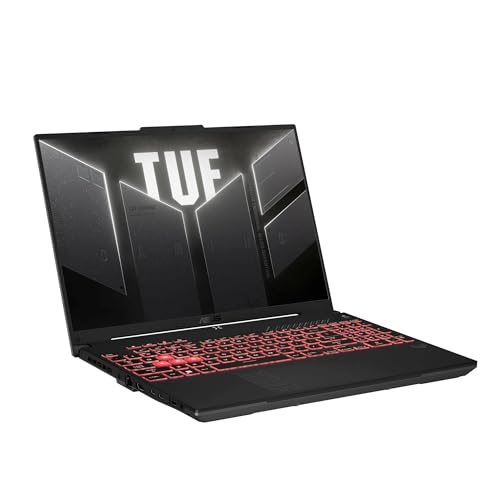
Best 16-Inch with Extra RAM and Storage
ASUS TUF Gaming A16 (RTX 4050)
Bottom line: A 16:10 screen, 24GB of DDR5 and a 1TB SSD make this the most generously equipped laptop here for players who want room to grow.
- 24GB of DDR5 is more memory than any other laptop on this list
- 1TB of storage holds a large library without an upgrade
- 16-inch 16:10 screen with G-SYNC and NVIDIA Advanced Optimus
- Ryzen 7 7445HS has 6 cores and boosts up to 4.7GHz
- MIL-STD-810H durability rating suits a laptop that travels
- The TUF A16 chassis is known for good cooling and a decent port selection
- Good price-to-performance ratio for the TUF line
- Fans get loud under heavy gaming loads
- Speakers are basic, so headphones are the better choice
- The RTX 4050 is an entry-level GPU from the previous generation
Table of Contents
Best Gaming Laptops Under 1000: Our Picks in Detail
1
Best for RTX 50 Series on a Budget
MSI Cyborg 17
Bottom line: One of the few sub-$1,000 listings with an RTX 5060, plus 16GB of DDR5 and a 1TB SSD, for players who want a newer GPU and a big 17-inch screen.
This listing is the Cyborg 17 B2RW with a Core 5 210H, an RTX 5060 with 8GB of GDDR7, 16GB of DDR5, a 1TB NVMe SSD and a 17.3-inch 1920 x 1080 display at 144Hz.
Pros & Cons
Pros
- RTX 5060 brings DLSS 4 and a newer GPU generation than the RTX 4050 laptops around it
- 1TB of storage means a real game library from day one
- 16GB of DDR5 sits in two slots that accept up to 96GB later
- 17.3-inch 144Hz screen gives more room than the 15.6-inch laptops on this list
- Single-fan cooling stays cool and stable under long loads
- PWM-free display is easier on the eyes in long sessions
- Physical webcam shutter and four-zone RGB keyboard add polish
- Wi-Fi 6E, HDMI, USB-C and Ethernet cover the essentials
Cons
- MSI keeps the GPU power limit conservative, so the RTX 5060 does not reach the speed of a full-power version
- The Full HD panel has limited color coverage and there is no SD card reader
- Only one M.2 slot, and at 5.5 lb it is a desk laptop first
Why We Picked It
Under a thousand dollars the usual choice is an RTX 4050, so a listing with an RTX 5060 and a 1TB drive stands out. The translucent chassis is more distinctive than the plain black boxes in this class, and the cooling design favors steady temperatures over peak numbers. The trade is power: MSI limits the GPU, so you are paying for the newer architecture and features more than raw frame rates.
Who It's For
You want the newest graphics generation you can get on a tight budget, and you play at a desk where a 17-inch screen is an advantage rather than a burden. You will add a second RAM stick or a larger drive later and keep the laptop for several years.
Specs & Configurations
- CPU
- Intel Core 5 210H
- GPU
- NVIDIA GeForce RTX 5060 8GB GDDR7
- RAM
- 16GB DDR5
- Storage
- 1TB NVMe SSD
- Screen
- 17.3 in, 1920 x 1080, 144Hz IPS
- Weight
- 5.5 lb
Get It Now
Check Price on Amazon
2
Best for Value Out of the Box
HP Victus 15 (Core i5, RTX 4050)
Bottom line: An RTX 4050 with 16GB of RAM already installed and a comfortable keyboard make this the easy, no-upgrade-needed starter for 1080p gaming.
This listing is the 2024 Victus 15 with a Core i5-13420H, an RTX 4050 with 6GB of GDDR6, 16GB of DDR4, a 512GB PCIe Gen 4 SSD and a 15.6-inch 1920 x 1080 display at 144Hz.
Pros & Cons
Pros
- RTX 4050 with DLSS 3 frame generation handles modern games at 1080p
- 16GB of RAM is installed, so there is no upgrade to buy on day one
- The Core i5-13420H has 8 cores, enough to keep the GPU fed
- Keyboard is well damped and comfortable for long sessions
- 144Hz IPS panel is a clear step up from 60Hz entry screens
- HDMI 2.1, USB-C with DisplayPort and Ethernet cover monitor and wired play
- Battery life is reasonable for a gaming laptop in light use
Cons
- The RTX 4050 is power-capped, which costs a few frames compared with higher-wattage versions
- The display is dim in color, with limited gamut and visible motion ghosting
- The chassis has only one usable SSD slot, so extra storage means swapping the drive
Why We Picked It
The Victus does not try to be exciting. It pairs a capable processor with an RTX 4050 and a full 16GB of memory, which is where many cheaper listings cut corners. The all-around package is balanced, and the keyboard is better than the price suggests. The screen and the power-limited GPU are the compromises that keep it affordable.
Who It's For
You are moving up from a console or an older laptop and want something that works the day it arrives. You play esports titles and current releases at 1080p, keep the laptop plugged in at a desk and are happy to live with an average screen.
Specs & Configurations
- CPU
- Intel Core i5-13420H
- GPU
- NVIDIA GeForce RTX 4050 6GB GDDR6
- RAM
- 16GB DDR4
- Storage
- 512GB PCIe Gen 4 NVMe SSD
- Screen
- 15.6 in, 1920 x 1080, 144Hz IPS
- Weight
- 5.1 lb
Get It Now
Check Price on Amazon
3
Best for Fast Refresh and Upgrades
Acer Nitro V 15 (RTX 4050)
Bottom line: A 165Hz screen, Thunderbolt 4 and two DDR5 slots make this the pick for competitive players who do not mind adding RAM.
This listing is the Nitro V 15 ANV15-52 with a Core i5-13420H, an RTX 4050 with 6GB of VRAM, 8GB of DDR5, a 512GB PCIe Gen 4 SSD and a 15.6-inch 1920 x 1080 display at 165Hz.
Pros & Cons
Pros
- 165Hz refresh rate is higher than the 144Hz found on most laptops at this level
- Thunderbolt 4 port handles charging, data and video out in one cable
- Two DDR5 slots accept up to 32GB, so memory is easy to add
- PCIe Gen 4 SSD loads games quickly
- At about 4.7 lb it is among the lighter laptops on this list
- Killer Gigabit Ethernet and Wi-Fi 6 keep online play stable
- RTX 4050 supports DLSS 3.5 for smoother frame rates in supported games
Cons
- 8GB of RAM is below the 16GB baseline for modern games, so budget for an upgrade
- The chassis family runs warm and noisy under heavy load
- The 1080p panel is built to a price and will not impress on color
Why We Picked It
Refresh rate is where the Nitro V 15 earns its place. A 165Hz panel and a Thunderbolt 4 port are features usually reserved for pricier models, and the two memory slots make the 8GB starting point a short-term problem rather than a permanent one. It is also lighter than most of its rivals, which helps if the laptop moves between rooms.
Who It's For
You play fast shooters and battle royales where every extra frame counts, and you are comfortable opening the bottom panel to add a second RAM stick. You want a laptop that is easier to carry to a friend's house than a heavy desktop replacement.
Specs & Configurations
- CPU
- Intel Core i5-13420H
- GPU
- NVIDIA GeForce RTX 4050 6GB
- RAM
- 8GB DDR5 (2 slots, up to 32GB)
- Storage
- 512GB PCIe Gen 4 SSD
- Screen
- 15.6 in, 1920 x 1080, 165Hz IPS
- Weight
- 4.7 lb
Get It Now
Check Price on Amazon
4
Best for Upgradeability and G-Sync
Lenovo LOQ 15 (Ryzen 5 7235HS)
Bottom line: A 100% sRGB G-Sync panel, 16GB of DDR5 and three USB-A ports suit players who plan to keep adding drives and accessories.
This listing is the LOQ 15 with a Ryzen 5 7235HS, an RTX 4050 with 6GB of VRAM, 16GB of DDR5, a 512GB SSD and a 15.6-inch 1920 x 1080 IPS display at 144Hz with G-SYNC.
Pros & Cons
Pros
- Panel is listed at 100% sRGB with G-SYNC, which is better color than many rivals at this level
- 16GB of DDR5 is installed from the start
- The LOQ 15 family uses two SODIMM slots and two M.2 slots, so memory and storage can both grow
- Keyboard has large arrow keys and a comfortable layout
- Three USB-A ports, USB-C, HDMI 2.1 and Ethernet cover most accessories
- Efficient Ryzen and RTX 4050 pairing keeps power draw modest
- Rapid Charge Pro and a camera e-shutter are included
Cons
- Fans can get loud when the laptop is gaming
- The plastic chassis is basic, and at about 5.3 lb it is heavy for a 15.6-inch laptop
- No Thunderbolt or USB4 port, and wireless stops at Wi-Fi 6
Why We Picked It
Lenovo built the LOQ line to be cheap without being closed off. The processor and RTX 4050 are efficient, the keyboard is roomy, and the memory and storage can be changed later, which matters because game installs keep growing. The display option with full sRGB coverage is the detail that sets this configuration apart from budget panels that wash out colors.
Who It's For
You want a laptop you can improve over time. You will start with 512GB and add a second SSD when the library fills, and you care enough about image quality that a better panel beats a flashier chassis.
Specs & Configurations
- CPU
- AMD Ryzen 5 7235HS
- GPU
- NVIDIA GeForce RTX 4050 6GB
- RAM
- 16GB DDR5
- Storage
- 512GB SSD
- Screen
- 15.6 in, 1920 x 1080, 144Hz IPS, G-SYNC
- Weight
- 5.3 lb
Get It Now
Check Price on Amazon
5
Best Build and Ports for the Price
Alienware 15 (2026)
Bottom line: A solid chassis, a good keyboard and USB-C with 100W power delivery give Alienware's cheapest line a more finished feel than most budget laptops.
This listing is the 2026 Alienware 15 with a Ryzen 5 220, an RTX 4050 with 6GB of GDDR6, 16GB of DDR5, a 512GB SSD and a 15.3-inch 1920 x 1200 display at 165Hz.
Pros & Cons
Pros
- 165Hz 16:10 display gives extra vertical space and fast motion at 1200p
- Keyboard and touchpad are comfortable for gaming and everyday use
- Build quality feels sturdier than most laptops in this class
- Two USB-C ports support power delivery up to 100W and DisplayPort 1.4a
- HDMI 2.1 and Ethernet round out a full port set
- Ryzen 5 220 has 6 cores and 12 threads, boosting up to 4.9GHz
- Dell and Alienware support and warranty options are widely available
Cons
- Color accuracy and color range are poor, so the screen suits games more than photo work
- Battery life is short, the laptop is heavy and the fans get loud under load
- Wireless is Wi-Fi 6 and the webcam is 720p
Why We Picked It
Alienware's budget line drops the flashy lighting and keeps the parts that matter day to day: a good keyboard, a sturdy body and a generous set of ports. The 16:10 screen is a small but real advantage over the 16:9 panels around it, and USB-C with power delivery means one cable can charge the laptop and drive a monitor.
Who It's For
You want a laptop that looks and feels more like a premium machine than a budget one, and you will connect it to a monitor, keyboard and Ethernet at a desk. You will accept a weak screen gamut and fan noise in exchange for the better build.
Specs & Configurations
- CPU
- AMD Ryzen 5 220
- GPU
- NVIDIA GeForce RTX 4050 6GB GDDR6
- RAM
- 16GB DDR5
- Storage
- 512GB SSD
- Screen
- 15.3 in, 1920 x 1200, 165Hz
- Ports
- 2 USB-A, 2 USB-C, HDMI 2.1, Ethernet
Get It Now
Check Price on Amazon
6
Best 16-Inch with Extra RAM and Storage
ASUS TUF Gaming A16 (RTX 4050)
Bottom line: A 16:10 screen, 24GB of DDR5 and a 1TB SSD make this the most generously equipped laptop here for players who want room to grow.
This listing is the TUF Gaming A16 with a Ryzen 7 7445HS, an RTX 4050, 24GB of DDR5, a 1TB SSD and a 16-inch 1920 x 1200 G-SYNC display.
Pros & Cons
Pros
- 24GB of DDR5 is more memory than any other laptop on this list
- 1TB of storage holds a large library without an upgrade
- 16-inch 16:10 screen with G-SYNC and NVIDIA Advanced Optimus
- Ryzen 7 7445HS has 6 cores and boosts up to 4.7GHz
- MIL-STD-810H durability rating suits a laptop that travels
- The TUF A16 chassis is known for good cooling and a decent port selection
- Good price-to-performance ratio for the TUF line
Cons
- Fans get loud under heavy gaming loads
- Speakers are basic, so headphones are the better choice
- The RTX 4050 is an entry-level GPU from the previous generation
Why We Picked It
Most budget laptops start with 8GB or 16GB of RAM and 512GB of storage. This TUF A16 listing starts at 24GB and 1TB, which saves the first round of upgrades, and the 16:10 screen suits both games and everyday work. ASUS has a reputation for solid cooling in this chassis, which helps an entry-level GPU run at its best.
Who It's For
You want a larger screen than the 15.6-inch standard and you do not want to spend your first month upgrading RAM and storage. You play AAA games at 1080p or 1200p, take the laptop to class or a friend's place and value a tougher build.
Specs & Configurations
- CPU
- AMD Ryzen 7 7445HS
- GPU
- NVIDIA GeForce RTX 4050
- RAM
- 24GB DDR5
- Storage
- 1TB SSD
- Screen
- 16 in, 1920 x 1200, 16:10, G-SYNC
- Durability
- MIL-STD-810H
Get It Now
Check Price on AmazonWhat to Look for in a Gaming Laptop Under 1000
GPU
The graphics card matters most for games. In this price range the realistic options are an RTX 4050, an RTX 5050 on a good sale or, rarely, an RTX 5060. An RTX 4050 plays 1080p games at medium to high settings, and DLSS frame generation helps in supported titles. Compare the full listing, because laptop GPUs run at very different power limits.
RAM and Storage
Treat 16GB of RAM as the baseline, and avoid 256GB drives, which fill up with a few modern games. If a listing has 8GB, check that it has an open slot, since memory is cheap to add later. A second M.2 slot is a useful extra for the same reason.
Screen
Expect a 1080p or 1200p IPS panel at 144Hz to 165Hz. Brightness and color vary a lot even at the same resolution, and they affect how games look more than a few extra frames. A 100% sRGB panel is a real advantage on a budget machine.
CPU
Do not overspend on the processor. A Core i5 or Ryzen 5 or 7 from the last few generations is enough when the GPU is the limit. Spend the difference on RAM, storage or a better screen.
Cooling and Noise
Budget gaming laptops run loud under load, so plan on headphones. A gaming laptop cooling pad helps keep temperatures and fan speeds down during long sessions.
Which Gaming Laptop Under 1000 Should You Buy?
If you want the newest GPU, the MSI Cyborg 17 is the one under-$1,000 listing with an RTX 5060 and a 1TB drive. The HP Victus 15 is the safest starter, the Acer Nitro V 15 is the pick for high refresh and easy upgrades, and the Lenovo LOQ 15 suits players who care about screen quality and expandability. The Alienware 15 has the best build and ports, and the ASUS TUF Gaming A16 gives you the most RAM and storage. Whichever you choose, the best gaming laptop under 1000 is the one whose exact CPU, GPU, RAM and storage match the games you play, so read the listing before you buy.