GameCuki is reader-supported. When you buy through links on our site, we may earn an affiliate commission at no extra cost to you. As an Amazon Associate I earn from qualifying purchases. Learn more.
A $50 cap used to mean a flimsy membrane board with a loud rattle. Now the best gaming keyboard under 50 dollars can be a Hall effect 60% with adjustable actuation, a hot-swappable gasket-mount 75%, or a quiet wireless full-size with a rechargeable battery. These nine picks cover each of those routes, so you can match the board to your desk, your games and the way you connect.
Switch type, layout and connection matter more at this price than RGB zones or “gaming” branding, so each pick spells out all three, plus the one limit you should know before you buy.
Best Gaming Keyboard Under $50: Quick Comparison
| Keyboard |
Layout |
Key type |
Connection |
| AULA WIN68 HE |
60% (68 keys) |
Hall effect magnetic switches |
Wired USB-C |
| Ajazz AK820 |
75% (82 keys) |
Hot-swappable pre-lubed linear |
Wired USB-C |
| Redragon K552 |
TKL (87 keys) |
Linear red mechanical |
Wired USB |
| MageGee MK-Box |
60% (68 keys) |
Linear red mechanical |
Wired, detachable cable |
| AULA S99 |
96% (99 keys) |
Clicky switches |
Bluetooth 5.0, 2.4GHz, USB wired |
| TECKNET Wireless |
Full-size with wrist rest |
Quiet membrane |
2.4GHz dongle or USB wired |
| Lenovo Legion K310 |
Full-size (104 keys) |
Membrane |
Wired USB-A |
| TECKNET Wired |
Full-size with wrist rest |
Quiet membrane |
Wired USB-A |
| SABLUTE 94-Key |
94 keys with numpad |
Quiet membrane |
Wired USB-A |
Best Gaming Keyboard Under $50: Our Picks in Detail
1
Best for Competitive FPS
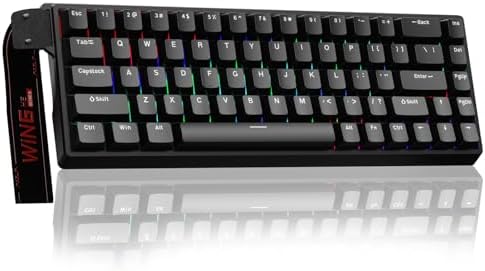
AULA WIN68 HE
Bottom line: The pick for shooter players who want adjustable actuation and an 8,000Hz polling rate on a compact 60% board.
The AULA WIN68 HE brings Hall effect switches and an 8,000Hz polling rate to a budget board.
Pros & Cons
Pros- Adjustable actuation point per key
- Fast trigger mode for quick counter-strafing
- 8,000Hz polling rate
- Remapping, macros and SOCD options in the web driver
- Compact 60% layout frees up mouse space
- Arrow keys kept despite the small size
- RGB with 14 preset effects
Cons- Web driver works on Windows only
- 60% layout means function keys sit behind Fn
- Wired only, no wireless option
Why We Picked It
Magnetic switches let you set how far a key must travel before it registers, down to 0.1mm steps, and fast trigger mode re-arms the key before it fully resets. That combination suits fast shooters like Counter-Strike and Valorant, and the 8,000Hz polling rate keeps input reports frequent. Remapping, macros and SOCD options live in a browser-based driver, so there is nothing to install.
Who It's For
You play fast shooters, want every millisecond of response you can get without paying for a premium Hall effect board and are happy with a 60% layout. The small footprint leaves your mouse arm more room, and per-key tuning lets you set movement keys differently from ability keys.
For a look at another budget Hall effect keyboard, read our DrunkDeer G65 review.
Specs & Configurations
- Layout
- 60%, 68 keys
- Switches
- Hall effect magnetic, linear
- Actuation
- adjustable 0.02mm to 3.44mm in 0.1mm steps
- Polling rate
- 8,000Hz
- Lighting
- RGB, 14 preset effects
- Connection
- wired USB-C
- Software
- web driver (Windows)

2
Best for a Custom-Feel 75%
Ajazz AK820
Bottom line: A hot-swappable, gasket-mount 75% with a volume knob for players who want a custom-keyboard feel without a custom-keyboard bill.
Gasket mounting and hot-swap sockets are custom-keyboard features, and the AK820 brings both in under this budget.
Pros & Cons
Pros- Hot-swappable sockets accept 3-pin and 5-pin switches
- Pre-lubed linear switches feel smooth out of the box
- Gasket mount with 5-layer dampening for a deeper sound
- Matte PBT keycaps resist shine
- Aluminum volume knob for quick audio control
- 75% layout keeps the function row and arrow keys
- Detachable USB-C cable
Cons- Wired only
- Ships with linear switches, so tactile fans must swap them
- No numpad
Why We Picked It
The AK820 packs five layers of dampening into a gasket-mounted case and ships with pre-lubed linear switches, so it sounds and feels more refined than most boards at this price. Because the switches are hot-swappable, you can change them later without soldering. The 82-key layout keeps your function row and arrows, and the knob handles volume without reaching for the media keys.
Who It's For
You want a keyboard that feels good for gaming and everyday typing, and you plan to tinker eventually. The compact 75% layout suits a tighter desk, and the detachable cable makes it easy to pack for a LAN. If you want to compare this size against other options, see our best 75 percent gaming keyboard guide.
Specs & Configurations
- Layout
- 75%, 82 keys
- Mount
- gasket with 5-layer sound dampening
- Switches
- pre-lubed linear, hot-swappable (3-pin and 5-pin)
- Keycaps
- PBT
- Extras
- aluminum volume knob, south-facing RGB
- Connection
- detachable USB-C cable

3
Best Mechanical TKL
Redragon K552
Bottom line: A metal-topped tenkeyless mechanical board with N-key rollover for players who want a proven, no-frills first mechanical keyboard.
The K552 is a long-running budget mechanical board, and its metal top plate sets it apart from all-plastic rivals.
Pros & Cons
Pros- True mechanical feel with linear red switches
- N-key rollover on all 87 keys
- Metal top plate feels sturdy
- Tenkeyless layout saves desk space
- Dedicated software for remapping and macros
- Plug-and-play on Windows, macOS and Linux
- Braided cable
Cons- Rainbow LED version has fixed color patterns
- Linear switches have no tactile bump
- Wired only
Why We Picked It
Tenkeyless layouts give you a full set of keys minus the numpad, which leaves room for wide mouse swipes. Linear red switches move smoothly for repeated taps, every key supports N-key rollover and a metal plate keeps the board planted on the desk. The software lets you remap keys and record macros if you want them.
Who It's For
You are moving from a membrane board to your first mechanical keyboard and want a layout that does not waste desk space. It suits PC players who value a solid build and simple plug-and-play use over wireless or extra features.
Specs & Configurations
- Layout
- tenkeyless, 87 keys
- Switches
- linear red mechanical
- Rollover
- N-key, all 87 keys
- Build
- metal top plate, anti-slip feet
- Lighting
- rainbow LED, 6 preset modes (fixed colors)
- Cable
- braided USB
- Software
- driver for remapping and macros

4
Best for Small Desks
MageGee MK-Box
Bottom line: A cheap 60% mechanical board that keeps dedicated arrow keys and an F row, ideal for tight desks and small hands.
The MK-Box squeezes a mechanical board into a footprint small enough for a laptop bag, and it keeps the keys many 60% boards cut.
Pros & Cons
Pros- Compact 68-key layout with separate arrow keys
- F1 to F12 stay available without Fn layers
- Linear red switches are smooth and light
- Anti-ghosting on all 68 keys
- Detachable USB-C cable
- Adjustable double kickstand
- Plug-and-play on Windows, Mac and Linux
Cons- Blue-only backlight
- No remapping software
- No numpad or dedicated navigation cluster
Why We Picked It
Many 60% keyboards hide arrows and the function row behind Fn combinations. The MK-Box includes both, so games that need them are easier to play, and it still frees up desk space for mouse movement. Linear red switches and full anti-ghosting keep fast inputs clean, and the detachable cable makes it simple to carry.
Who It's For
You have a small desk, a tight setup or a smaller hand span and want a mechanical board you can toss in a bag. It is a good fit if you prefer smooth linear switches and do not need software or multi-color lighting. Our guide to the best gaming keyboard for small hands covers more compact options.
Specs & Configurations
- Layout
- 60%, 68 keys with arrows and F1 to F12
- Switches
- linear red mechanical
- Rollover
- all 68 keys anti-ghosting
- Lighting
- blue LED, about 16 modes
- Cable
- detachable USB-C
- Extras
- double kickstand feet

5
Best for Multi-Device Wireless
AULA S99
Bottom line: A 96% board with Bluetooth, 2.4GHz and wired modes for players who split time between a PC, laptop and tablet.
The S99 gives you three ways to connect in one board: Bluetooth, 2.4GHz and USB.
Pros & Cons
Pros- Three connection modes in one board
- Pairs with up to five devices
- 2.4GHz mode for gaming, Bluetooth for other devices
- Multifunction knob for volume and lighting
- Foldable 2-stage kickstand for tilt
- Full numpad in a compact 96% case
- Rechargeable
Cons- Bluetooth mode can add latency, so use 2.4GHz or wired for fast shooters
- 96% layout takes more room than a 60% or TKL
- Clicky switches may be loud for shared spaces
Why We Picked It
Bluetooth 5.0 handles your phone, tablet and laptop, the 2.4GHz receiver covers gaming and USB wired mode is there when the battery runs low. A knob on the corner controls volume, connection mode and lighting, and the 96% layout fits a numpad into a smaller case than a standard full-size board.
Who It's For
You game on a PC, work on a laptop and browse on a tablet, and you want one keyboard that switches between them. It suits anyone who needs a numpad for spreadsheets or macros but wants a tidier desk than a full-size board gives.
Specs & Configurations
- Layout
- 96%, 99 keys with numpad
- Connection
- Bluetooth 5.0, 2.4GHz wireless, USB wired
- Devices
- pairs with up to 5
- Lighting
- 16.8 million colors, 16 preset effects
- Extras
- multifunction knob, foldable 2-stage kickstand
- Compatible with
- PC, laptop, gaming console, smartphone, tablet

6
Best Quiet Wireless
TECKNET Wireless Gaming Keyboard
Bottom line: A quiet full-size 2.4GHz wireless board with a wrist rest and big battery for players who want a cable-free desk.
This TECKNET board is the one to look at if cables bother you and noise matters more than switch feel.
Pros & Cons
Pros- 2.4GHz wireless with a USB receiver
- Wired mode on the same board
- Large 4000mAh rechargeable battery
- Whisper-quiet keys
- Integrated wrist rest for long sessions
- 12 dedicated multimedia keys
- Spill resistance with drainage holes
- Metal base for stability
Cons- Membrane switches lack mechanical feel
- 25-key anti-ghosting instead of full N-key rollover
- Wrist rest and full-size layout take a lot of desk space
Why We Picked It
It covers the basics well: a 2.4GHz receiver rated for 33 feet, a 4000mAh battery that cuts down on recharging and quiet keys that will not wake the house. A wrist rest, a stepped key layout, a metal base and drainage holes for spills make it a comfortable daily driver for both games and work.
Who It's For
You want a wireless keyboard for the couch or a clean desk, play single-player or casual games and share your space with others. The quiet keys and wrist rest suit long sessions, and the wired mode gives you a fallback if the battery runs out.
Specs & Configurations
- Layout
- full-size with integrated wrist rest
- Switches
- whisper-quiet membrane
- Connection
- 2.4GHz USB receiver (33 ft) or wired
- Battery
- 4000mAh rechargeable
- Anti-ghosting
- 25 keys
- Extras
- 12 multimedia keys, 7-degree stand, IP32 spill resistance

7
Best Full-Size from a Known Brand
Lenovo Legion K310
Bottom line: A water-resistant, full-size Legion membrane board for players who want a recognizable brand and a numpad.
The Legion K310 is a straightforward, brand-backed full-size board that is happy to get splashed.
Pros & Cons
Pros- Full-size layout with numpad
- 24-key rollover covers gaming inputs
- Splash-resistant body with drainage holes
- Quiet membrane keys
- Programmable keys
- Fn media and volume controls
- 5-zone RGB lighting
- Rated for 20 million keystrokes
Cons- Membrane switches, not mechanical
- Only five lighting zones
- Wired only
Why We Picked It
A full-size frame, a 24-key rollover and quiet membrane keys cover the basics of PC gaming. Drainage holes and a water-resistant exterior protect against spills, and Fn shortcuts handle volume and media. The 20-million-keystroke rating suggests it is meant for daily use.
Who It's For
You want a dependable keyboard with a numpad and the Legion name, play on PC and care more about durability and quiet than switch feel. It suits students and shared rooms where a loud mechanical board would not work.
Specs & Configurations
- Layout
- full-size, 104 keys
- Switches
- quiet membrane
- Rollover
- 24-key
- Lighting
- 5-zone RGB
- Rated life
- 20 million keystrokes
- Water resistance
- splash-resistant with drainage holes
- Connection
- wired USB-A
- Extras
- programmable keys, Fn media controls

8
Best Budget with Wrist Rest
TECKNET Wired Gaming Keyboard
Bottom line: A quiet, spill-resistant wired board with an integrated wrist rest for players on a tight budget.
The wired TECKNET trades switch feel for comfort and price, and it does that well.
Pros & Cons
Pros- Integrated wrist rest
- Quiet keys
- 25-key anti-ghosting
- 15-zone rainbow backlight
- 12 dedicated multimedia keys
- IP32 spill resistance with drainage holes
- Metal panel design
- Lifetime support with registration
Cons- Membrane keys feel mushy compared with mechanical
- 25-key anti-ghosting instead of full N-key rollover
- Wired only
Why We Picked It
The ergonomic stepped layout, 7-degree angle and built-in wrist rest make long sessions easier on your wrists. Twelve multimedia keys, a 15-zone backlight and spill resistance round out a feature set that is generous for the money, and the quiet membrane switches keep noise down.
Who It's For
You want the cheapest comfortable full-size gaming keyboard that does not scream for attention. It suits casual PC play and daily work in a shared space, and the wrist rest helps if you type a lot.
Specs & Configurations
- Layout
- full-size with integrated wrist rest
- Switches
- quiet membrane
- Anti-ghosting
- 25 keys
- Lighting
- 15-zone rainbow, 7 modes, 4 brightness levels
- Extras
- 12 multimedia keys, 7-degree angle, IP32 spill resistance
- Connection
- wired USB-A

9
Best for PS5 and Xbox Players
SABLUTE 94-Key Gaming Keyboard
Bottom line: A quiet 94-key board with a sound-reactive light bar and PS5 and Xbox support for console and PC players.
The SABLUTE is a budget board built for living-room and desk setups where the glow of the light bar is part of the appeal.
Pros & Cons
Pros- Compact 94-key layout with numpad
- Quiet membrane keys
- Sound-reactive RGB light bar
- Dual knobs for volume and lighting
- PS5 and Xbox Series X and S compatibility
- 2-year replacement support
- Separate arrow keys
Cons- Key legends are not shine-through, so you need room light
- Console support varies by game and feature
- Cable is fixed and not detachable
Why We Picked It
A 94-key layout keeps the numpad and arrows while using less space than a standard full-size board. The light bar reacts to game audio, two knobs control volume and lighting, and the keys are quiet enough for late-night sessions. Console compatibility is a bonus when you plug it into a PS5 or Xbox.
Who It's For
You play on PC and console, want a quiet board with eye-catching lighting and do not mind the key legends needing room light. It is a good fit for a shared room where the sound of a mechanical board is a problem.
Specs & Configurations
- Layout
- 94 keys with numpad and separate arrows
- Switches
- quiet membrane
- Lighting
- sound-reactive RGB light bar, 8 effects
- Controls
- dual knobs for volume and lighting
- Compatibility
- Windows PC and laptop, PS5, Xbox Series X and S (console support varies)
- Connection
- fixed USB-A cable
- Support
- 2-year replacement
How to Choose a Gaming Keyboard Under $50
Switch Type
Mechanical switches feel crisper and last longer, linear switches move smoothly for repeated taps and membrane boards are quieter and cheaper. Hall effect switches use magnets instead of physical contacts, which allows adjustable actuation points and fast trigger modes, features that were once limited to expensive boards. Pick the feel you like first, because it is the biggest difference you will notice.
Layout
Full-size boards keep a numpad, tenkeyless layouts drop it and 75% and 60% boards shrink further to free up mouse space. Choose based on desk room and whether you use a numpad. If you want a compact board with more keys than a 60%, our best low profile gaming keyboard guide covers another route.
Rollover and Anti-Ghosting
Anti-ghosting makes sure several keys register at once. N-key rollover registers every key, while 24- or 25-key anti-ghosting is more than most games ask for, since movement plus a few ability keys rarely exceeds a handful of presses at the same time.
Connection
Wired is the simplest and has the least latency. 2.4GHz wireless is close behind, while Bluetooth is better kept for phones, tablets and casual play. If you game competitively, choose wired or 2.4GHz.
Software and Lighting
Remapping, macros and per-key actuation need driver software or a web driver, so check whether a board offers it before buying. RGB zones look good but do not change how the board plays.
Which Gaming Keyboard Under $50 Should You Buy?
If you play competitive shooters, the AULA WIN68 HE is the best gaming keyboard under $50 because adjustable actuation and an 8,000Hz polling rate are hard to find at this level. The Ajazz AK820 is the one to buy if you want a hot-swappable board that feels like a custom build, and the Redragon K552 remains the easy first mechanical keyboard. Pick the AULA S99 or the wireless TECKNET if you want to lose the cable, and the Legion K310, wired TECKNET or SABLUTE if you want a quiet full-size board for a shared room. Any of the nine will do the job, so match the layout and switch type to your desk, then check the price. If you are also building out your setup on a budget, our best wireless gaming headset under $50 guide covers the audio side.

