

A headset that is dead when you finally have an hour to play is a special kind of annoying, and a tangle of USB-C cables on the desk does not help. If you are shopping for the best charging dock for Meta Quest 3, the goal is simple: drop the headset and controllers in place and have everything topped up for the next session. We picked four docks that charge the headset and Touch Plus controllers, each confirmed for Quest 3 and Quest 3S. If your controllers also need a firmer hold, our best Quest 3 controller grips guide covers that, and the dock notes below tell you which grips can stay on while charging.
Best Charging Dock for Meta Quest 3: Our Picks in Detail

Meta Quest Compact Charging Dock
Bottom line: The safest dock for Quest 3 and 3S, because it is built by Meta for Touch Plus controllers and keeps Active Straps on while they charge.
Meta's compact dock is a small round base that charges both Touch Plus controllers as you drop them in, with built-in protection against overheating. The headset charges through the extended USB-C cable that comes in the box.
Pros & Cons
- Made by Meta for Quest 3 and 3S
- Controllers charge with Active Straps attached
- Rechargeable batteries included
- Compact footprint
- Shows controller battery level inside the headset
- Headset charges through a cable, not a docked connector
- Power adapter sold separately
- No headset stand
Why We Picked It
Third-party docks promise more, but this one is the least fussy. It is designed around Touch Plus controllers, shows the controller battery level inside the headset, and it works with Active Straps still attached, which matters if you already own them. Meta lists it for both Quest 3 and Quest 3S.
Who It's For
You want an official, low-risk dock for a Quest 3 or 3S and don't mind plugging the headset in with the included cable. Both Touch Plus controllers just drop in, Active Straps stay on while they charge, and the small round base barely takes up desk space.
Specs & Configurations
- Fits
- Quest 3/3S
- Charges
- Two Touch Plus controllers (drop-in)
- Headset
- Included 32cm USB-C cable
- In the box
- Dock, 2 rechargeable batteries, USB-C power cable
- Power adapter
- 18W minimum, not included
Get It Now
Check Price at Meta
AMVR CD2 Magnetic Charging Dock
Bottom line: The most complete stand here, with magnetic headset charging, two controller bays, a charger in the box and room for third-party straps.
AMVR's CD2 is a vertical stand with a magnetic headset connection, two controller bays and a USB-C adapter that sits in the headset port so you are not wearing out the original port.
Pros & Cons
- Magnetic headset charging means less plugging and unplugging
- Charger and batteries included
- Works with many face pads and head straps
- Back stand holds controller grips while they charge
- USB-A port and six RGB light modes
- Charging and data transfer cannot happen at the same time
- RGB lighting is not for everyone
Why We Picked It
It is the only pick here that ships with a fast charger, two controller batteries and a magnetic headset adapter in one box. The same adapter also lets you connect a battery head strap or a link cable, with the catch that charging and data transfer cannot run together. The rear stand holds controller grip covers while the controllers charge.
Who It's For
You want one stand on the desk with the headset docked magnetically and the controllers parked beside it. The charger, two controller batteries and USB-C adapter all come in the box, and the rear stand holds your controller grip covers while they charge.
Specs & Configurations
- Fits
- Quest 3/3S
- Charging
- Magnetic headset connection, drop-in controllers
- In the box
- Dock, 2 controller batteries, PD charger, USB-C adapter
- Extras
- USB-A port, 6 RGB light modes
- Warranty
- 12 months
Get It Now
Check Price on Amazon
NexiGo Enhanced Charging Dock
Bottom line: A display-style stand that handles the Elite Strap with Battery and charges controllers without taking their silicone covers off.
NexiGo's dock is a stand that holds the headset up, parks both controllers on the base and has status LEDs on the column and on each side of the base.
Pros & Cons
- Holds the Elite Strap with Battery
- Controllers charge with silicone covers on
- LED can be switched off
- Rechargeable batteries included
- Stand holds the headset upright
- Takes more desk space than a compact base
- Fits Quest 3/3S only, the Quest 2 version is a separate listing
Why We Picked It
If you wear an Elite Strap with Battery, plenty of docks make you take it off or tilt the headset awkwardly. This one is designed around it, and the controller slots accept silicone covers, so you are not pulling grips off after every session. The LED can be turned off when it is next to your bed.
Who It's For
You wear an Elite Strap with Battery and keep silicone grips on your controllers. This stand is designed around that setup, so there's nothing to remove after a session, and the LED can be turned off when it sits next to your bed.
Specs & Configurations
- Fits
- Quest 3/3S
- Charging
- Wireless drop-in for controllers
- Straps
- Supports Elite Strap with Battery
- Controller covers
- Charge without removing
- Lighting
- LED, can be turned off
- Protection
- Over-charge, over-load, over-current
Get It Now
Check Price on Amazon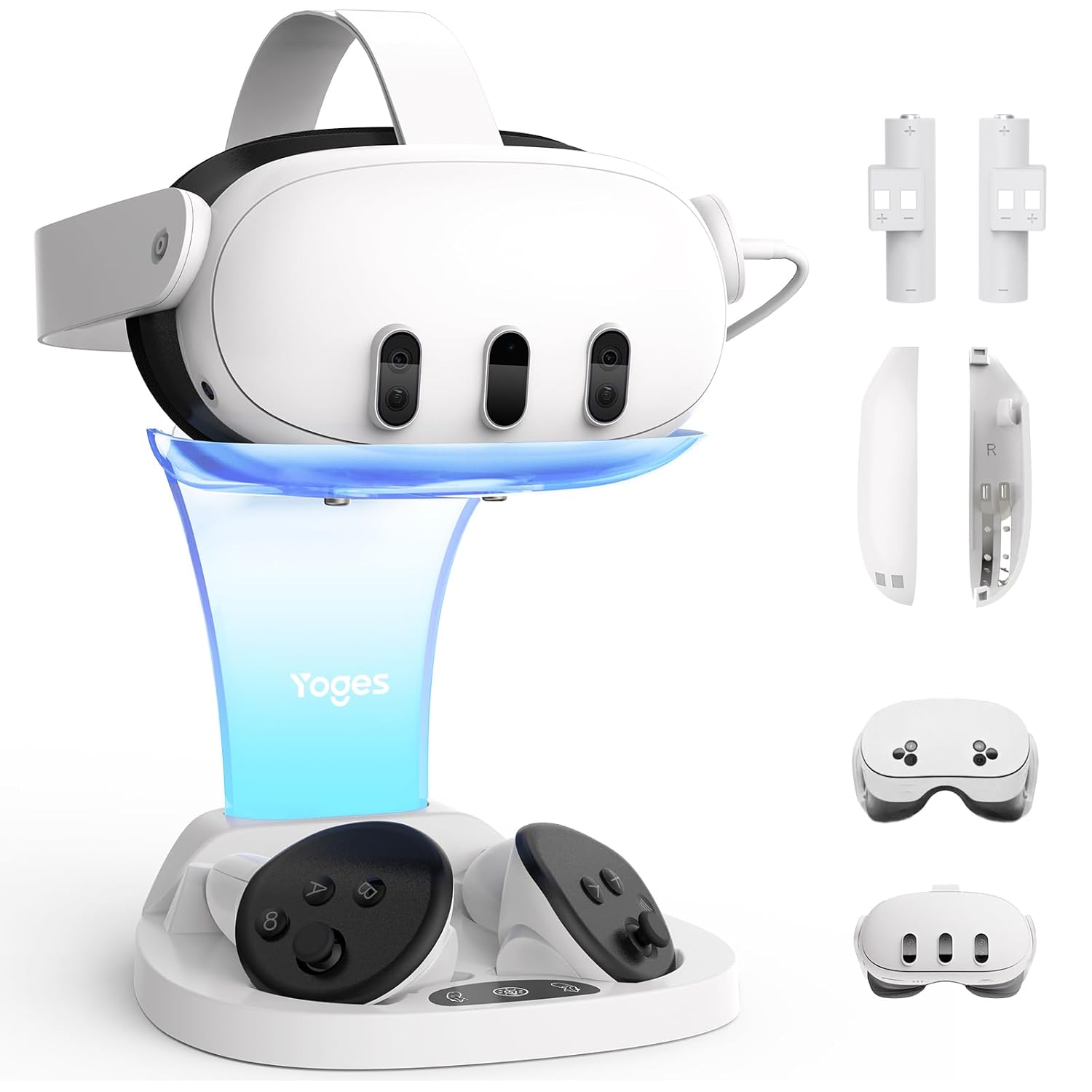
YOGES Charging Dock
Bottom line: A budget stand with magnetic controller batteries and strap support, as long as you bring your own 18W adapter.
YOGES makes a vertical stand with an LED base, two rechargeable controller batteries with covers, and a button to turn the light off.
Pros & Cons
- Controller batteries and covers included
- Works with Elite Strap and third-party battery straps
- LED light can be switched off
- Lower cost than the other docks here
- Headset and both controllers charge in one place
- No power adapter in the box
- Not compatible with Quest 2
- Headset charges through a cable
Why We Picked It
It covers the basics at a lower cost: the headset and both controllers in one place, with batteries in the box and support for most Quest 3 straps. It is also clear about its limits. It is for Quest 3 and 3S only, and it recommends an 18W adapter that you supply.
Who It's For
You have a Quest 3 or 3S and want a tidy vertical stand without paying for extras. The headset and both controllers charge in one place, batteries and covers are in the box, and it supports the Elite Strap and most third-party battery straps with an 18W adapter you supply.
Specs & Configurations
- Fits
- Quest 3/3S (not Quest 2)
- Charging
- Headset via USB-C, controllers on magnetic ports
- In the box
- Dock, 2 batteries, 2 battery covers, 2 USB-C cables
- Straps
- Supports Elite Strap and third-party battery straps
- Adapter
- 18W recommended, not included
Get It Now
Check Price on Amazon