GameCuki is reader-supported. When you buy through links on our site, we may earn an affiliate commission at no extra cost to you. As an Amazon Associate I earn from qualifying purchases. Learn more.
Most vertical mice were built for spreadsheets, so finding the best vertical mouse for gaming means filtering for the few that pair a handshake grip with a real gaming sensor, usable buttons and a weight you can live with. The seven picks below range from a 30K-sensor Razer with Hyperspeed wireless to budget wired mice with a thumb rocker, and each one is right-handed unless noted. If you are weighing a vertical shape against a contoured one, our guide to the best ergonomic gaming mouse covers the traditional options.
This guide is about comfort and shape. It is not medical advice, and no mouse prevents or treats an injury. If you have ongoing pain or numbness, talk to a doctor or physical therapist.
Best Vertical Mouse for Gaming: Our Picks in Detail

1
Best Overall for Gaming
Razer Pro Click V2 Vertical
Bottom line: The only vertical mouse here with a true gaming sensor, mechanical switches and Hyperspeed wireless, best for players who value comfort over flick speed.
Razer's first vertical mouse takes the Pro Click V2 formula and tilts it up into a handshake grip.
Pros & Cons
Pros- Focus Pro 30K sensor that tracks on glass
- Mechanical switches rated for 60 million clicks
- HyperSpeed wireless, Bluetooth and wired USB-C modes
- Up to 6 months of battery life
- A 5 minute charge covers about 3 working days
- Base support lifts the wrist off the desk
- Tall tilt suits larger hands
- 18-zone lighting with underglow
Cons- At about 5.3 oz it is heavy for fast shooters
- The lower thumb button is easy to press by accident
- Right-handed only, with a non-replaceable battery
Why We Picked It
Most vertical mice stop at an office-grade sensor. The Pro Click V2 Vertical ships with Razer's Focus Pro 30K optical sensor and mechanical switches, so it behaves like a gaming mouse that happens to stand on its side. It also connects over three routes, which makes it easy to share between a gaming PC and a work laptop. The trade is weight, since it is far heavier than a typical shooter mouse.
Who It's For
Players who spend long evenings in RPGs, strategy games, MMOs and relaxed shooters and want the hand in a handshake position instead of flat on the desk. The tall tilt and wrist base reward a loose, relaxed grip.
It also suits anyone who games and works on the same mouse, since the multi-device switching and long battery life cover a full workday as well.
Specs & Configurations
- Weight
- about 5.3 oz
- Sensor
- Focus Pro 30K optical
- Buttons
- 6
- Connection
- HyperSpeed 2.4 GHz, Bluetooth, USB-C
- Switches
- mechanical, rated for 60 million clicks
- Battery
- up to 6 months
2
Best for High Polling Rate
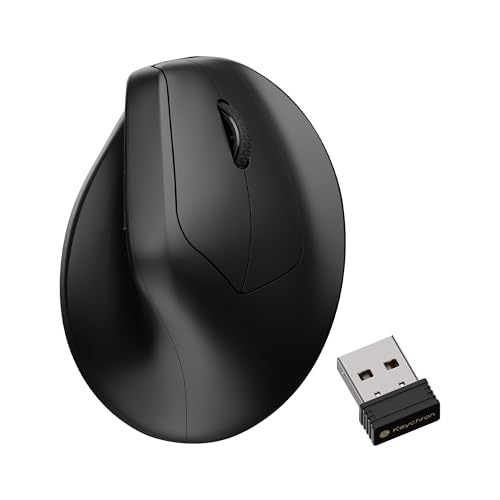
Keychron M5 8K
Bottom line: A 47 degree vertical mouse with an 8K polling rate and a 30K sensor, built for players who want a gentler tilt with modern gaming specs.
Keychron brings gaming-grade polling to the vertical mouse, a spec most rivals skip.
Pros & Cons
Pros- PixArt 3950 sensor with up to 30K DPI
- Up to 8K polling rate
- 47 degree angle is an easier step up from a flat mouse
- Thumb rest on the side of the shell
- Thumb wheel works as a horizontal scroll
- Five on-board profiles
- 2.4 GHz, Bluetooth 5.3 and wired USB-C
- Settings in the Keychron Launcher web app
Cons- Right-handed only
- Works with Windows and macOS only
- The gentler 47 degree tilt is less upright than 57 degree mice
Why We Picked It
The M5 8K pairs a PixArt 3950 sensor with up to 8K polling and a 47 degree angle, so the shell sits closer to a normal mouse than the 57 degree designs. That makes the change from a flat mouse less dramatic. The Launcher web app handles DPI, polling rate and lift-off distance, and five on-board profiles keep settings with the mouse when you move between computers.
Who It's For
Shooter and competitive players who want to try a vertical mouse without giving up polling rate and sensor headroom. The thumb wheel and side buttons also help on a desk that doubles as a work setup.
A slightly less upright angle is easier to adapt to if your hand is used to a regular claw or palm grip.
Specs & Configurations
- Angle
- 47 degrees
- Sensor
- PixArt 3950, up to 30K DPI
- Polling
- up to 8K
- Buttons
- 6 with thumb wheel
- Connection
- 2.4 GHz, Bluetooth 5.3, USB-C
- Profiles
- 5 on-board

3
Best for Work and Casual Play
Logitech MX Vertical
Bottom line: A 57 degree vertical mouse with a rechargeable battery and three-computer switching, better for relaxed gaming than for competitive play.
Logitech's MX Vertical is the established name in vertical mice, with a build that handles a full day at the desk.
Pros & Cons
Pros- 57 degree vertical angle
- Thumb rest under the thumb
- Textured rubber surface for a secure grip
- 4000 DPI sensor with a cursor speed switch
- Rechargeable battery rated for up to 4 months
- Switches between up to three computers
- Works with Windows, macOS, Linux, Chrome OS, iPadOS and Android
Cons- The 4000 DPI sensor is aimed at desk work, not competitive aiming
- Only four buttons, so MMO binds are limited
- Right-handed only
Why We Picked It
The MX Vertical brings the MX series build quality to a 57 degree shell, with a textured rubber surface and a thumb rest that keep the hand planted. Its cursor speed switch changes DPI on the fly, and the three-computer pairing makes it a natural fit for a desk that holds a gaming PC and a laptop. It is the most polished office-and-play option here, with a sensor that is fine for casual games but not for twitch aiming.
Who It's For
Players who work at the same desk they game on and want one mouse for both. It suits turn-based games, builders, survival games and other titles where precision matters less than comfort over a long session.
Specs & Configurations
- Angle
- 57 degrees
- Sensor
- 4000 DPI optical
- Buttons
- 4
- Battery
- up to 4 months, rechargeable
- Connection
- USB receiver, Bluetooth
- Hand
- right

4
Best for Small to Medium Hands
Logitech Lift
Bottom line: A compact 57 degree vertical mouse with quiet clicks and a battery that lasts up to two years, for smaller hands and relaxed gaming.
The Lift shrinks the vertical idea into a lighter, smaller mouse that suits smaller hands.
Pros & Cons
Pros- Compact shell sized for small to medium right hands
- 57 degree vertical angle
- Lighter than the Razer at about 4.4 oz
- Up to 2 years on a battery
- Quiet clicks
- Connects over Bluetooth or the Logi Bolt receiver
- Six buttons, four customizable in Logi Options+
- Graphite model uses 70% recycled plastic
Cons- Too small for large hands
- Sensor and wireless setup are built for desk work, not fast shooters
- Battery-powered, so it is not rechargeable
Why We Picked It
Lift keeps the 57 degree angle of the MX Vertical in a smaller, lighter body with a softly textured grip and a snug thumb rest. The battery runs for up to two years, so charging is not part of the routine. It lacks a gaming-grade sensor, but for strategy, sim and RPG players with smaller hands, the shape is the draw.
Who It's For
Players with small to medium hands who found larger vertical mice awkward to reach around. It fits a quiet desk, a shared room or a late-night session where click noise matters.
Left-handed players should note that Logitech sells a separate left-handed Lift listing.
Specs & Configurations
- Weight
- 125 g (about 4.4 oz)
- Angle
- 57 degrees
- Sensor
- 4000 DPI optical
- Buttons
- 6
- Connection
- Bluetooth Low Energy, Logi Bolt USB
- Battery
- up to 24 months
5
Best for MMO and MOBA Binds
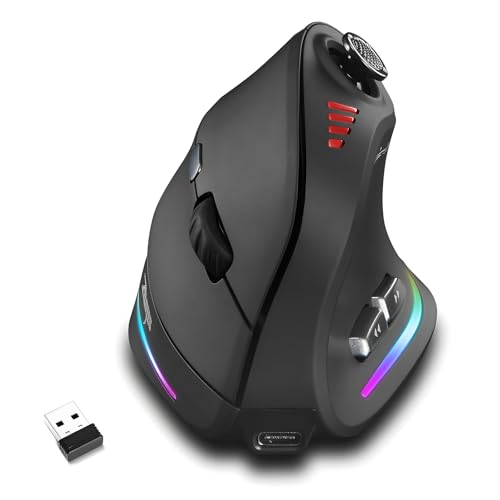
Attoe 5D Rocker Wireless Vertical Gaming Mouse
Bottom line: A tri-mode vertical mouse with 12 programmable buttons and a five-way thumb rocker, made for players with long ability bars.
Attoe packs a thumb rocker and a dozen buttons onto a vertical shell, a mix the big brands do not offer.
Pros & Cons
Pros- 12 programmable buttons
- Five-way thumb rocker replaces five keys
- Up to 24000 DPI
- 2.4 GHz, Bluetooth 5.0 and USB-C wired modes
- Macro editing through the supplied software
- Settings saved in the mouse
- About 3.9 oz, lighter than the Razer and about the same as the Lift
- LED lighting
Cons- Software setup follows a manual, so expect to spend time on first use
- Right-handed only
- A lesser-known brand with a shorter track record than Logitech or Razer
Why We Picked It
Vertical mice rarely add more than a couple of side buttons. This one has twelve programmable controls and a five-way rocker that stands in for five keys. It also runs wired, wireless 2.4 GHz or Bluetooth, and profiles stay in the mouse, so keybinds follow you from PC to PC.
Who It's For
MMO, MOBA and action RPG players who bind many abilities to the thumb and want the wrist in a handshake position. Players who keep a long hotbar will make use of the rocker for movement or camera control.
Specs & Configurations
- Weight
- 110 g (about 3.9 oz)
- Sensor
- up to 24000 DPI
- Buttons
- 12 programmable
- Connection
- 2.4 GHz, Bluetooth, USB-C wired
- Range
- 33 feet
- Memory
- on-board profile storage

6
Best Wired Budget Pick
TRELC Wired Vertical Gaming Mouse
Bottom line: A wired vertical mouse with 11 buttons, a rocker and a PMW3325 sensor, for gamers who want zero latency worries at a low cost.
This TRELC is the budget route to a gaming-focused vertical mouse, with the wire doing the work wireless mice do with batteries.
Pros & Cons
Pros- Wired USB connection with no battery to charge
- PMW3325 sensor with 5 DPI levels up to 10000
- 11 programmable buttons
- Five-direction thumb rocker
- On-board memory keeps settings
- Five preset lighting effects
- Handshake grip suits slower games
Cons- Wired only, so cable drag can limit movement
- At about 5.8 oz it is heavy
- Right-handed only
Why We Picked It
A wired link removes battery and polling questions entirely, and the PMW3325 sensor is a recognized gaming chip. The shell has an 11 button layout with a rocker, so it covers MMO and MOBA use at a lower price than the wireless picks. It is heavy, which pushes it toward slower games.
Who It's For
Players on a tight budget who want to try a vertical shape in games before paying for a premium wireless model. The cord makes sense on a desktop that already has a mouse bungee or a fixed layout.
Specs & Configurations
- Weight
- about 5.8 oz
- Sensor
- PMW3325, up to 10000 DPI
- Buttons
- 11 programmable
- Connection
- wired USB
- Rocker
- 5-direction
- Lighting
- 5 preset effects
7
Best Budget Wireless Starter
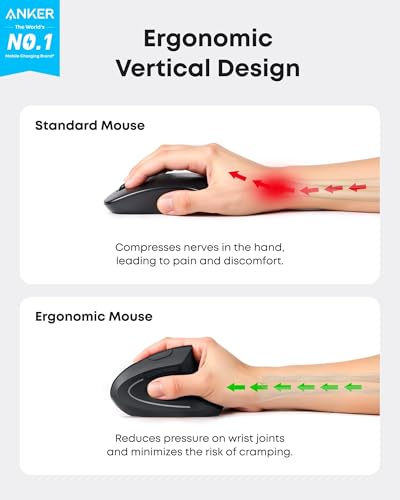
Anker 2.4G Wireless Vertical Mouse
Bottom line: A simple wireless vertical mouse for trying the shape in casual games, not for fast aiming.
Anker's vertical mouse is the plainest option here and the easiest way to try the shape.
Pros & Cons
Pros- Handshake grip in a compact shell
- 2.4 GHz wireless through a USB receiver
- Three DPI settings
- Back and forward buttons
- Receiver stores in the base
- Powers down after 8 minutes idle
- Works with Windows and Linux
Cons- 1600 DPI maximum, so it cannot keep up in fast shooters
- Batteries are not included
- Right-handed only
Why We Picked It
It strips the vertical mouse down to a 2.4 GHz receiver, three DPI steps and back and forward buttons. It leaves out extras like macro software. For a first vertical mouse it removes most of the risk, because the shape is the only thing you are paying for.
Who It's For
Anyone curious about vertical mice who plays casual or turn-based games. The three DPI steps are enough for menus, builders and puzzle games, and the receiver stores in the base so it travels easily.
Specs & Configurations
- Connection
- 2.4 GHz USB receiver
- DPI
- 800/1200/1600
- Buttons
- 5
- Power
- 2 AAA batteries (not included)
- Range
- 5 m
- Hand
- right
How to Choose a Vertical Mouse for Gaming
Angle and Hand Size
Vertical mice tilt the hand toward a handshake position, and the angle changes how much you notice the shift. The Keychron M5 uses 47 degrees, while the Logitech MX Vertical and Lift use 57 degrees, and the Razer has a taller tilt. A gentler angle is an easier step from a flat mouse. Smaller hands usually fit the compact Lift, and larger hands suit the taller Razer.
Weight and Sensor
Weight is the main gaming trade-off. Shooter mice often weigh around 2 oz, while the Razer here is about 5.3 oz. That heft is fine for strategy, RPGs and MMOs, but it slows quick flicks. For aiming, look for a modern gaming sensor and a polling rate of 1000 Hz or higher, as on the Razer and Keychron.
Wired or Wireless
Wired mice like the TRELC skip batteries and charging. Wireless models are tidier, and 2.4 GHz modes are the safer choice for games, with Bluetooth better kept for work and travel.
Buttons and Customization
MMO and MOBA players benefit from the Attoe or TRELC, which add a rocker and many side buttons. Shooter players usually want fewer buttons and a lighter shell.
Frequently Asked Questions
Can you play FPS games with a vertical mouse?
Yes, but it takes adjustment. Some first-person games feel odd at first, and the heavier models are harder to flick quickly. Most players pick a vertical mouse for comfort, then find a sensitivity that works.
Are vertical mice good for gaming?
They work well for slower games and long sessions, where grip comfort matters more than speed. Few vertical mice are light enough for the fastest competitive shooters.
Can left-handed gamers use a vertical mouse?
Most are right-handed only. Logitech sells a separate left-handed Lift, and each pick here notes its hand orientation.
Do vertical mice need special software?
Not to work, but software unlocks DPI changes, macros and button mapping on the gaming models.
Which Is the Best Vertical Mouse for Gaming?
The Razer Pro Click V2 Vertical is the best vertical mouse for gaming if you want a real gaming sensor and are fine with the weight. Choose the Keychron M5 8K for a gentler angle and higher polling, the Logitech Lift for smaller hands, and the Attoe or TRELC when you need thumb buttons for MMO and MOBA games. Whichever you pick, a vertical mouse rewards slower, comfort-first play over twitch aiming.

