

A phone that throttles in the middle of a ranked match drops frames right when you need them most. The best phone cooler for gaming pulls heat off the back of the phone fast enough to hold your frame rate through a long session, without a loud fan or a cable that gets in your way. This guide covers eight magnetic and clip-on coolers, from budget fans to 35W Peltier models, plus how to match one to your phone.
Best Phone Cooler for Gaming in 2026
GameCuki is reader-supported. When you buy through links on our site, we may earn an affiliate commission at no extra cost to you. As an Amazon Associate I earn from qualifying purchases. Learn more.
Our Top Picks
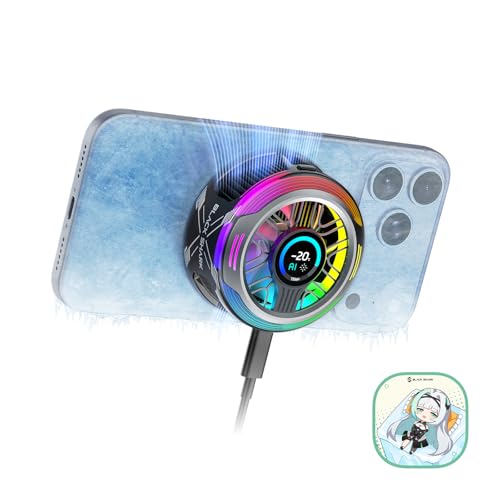
Best Overall
Black Shark Magnetic Phone Cooler 6 Pro
Bottom line: If you play demanding games for hours, the 6 Pro is the strongest cooler here and the only one that shows live temperature and fan speed on its own screen.
- Highest cooling power on the list at up to 35W
- Built-in display shows power, temperature and fan speed
- Magnetic ring plate covers non-magnetic phones
- Addressable RGB lighting and app control
- Works with Android, iPhone, Switch and iPad
- Most expensive pick here
- Needs a 40W or stronger charger for full output
- Adds noticeable bulk to the back of the phone

Best Value
Black Shark FunCooler 6
Bottom line: The FunCooler 6 gives you three fan modes, app control and a quiet 25 dB silent mode in a 75 g body, which makes it the easiest all-round recommendation.
- Quiet silent mode at 25 dB
- Light at 75 g
- Three modes plus app control for fan speed and lighting
- Vertical air duct keeps heat off your hand
- Overclock, Standard and Silent modes
- Wired only, so it needs a power source
- Power should exceed 20W for best results
- Data cable is not included

Best Budget Black Shark
Black Shark FunCooler 5
Bottom line: The FunCooler 5 drops the app and the extra silent headroom of the FunCooler 6 but keeps the same 20W Peltier cooling at a lower price.
- Same 20W Peltier cooling as the newer model
- Removable grips fit non-magnetic phones
- Simple one-button mode switch
- Four RGB lighting levels
- 12N magnet holds the phone firmly
- Louder than the FunCooler 6 at 30 dB
- No app control
- Needs a wired power source of more than 20W

Best for Hot Climates
Black Shark Magnetic Phone Cooler 5 Pro
Bottom line: The 5 Pro carries the same 35W rating as the 6 Pro with dual temperature sensors and an auto shutoff, so it suits hot rooms and summer gaming sessions.
- 35W cooling rating
- Dual sensors and auto shutoff below -4°F or above 140°F
- Detachable grips plus magnetic mounting
- 1/4-inch thread for stands and brackets
- 18 addressable RGB LEDs
- Heavier and larger than the FunCooler models
- No display, unlike the 6 Pro
- Needs a strong charger to reach full output

Best Clip-On
Black Shark Live Streaming Cooler
Bottom line: This is the cooler to buy if your phone case is not magnet-friendly, because its adjustable clamp holds a case-covered phone without any magnet at all.
- Clamp fits most phones with slim cases
- 28W rating
- 1/4-inch thread works with tripods and gimbals
- Quiet silent mode below 30 dB
- Adaptive clamp holds 65 to 85 mm phones
- Does not attach magnetically
- Needs a 30W or stronger PD charger for full power
- Clamp adds thickness on the sides of the phone

Best for iPhone
TORRAS PolarCircle Qi2 Wireless Charger Cooler
Bottom line: The PolarCircle turns charging itself into a cooling job, so it fits iPhone players who game at a desk and want one stand that charges and cools.
- Charges and cools in one stand
- 360° stand switches between portrait and landscape
- Qi2 magnetic alignment for iPhone
- One cable instead of a cooler plus a charger
- 15W Qi2 charging while you play
- Designed around iPhone, so Android needs a magnetic case or ring
- Tied to a desk rather than a handheld grip
- Costs more than a basic fan

Fastest Cooling Charger
TORRAS PolarCircle Qi2.2 25W Cooling Charger
Bottom line: The 25W model keeps the PolarCircle idea but charges faster, and it makes sense only if you have a newer Qi2.2 iPhone and a strong charger to feed it.
- Faster 25W charging than the original
- Turbine fan plus TEC cooling chip
- Same 360° stand for portrait and landscape
- Battery care feature for long charging sessions
- Works with Qi2 and Qi2.2 iPhones
- Highest price among the chargers
- Best results need Torras's IceNano plug
- Thick, metal or wallet cases can weaken alignment

Cheapest Active Cooler
TELESIN Magnetic Phone Cooler Pro
Bottom line: The TELESIN Pro is the cheapest active cooler here with a digital temperature readout, but its ratings are mixed, so buy it only if you accept some risk.
- Digital readout shows fan temperature
- Quiet at below 28 dB
- Magnetic sheet included for non-magnetic phones
- Pairs with TELESIN neck mounts
- Small, light magnetic fan
- Ratings are mixed and cooling strength is inconsistent
- Compatibility problems on newer iPhones, including the 16 Pro Max
- Needs external power
Table of Contents
Best Phone Cooler for Gaming: Our Picks in Detail
1
Best Overall
Black Shark Magnetic Phone Cooler 6 Pro
Bottom line: If you play demanding games for hours, the 6 Pro is the strongest cooler here and the only one that shows live temperature and fan speed on its own screen.
The Black Shark Magnetic Phone Cooler 6 Pro is a thermoelectric cooler that clamps to the back of the phone with a magnet and a plate.
Pros & Cons
Pros
- Highest cooling power on the list at up to 35W
- Built-in display shows power, temperature and fan speed
- Magnetic ring plate covers non-magnetic phones
- Addressable RGB lighting and app control
- Works with Android, iPhone, Switch and iPad
Cons
- Most expensive pick here
- Needs a 40W or stronger charger for full output
- Adds noticeable bulk to the back of the phone
Why We Picked It
Of every cooler in this guide, the 6 Pro offers the most cooling headroom with a rated 35W output. The small color display is the feature that sets it apart for gamers, since you can see device temperature and fan speed without opening an app mid-match. It is also the only pick where the maker recommends a 40W-plus charger, which is a fair trade for the extra power.
Who It's For
Players of graphically heavy titles on flagship phones who want maximum cooling and a clear read on what the cooler is doing. Up to 35W of cooling headroom suits long sessions, and the small screen shows temperature and fan speed so you never need to leave the game to check an app. The magnetic ring plate covers phones without built-in magnets.
Specs & Configurations
- Cooling power
- Up to 35W
- Display
- 0.71 in full-color
- Mounting
- Magnetic with included ring plate
- Works with
- Android, iPhone, Switch, iPad
- Charger
- 40W+ recommended
Get It Now
Check Price on Amazon
2
Best Value
Black Shark FunCooler 6
Bottom line: The FunCooler 6 gives you three fan modes, app control and a quiet 25 dB silent mode in a 75 g body, which makes it the easiest all-round recommendation.
The FunCooler 6 is Black Shark's mainstream magnetic cooler with a built-in USB-C port.
Pros & Cons
Pros
- Quiet silent mode at 25 dB
- Light at 75 g
- Three modes plus app control for fan speed and lighting
- Vertical air duct keeps heat off your hand
- Overclock, Standard and Silent modes
Cons
- Wired only, so it needs a power source
- Power should exceed 20W for best results
- Data cable is not included
Why We Picked It
It covers the three things most mobile gamers care about: cooling that is strong enough for long sessions, noise low enough to keep the game audio clear, and a weight that does not make the phone tiring to hold. The vertical air duct also sends warm air away from your palm, which matters more in handheld play than the headline wattage suggests.
Who It's For
Most players who want a single dependable cooler for Genshin-style open worlds, shooters and long ranked sessions. The 75 g body is easy to hold for hours, the 25 dB silent mode keeps game audio clear, and the vertical air duct moves warm air away from your palm.
Specs & Configurations
- Cooling power
- 20W
- Weight
- 75 g
- Noise
- 25 dB in silent mode
- Modes
- Overclock/Standard/Silent
- Control
- Shark Arsenal app
Get It Now
Check Price on Amazon
3
Best Budget Black Shark
Black Shark FunCooler 5
Bottom line: The FunCooler 5 drops the app and the extra silent headroom of the FunCooler 6 but keeps the same 20W Peltier cooling at a lower price.
The FunCooler 5 is the previous generation of Black Shark's compact magnetic cooler.
Pros & Cons
Pros
- Same 20W Peltier cooling as the newer model
- Removable grips fit non-magnetic phones
- Simple one-button mode switch
- Four RGB lighting levels
- 12N magnet holds the phone firmly
Cons
- Louder than the FunCooler 6 at 30 dB
- No app control
- Needs a wired power source of more than 20W
Why We Picked It
If you do not care about app settings, this is the same core idea as the FunCooler 6 for less money. The 12N magnet holds the phone firmly, and the removable grips mean a Galaxy or Pixel without magnets can still use it.
Who It's For
Budget-minded players who want proven Peltier cooling and a button that switches between two modes. The 20W cooling suits long sessions, the 12N magnet holds the phone firmly, and the removable grips mean a phone without magnets can still use it.
Specs & Configurations
- Cooling power
- 20W
- Weight
- 0.18 lb
- Noise
- 30 dB in silent mode
- Modes
- Overclock/Silent
- Mounting
- Magnet plus removable grips
Get It Now
Check Price on Amazon
4
Best for Hot Climates
Black Shark Magnetic Phone Cooler 5 Pro
Bottom line: The 5 Pro carries the same 35W rating as the 6 Pro with dual temperature sensors and an auto shutoff, so it suits hot rooms and summer gaming sessions.
The 5 Pro was the first Black Shark cooler to reach a 35W rating.
Pros & Cons
Pros
- 35W cooling rating
- Dual sensors and auto shutoff below -4°F or above 140°F
- Detachable grips plus magnetic mounting
- 1/4-inch thread for stands and brackets
- 18 addressable RGB LEDs
Cons
- Heavier and larger than the FunCooler models
- No display, unlike the 6 Pro
- Needs a strong charger to reach full output
Why We Picked It
It is the pick for a hot room or a long summer session, since the dual sensors watch the cooler itself and shut it off before it gets too cold or too warm. Detachable grips make it work with phones that are not magnetic, and the 1/4-inch thread lets you put it on a stand or a streaming bracket.
Who It's For
Players who game through hot rooms and long summer sessions and want 35W cooling with the option of clipping on instead of magnetic mounting. The dual sensors and auto shutoff watch the cooler itself, and the 1/4-inch thread lets you set it on a stand or streaming bracket.
Specs & Configurations
- Cooling power
- Up to 35W
- Lighting
- 18 addressable RGB LEDs
- Sensors
- Dual NTC
- Safety
- Auto shutoff above 140°F
- Mounting
- Magnetic or clip-on grips
Get It Now
Check Price on Amazon
5
Best Clip-On
Black Shark Live Streaming Cooler
Bottom line: This is the cooler to buy if your phone case is not magnet-friendly, because its adjustable clamp holds a case-covered phone without any magnet at all.
This cooler clamps onto the phone instead of using a magnet.
Pros & Cons
Pros
- Clamp fits most phones with slim cases
- 28W rating
- 1/4-inch thread works with tripods and gimbals
- Quiet silent mode below 30 dB
- Adaptive clamp holds 65 to 85 mm phones
Cons
- Does not attach magnetically
- Needs a 30W or stronger PD charger for full power
- Clamp adds thickness on the sides of the phone
Why We Picked It
Most phone coolers lean on magnets, which means a thick case or a non-magnetic Android phone can leave you without a good option. The Live Streaming Cooler solves that with a 65 to 85 mm adaptive clamp, and it keeps the quiet profile that makes it comfortable on camera. The 1/4-inch thread also makes it easy to mount on a stand.
Who It's For
Gamers who keep a rugged case on and streamers who mount the phone on a tripod or arm. The clamp grips through a thick case without needing a magnet, the 28W rating handles long sessions, and the quiet silent mode stays comfortable on camera.
Specs & Configurations
- Cooling power
- 28W
- Mounting
- Clip-on, 65-85 mm clamp
- Noise
- Below 30 dB in silent mode
- Thread
- 1/4 inch universal
- Charger
- 30W+ PD needed for full power
- Magnetic
- No
Get It Now
Check Price on Amazon
6
Best for iPhone
TORRAS PolarCircle Qi2 Wireless Charger Cooler
Bottom line: The PolarCircle turns charging itself into a cooling job, so it fits iPhone players who game at a desk and want one stand that charges and cools.
The PolarCircle is a Qi2 wireless charging stand with a thermoelectric cooling plate.
Pros & Cons
Pros
- Charges and cools in one stand
- 360° stand switches between portrait and landscape
- Qi2 magnetic alignment for iPhone
- One cable instead of a cooler plus a charger
- 15W Qi2 charging while you play
Cons
- Designed around iPhone, so Android needs a magnetic case or ring
- Tied to a desk rather than a handheld grip
- Costs more than a basic fan
Why We Picked It
For gamers who play plugged in, it solves two problems at once, since the phone charges at 15W while the cooling plate keeps the charging heat in check. The 360 degree stand also lets you switch between portrait and landscape without unplugging anything, which is a real convenience for long sessions on a desk.
Who It's For
iPhone players who game at a desk and want a single stand for charging and cooling. The phone charges at 15W while the cooling plate keeps heat in check, and the 360 degree stand flips between portrait and landscape without unplugging anything.
Specs & Configurations
- Charging
- 15W Qi2
- Cooling
- TEC semiconductor
- Stand
- 360° rotating
- Built for
- Qi2 iPhones
- Power
- USB-C
Get It Now
Check Price on Amazon
7
Fastest Cooling Charger
TORRAS PolarCircle Qi2.2 25W Cooling Charger
Bottom line: The 25W model keeps the PolarCircle idea but charges faster, and it makes sense only if you have a newer Qi2.2 iPhone and a strong charger to feed it.
The Qi2.2 PolarCircle is the faster version of Torras's cooling charger.
Pros & Cons
Pros
- Faster 25W charging than the original
- Turbine fan plus TEC cooling chip
- Same 360° stand for portrait and landscape
- Battery care feature for long charging sessions
- Works with Qi2 and Qi2.2 iPhones
Cons
- Highest price among the chargers
- Best results need Torras's IceNano plug
- Thick, metal or wallet cases can weaken alignment
Why We Picked It
It adds a turbine fan to the thermoelectric chip and lifts charging to 25W, which matters if you want to top up quickly between matches without heating the phone. It is built for Qi2 and Qi2.2 iPhones, and Android and Samsung phones can work when paired with a compatible magnetic case or ring.
Who It's For
iPhone gamers on a recent model who want the quickest wireless charge with cooling. The 25W Qi2.2 charging tops up the phone between matches, the turbine fan and thermoelectric chip keep heat down, and the rotating stand switches between portrait and landscape.
Specs & Configurations
- Charging
- 25W Qi2.2
- Cooling
- TEC chip plus turbine fan
- Stand
- 360° rotating
- Built for
- Qi2/Qi2.2 iPhones
- Plug
- IceNano 45W recommended
- Android
- Needs magnetic case or ring
Get It Now
Check Price on Amazon
8
Cheapest Active Cooler
TELESIN Magnetic Phone Cooler Pro
Bottom line: The TELESIN Pro is the cheapest active cooler here with a digital temperature readout, but its ratings are mixed, so buy it only if you accept some risk.
The TELESIN Pro is a small magnetic fan with a Peltier plate and a temperature display.
Pros & Cons
Pros
- Digital readout shows fan temperature
- Quiet at below 28 dB
- Magnetic sheet included for non-magnetic phones
- Pairs with TELESIN neck mounts
- Small, light magnetic fan
Cons
- Ratings are mixed and cooling strength is inconsistent
- Compatibility problems on newer iPhones, including the 16 Pro Max
- Needs external power
Why We Picked It
It earns a spot because it is the least expensive cooler here with a real temperature readout, and because it is quiet enough for voice chat. The cons matter, though. Mixed ratings and compatibility problems on new iPhones are why it sits at the bottom of the list.
Who It's For
Budget buyers who want to try an active cooler on an Android phone or older iPhone before spending more. The temperature readout shows what the cooler is doing, the sub-28 dB fan stays quiet enough for voice chat, and the magnetic sheet covers phones without built-in magnets.
Specs & Configurations
- Noise
- Below 28 dB
- Display
- Digital temperature readout
- Mounting
- Magnetic with plate for non-magnetic phones
- Power
- External, no battery
- Extras
- Fits TELESIN neck mount
Get It Now
Check Price on AmazonPhone Cooler Comparison Table
| Cooler | Type | Power or charging | Noise | Best for |
|---|---|---|---|---|
| Black Shark 6 Pro | Magnetic Peltier | Up to 35W | Not stated | Maximum cooling |
| Black Shark FunCooler 6 | Magnetic Peltier | 20W | 25 dB silent | All-round value |
| Black Shark FunCooler 5 | Magnetic Peltier | 20W | 30 dB silent | Lower price |
| Black Shark 5 Pro | Magnetic or clip-on | Up to 35W | Not stated | Hot rooms |
| Black Shark Live Streaming Cooler | Clip-on | 28W | Below 30 dB silent | Cases without magnets |
| TORRAS PolarCircle Qi2 | Charging stand | 15W charging | Not stated | iPhone desk play |
| TORRAS PolarCircle Qi2.2 25W | Charging stand | 25W charging | Not stated | Fast charging |
| TELESIN Pro | Magnetic Peltier | Not stated | Below 28 dB | Lowest price |
How to Choose a Phone Cooler for Gaming
Passive vs Active Coolers
Passive coolers use heat-conducting materials and need no power, so they are quiet but gentle. Active coolers use a fan or a thermoelectric plate and cool far faster, which is what long gaming sessions call for. Every pick in this guide is active.
Check How It Attaches
Magnetic coolers snap onto MagSafe and Qi2 iPhones directly. Most Android phones need the included plate or ring, and a thick case can weaken the grip. If you want zero magnet worries, the clip-on options hold the phone by its sides.
Match the Power Supply
Most of these coolers draw their power from the charging port or a separate cable, and several need a 20W to 40W charger for full output. Plan for the cable and charger, because a weak charger will limit cooling.
Watch the Noise
If you chat in voice or stream, check the silent-mode rating. Numbers in the mid-20s dB are quiet, while 30 dB and above can be audible in a quiet room.
Mind the Grip
A cooler on the back of the phone changes how you hold it. Look for a lightweight body and a design that keeps warm air away from your palm. If you also game on a laptop, our guide to the best gaming laptop cooling pad covers the same heat problem on a bigger screen.
FAQ
Do phone coolers really work?
Yes. Active coolers can pull heat off the back of the phone quickly, which helps the chipset avoid throttling. The effect is strongest in long sessions and warm rooms.
Can a phone cooler damage my phone?
A poorly built cooler or an incompatible attachment could cause problems, so choose a reputable brand and follow its guidance on power supplies and cases. Very cold surfaces can also create condensation, so avoid running a cooler at its coldest setting for long stretches in humid conditions.
What is the difference between passive and active phone coolers?
Passive coolers use thermal materials to spread heat and need no power. Active coolers use a fan or thermoelectric chip and a power source to remove heat much faster.
Can I use a phone cooler with any smartphone?
Most work with many phones, but magnetic models need a magnetic case or ring on non-MagSafe devices, and thick cases can reduce grip. Check the size and mounting details before you buy.
Which Phone Cooler for Gaming Should You Buy?
Get the Black Shark 6 Pro if you want the strongest cooling and a live readout, and the FunCooler 6 if you want the best phone cooler for gaming at a sensible price. Pick the Live Streaming Cooler if your case kills magnets, and choose a TORRAS PolarCircle only if you game on an iPhone at a desk. Skip the TELESIN Pro unless the price matters more than reliability.