GameCuki is reader-supported. When you buy through links on our site, we may earn an affiliate commission at no extra cost to you. As an Amazon Associate I earn from qualifying purchases. Learn more.
Drag clicking lives and dies on friction, and a smooth plastic mouse button gives your finger almost nothing to catch on. The best mouse grip tape for drag clicking adds that grip while staying thin enough not to change how the button feels, and the right tape can make the technique much easier to pull off.
To build this list, we compared grip tapes from Dragon Grips, Pulsar, TALONGAMES, Razer, Lizard Skins and HOTLINEGAMES, looking at surface texture, thickness, how easily each one fits on a mouse button and how well it holds up. Below you’ll find 7 picks, what makes a tape good for drag clicking, how to apply it and what to avoid.
What Makes Tape Good for Drag Clicking?
Drag clicking works by dragging your finger across the left mouse button so that friction makes the button register a rapid series of clicks. That means the surface under your finger matters more than anything else:
- Textured, grippy surface: rubber, polyurethane or textured PVC gives your finger the friction it needs. Smooth plastic lets it slide without catching.
- Thin profile: around 0.3 to 0.5mm keeps the button feeling normal for everyday clicks and aiming.
- Strong adhesive: dragging puts constant sideways force on the tape, so it needs to stay put without peeling at the edges.
- The right size: small pre-cut pieces or cut-to-fit sheets make it easy to cover just the area where your finger drags.
Best Mouse Grip Tape for Drag Clicking: Our Picks in Detail

1
Best Overall
Dragon Grips Rubber Grip Tape (13 pc)
Bottom line: The best grip tape for drag clicking, giving your finger something to catch on without changing how normal clicks feel.
Dragon Grips is the only brand on this list that names drag clicking in its product description, calling this tape ideal for mouse precision, including drag-clicking performance. It's a 0.5mm textured PVC rubber that comes in 13 pre-cut pieces in different sizes, so you can pick one that fits your left mouse button.
Pros & Cons
Pros- Made with drag clicking in mind
- Thin 0.5mm rubber keeps click feel
- Variety of pre-cut sizes for button tops
- 13 pre-cut pieces in different sizes
- Textured PVC rubber that stays non-abrasive
- Pressure-sensitive peel-and-stick adhesive
- Waterproof and washable
Cons- Texture is grippy rather than rough
- Edges can lift with heavy use
Why We Picked It
Drag clicking needs a surface your finger can catch on, and Dragon Grips' textured PVC rubber delivers exactly that while staying non-abrasive, so it's easier on your fingertip than skateboard-style grip tape. At 0.5mm thin, it barely changes how the button feels for normal clicks, the assortment of pre-cut shapes makes it easy to cover just the part of the button you drag across, and the pressure-sensitive adhesive applies cleanly to smooth plastic. Because it's designed with drag clicking in mind, it's the best mouse grip tape for drag clicking for most players.
Who It's For
You drag click for Minecraft PvP or bridging and want a purpose-made tape for almost any mouse. The textured rubber gives your finger something to catch on while staying easy on your fingertip, and the pre-cut shapes let you cover just the part of the left button you drag across.
Specs & Configurations
- Material
- textured PVC rubber
- Thickness
- 0.5mm
- Pieces
- 13 pre-cut shapes
- Adhesive
- pressure-sensitive, peel-and-stick
- Extras
- waterproof, washable, made in the USA

2
Best Value
Dragon Grips Hexagon Grip Stickers (84 pc)
Bottom line: The best value for heavy drag clickers, with 84 small pieces so you can replace a worn one in seconds.
These Dragon Grips hexagons use the same 0.5mm PVC rubber in 84 small pieces, and the brand specifically lists mouse and gaming use. The 5/8-inch hexagons are just the right size to sit where your finger drags on the left button.
Pros & Cons
Pros- Lots of spares for replacing worn pieces
- Small hexagons fit the drag zone precisely
- Thin rubber keeps click feel
- 84 pieces in the pack
- PVC synthetic rubber, 0.5mm
- Waterproof and washable
- Pressure-sensitive adhesive
Cons- Pieces can slide on heavily used surfaces
- Corners can catch on fabric
Why We Picked It
Drag clicking wears tape faster than normal use, so having spares matters, and with 84 pieces you can replace a worn hexagon in seconds. The small shapes let you place grip exactly in your drag zone without covering the whole button, and the thin rubber keeps everyday clicks feeling normal. It's the best value pick for anyone who drag clicks a lot.
Who It's For
You drag click a lot and wear through tape fast. With 84 small hexagons and half-hexes, you can replace a worn piece in seconds, and the small shapes let you place grip exactly in your drag zone without covering the whole button.
Specs & Configurations
- Material
- PVC synthetic rubber
- Thickness
- 0.5mm
- Pieces
- 72 5/8-inch hexagons + 12 half-hexes
- Adhesive
- pressure-sensitive
- Extras
- waterproof, washable, made in the USA

3
Best Gaming Grip Tape
Pulsar SUPERGRIP Pre-Cut Universal Griptape
Bottom line: A great gaming grip tape for drag clicking with sweaty fingers, as long as you keep spare pieces handy.
The Pulsar SUPERGRIP Pre-Cut Universal Griptape is a gaming-focused grip tape in pre-cut universal shapes that work on almost any mouse.
Pros & Cons
Pros- Texture-based grip that doesn't feel sticky
- Sweat-absorbing for long sessions
- Plenty of spare pieces
- Pre-laminated 0.5mm tape
- Pre-cut universal shapes fit almost any mouse
- Works on mice, keyboards and other surfaces
Cons- Pieces are small
- Texture wears quickly with heavy use
Why We Picked It
Pulsar's SUPERGRIP gets its grip from texture rather than tackiness, which is the kind of surface that gives a dragging finger friction without leaving your fingertip feeling sticky. It's also sweat-absorbing, a big plus because sweaty fingers slide instead of catching. The small pre-cut shapes fit neatly on a button, and the pack includes plenty of spares, which you'll need, since the texture wears quickly under heavy use.
Who It's For
Your fingers sweat while you drag click. The sweat-absorbing tape gives a dragging finger friction from texture rather than tackiness, the small pre-cut shapes fit neatly on a button, and the spare pieces in the pack let you swap in fresh ones as the texture wears.
Specs & Configurations
- Thickness
- 0.5mm
- Type
- pre-cut universal shapes
- Material
- pre-laminated, sweat-absorbing
- Use
- mice, keyboards or any surface

4
Thinnest Option
TALONGAMES Universal Grip Tape PU-0 (0.3mm)
Bottom line: The most unobtrusive option if you don't want tape to change how your buttons feel.
The TALONGAMES PU-0 is the thinnest tape on this list at 0.3mm, and its 40mm-long rectangles are a natural fit for the top of a mouse button.
Pros & Cons
Pros- Thinnest tape here
- Rectangles sized for mouse buttons
- Grippy without ridges that trap dirt
- 0.3mm polyurethane, stretchy
- 30 pieces in the pack
- 40mm rectangles fit the top of a mouse button
- 3M adhesive
Cons- Adhesive doesn't last long
- Plain look, no pre-cut button shapes
Why We Picked It
If you don't want tape to change how your buttons feel, 0.3mm polyurethane is about as unobtrusive as it gets, yet it still grips well without ridges that trap dirt and flake when you clean them. The wider rectangles fit the left and right buttons, so you can add friction exactly where you drag, and the stretchy material conforms to curved button shapes. With 30 pieces in the pack, replacements are easy when the adhesive wears out.
Who It's For
You use your mouse for competitive aiming as well as drag clicking and don't want thick tape on the buttons. At 0.3mm it barely changes how clicks feel, the stretchy rectangles conform to curved buttons, and the 30 pieces make replacements easy when the adhesive wears out.
Specs & Configurations
- Thickness
- 0.3mm
- Material
- polyurethane, stretchy
- Pieces
- 16 pcs 40 x 15mm, 14 pcs 40 x 19mm
- Adhesive
- 3M
- Use
- mice, controllers, keyboards, phones

5
Best Cut-to-Fit
Lizard Skins DSP Mouse Grip
Bottom line: The pick if pre-cut pieces never match your mouse, letting you cover your exact drag path.
The Lizard Skins DSP Mouse Grip comes as a sheet of 0.5mm DuraSoft Polymer with a grid transfer sheet, so you can trace your exact button shape and cut a perfect fit.
Pros & Cons
Pros- Cut a piece that matches your button exactly
- Long-lasting adhesive
- Soft, comfortable texture
- 0.5mm DuraSoft Polymer
- Grid transfer sheet for tracing
- Ten color options
- Holds up to isopropyl alcohol cleaning
Cons- Soft rather than tacky
- Pricier for the amount of material
Why We Picked It
Pre-cut pieces never quite match every mouse, and drag clicking works best when the grip covers your drag path without overlapping the button gap. Lizard Skins solves that with a trace-and-cut sheet, and the adhesive holds up well even through cleaning with isopropyl alcohol, which matters for a surface you'll be dragging across constantly. The DSP polymer is soft and grippy enough for sweaty fingers, though it isn't tacky.
Who It's For
You use an uncommon or ergonomic mouse and pre-cut pieces never match. The trace-and-cut sheet lets you cover your exact drag path on the left button, the adhesive holds up to constant dragging and alcohol cleaning, and the soft polymer is grippy enough for sweaty fingers.
Specs & Configurations
- Material
- DuraSoft Polymer (DSP)
- Thickness
- 0.5mm
- Type
- cut to fit, with grid transfer sheet
- Colors
- 10
- Use
- gaming and everyday mice

6
Best Brand-Name Grip
Razer Mouse Grip Tape for DeathAdder V2 Mini
Bottom line: A durable brand-name grip that won't need replacing every few weeks, if you own a DeathAdder V2 Mini.
Razer's anti-slip grip tape is a 0.5mm polyurethane tape pre-cut for the DeathAdder V2 Mini, and it can be trimmed to fit similar mice.
Pros & Cons
Pros- Grip stays grippy for a long time
- Durable through years of daily use
- Texture that's neither hard nor soft
- Anti-slip polyurethane, 0.5mm
- Pre-cut for the DeathAdder V2 Mini
- Can be trimmed for similar mice
- Self-adhesive
Cons- Pre-cut for one mouse
- Adhesive can loosen over time
Why We Picked It
Durability is the hidden challenge with drag clicking, since constant dragging wears down cheap tape fast. Razer's polyurethane grip stays grippy for a long time and holds up well under heavy daily use, with a texture that's neither hard nor soft. It's a strong choice if you want a brand-name grip that won't need replacing every few weeks.
Who It's For
You use a Razer DeathAdder V2 Mini, or a similar mouse you are willing to trim for, and you want grip that lasts. The polyurethane tape holds up under heavy daily dragging, with a texture that is neither hard nor soft, so you are not replacing it every few weeks.
Specs & Configurations
- Material
- anti-slip polyurethane
- Thickness
- 0.5mm
- Fit
- pre-cut for Razer DeathAdder V2 Mini
- Adhesive
- self-adhesive
7
Best for Logitech G502
HOTLINEGAMES 2.0 Plus Grip Tape for Logitech G502
Bottom line: The pick for G502 owners who want maximum friction, as long as the pieces are placed precisely.
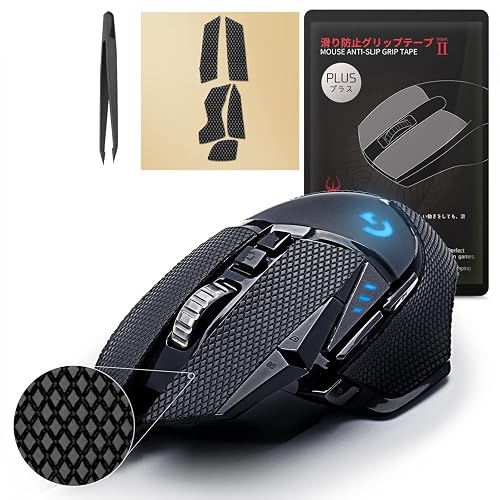
The HOTLINEGAMES 2.0 Plus set is pre-cut for the Logitech G502, and HOTLINEGAMES says its diamond-texture surface improves the friction coefficient and absorbs sweat.
Pros & Cons
Pros- Diamond texture designed to increase friction
- Precise pre-cut G502 fit
- Tweezers for accurate placement
- Diamond-texture, sweat-absorbing polymer
- 3M adhesive with no residue
- Grip set, tweezers and guide included
- Fits G502 and G502 Wireless
Cons- Only fits the G502
- Misalignment can make buttons stick
Why We Picked It
Higher friction is exactly what drag clicking needs, and HOTLINEGAMES designs its diamond texture to raise the friction coefficient and grip even with dry hands. The pre-cut pieces match the G502 precisely, and included tweezers help you place them accurately, which matters because misaligned tape can catch on the button gap and make clicks stick.
Who It's For
You drag click on a Logitech G502 or G502 Wireless and want high friction. The diamond texture is designed to raise grip even with dry hands, the pre-cut pieces match the mouse precisely, and the tweezers help you place them accurately for everyday play too.
Specs & Configurations
- Fits
- Logitech G502, G502 Wireless
- Texture
- diamond texture, sweat-absorbing polymer
- Adhesive
- 3M, no residue
- In the box
- grip set, tweezers, user guide
How to Apply Tape for Drag Clicking
- Clean the button: wipe it with rubbing alcohol and let it dry, since dust or oil stops the adhesive from bonding and can leave a bump.
- Find your drag zone: place your finger the way you drag click and note where it moves across the left button.
- Cut or choose a piece: cover the drag zone without overlapping the gap between the button and the mouse shell.
- Line it up, then press firmly: position the piece carefully before pressing it down, since misaligned tape can catch and make the button stick.
- Try it and replace: try a few drag clicks, and replace the piece when the texture wears smooth.
What to Avoid
- Self-fusing silicone tape: tapes like Core Prodigy Fusion and XFasten have no adhesive and only stick to themselves, so they can’t stay on a flat mouse button.
- Industrial electrical tape: 3M lists its Scotch Super 33+ for industrial and occupational use only, and vinyl tape is designed for insulation, not grip.
- Thick or rough tape: skateboard-style grip tape can be abrasive on your fingertip, and thick tape changes how the button clicks.
- Covering the button gap: tape that overlaps the seam between the button and shell can make clicks stick.
Final Verdict: Which Tape Should You Use for Drag Clicking?
Start with Dragon Grips Rubber Grip Tape: it’s thin, textured and designed with drag clicking in mind. Get the Dragon Grips hexagons if you want plenty of spares, Pulsar SUPERGRIP for sweaty hands, the TALONGAMES PU-0 for the thinnest feel, and Lizard Skins DSP for a custom cut. DeathAdder V2 Mini owners should look at Razer’s long-lasting tape, and G502 owners at the HOTLINEGAMES 2.0 Plus. For grip on the rest of your mouse, see our guide to the best mouse grip tape.

