GameCuki is reader-supported. When you buy through links on our site, we may earn an affiliate commission at no extra cost to you. As an Amazon Associate I earn from qualifying purchases. Learn more.
A headset tossed on the desk ends up crushed under a keyboard tray or dangling by its cable, and the headband padding pays for it. The best gaming headset stand fixes that in seconds, and the right one also gives you extra USB ports, a cable parking spot or a clear patch of desk. Ten picks follow, covering USB hub towers, a dual stand, desk clamps and stick-on hangers.
If you are still choosing the headset itself, our guides to the best lightweight wireless gaming headset and the best headset for PS5 are good places to start.
Best Gaming Headset Stand: Our Picks in Detail

1
Best Overall
Razer Base Station V2 Chroma
Bottom line: A tall, heavy aluminum tower with two USB charging ports and a 3.5mm jack, so it suits PC players with a big headset who want a stand that doubles as a hub.
Razer's Base Station V2 Chroma is the stand most gamers picture when they think of a headset stand, and it earns the Best Overall spot by getting the basics right before the lighting. The tall aluminum frame leaves room for headsets with large cups.
Pros & Cons
Pros- Extra height for large headsets
- Low center of gravity and rubber base keep it planted
- Two USB ports and a 3.5mm jack at desk level
- Detachable base for carrying
- Chroma RGB lighting
Cons- Full lighting control needs Razer software
- Overkill if you only want somewhere to hang a headset
Why We Picked It
The weight is the story here. At about 1 lb with a low center of gravity and a high-friction rubber base, it stays put when you yank a headset off in the middle of a match. The two USB 3.1 charging ports and 3.5mm audio combo port sit within reach, so a wireless dongle, a controller cable or a wired headset plug can live on the stand instead of behind the PC. The base detaches for transport, which is handy for LAN events.
Who It's For
You game on a PC with a big headset, a desk lit in RGB and a handful of cables that need a home. This tower gives the headset a tall, heavy perch beside your keyboard, with a wireless dongle, a controller cable or a wired headset plug within easy reach.
The base stays put when you pull the headset off between rounds, and it detaches when the setup travels to a LAN event.
Specs & Configurations
- Type
- Desk stand with USB ports
- Height
- 10.94 in
- Weight
- 1 lb
- Ports
- 2 USB 3.1 + 3.5mm
- Lighting
- Chroma RGB

2
Best With USB and Aux Ports
EKSA RGB Headset Stand
Bottom line: A stand with two USB ports and 3.5mm jacks at a much lower price than the big-brand towers, best for gamers who want hub-style connections without the premium.
EKSA's stand is the straightforward answer to a simple question: what if you wanted the ports of a premium tower without paying for the badge? It gives you two USB ports and 3.5mm audio jacks on the base, with no drivers needed.
Pros & Cons
Pros- Two USB ports and 3.5mm jacks on the base, no drivers needed
- Aluminum alloy rod with a non-slip ABS base
- Plug-and-play on Windows, Linux and Mac
- Three RGB lighting modes
- Two-year after-sales service
Cons- Lighter ABS base than a metal tower
- Only three lighting modes
Why We Picked It
The ports sit on the stand, so plugging in a wired headset or a USB drive does not mean reaching behind the monitor. The aluminum alloy rod and non-slip ABS base keep the headset steady, and it adds virtual 7.1 surround through its USB and 3.5mm connections. Treat that as a nice extra, not a reason to buy on its own.
Who It's For
You play on a PC, like a little RGB on the desk and are tired of reaching behind the monitor every time a wired headset or a USB drive needs a port. EKSA puts the connections right at the base, where the headset hangs, and a rubber-padded aluminum rod holds it steady.
Specs & Configurations
- Type
- Desk stand with USB ports
- Frame
- Aluminum alloy rod, non-slip ABS base
- Ports
- 2 USB + 3.5mm audio
- Lighting
- 3 RGB modes
- Warranty
- 2-year after-sales service

3
Best for Small Desks
New Bee RGB Headphone Stand
Bottom line: A compact aluminum stand with a USB-C port, a USB port and a 4.47 in base, so it fits desks where the big towers would crowd your mouse.
Not every desk has room for a 5 in wide base and a mouse pad. This New Bee stand keeps the tower idea in a smaller package, with aluminum and a curved rubber rest for the headband.
Pros & Cons
Pros- Small footprint for tight desks
- USB-C and USB ports for charging a phone or tablet
- Aluminum build with a TPU rubber headband rest
- Seven RGB modes, with a long press to switch the lighting off
- Aluminum build fits gaming and studio headphones
Cons- At 9.53 in tall, very large headsets may sit lower
- No audio jack
Why We Picked It
At 9.53 in tall with a 4.47 in base, it takes up little space and still fits gaming headsets and studio headphones alike. The two ports let you charge a phone or move files without stretching behind the PC, and the silicone pads on the bottom grip the desk. You can long-press to switch the RGB off if you want a plain look.
Who It's For
Your desk is narrow, your mouse pad takes most of it and a monitor arm or shelf setup leaves little spare room. This stand's 4.47 in base fits the gap and still hangs gaming headsets or studio headphones on a curved rubber rest.
The USB-C and USB ports let you top up a phone or move files without stretching behind the PC, and you can turn the lighting off for a plain look.
Specs & Configurations
- Type
- Desk stand with USB ports
- Height
- 9.53 in
- Base width
- 4.47 in
- Ports
- USB-C + USB
- Lighting
- 7 RGB modes

4
Best for Wired Mouse Players
Tilted Nation Gaming Headset Stand
Bottom line: A headset stand with a built-in mouse bungee and a two-port USB 2.0 hub, aimed at wired-mouse players who want the cable to stop dragging.
The mouse bungee is the hook: a flexible cord holder built into the stand so a wired mouse feels less tethered. If your mouse is wired, that is a real desk upgrade, not a gimmick.
Pros & Cons
Pros- Mouse bungee keeps a wired mouse cable off the desk
- Two USB 2.0 ports for a keyboard or flash drive
- Weighted base with non-slip grips
- Dynamic or static RGB
- Hub and bungee share one footprint
Cons- USB 2.0 only, so not for fast external drives
- The mouse bungee only helps with a wired mouse
Why We Picked It
It combines three desk problems in one footprint, with a place for the headset, a lift for the mouse cable and two USB ports for a keyboard or accessories. The base is weighted and fitted with non-slip grips, so it stays put during fast flicks and quick headset grabs.
Who It's For
You play fast shooters on a wired mouse and the cable keeps catching on the desk edge during flicks. This stand puts the headset, a mouse bungee and two USB ports in one footprint, so the cable floats where you want it.
The weighted, non-slip base stays planted through quick headset grabs, and the ports hold a keyboard cable or a flash drive.
Specs & Configurations
- Type
- Desk stand with USB hub
- Hub
- 2 USB 2.0 ports
- Extra
- Built-in mouse bungee
- Lighting
- Dynamic or static RGB
- Base
- Weighted, non-slip grips
5
Best for Cable Clutter
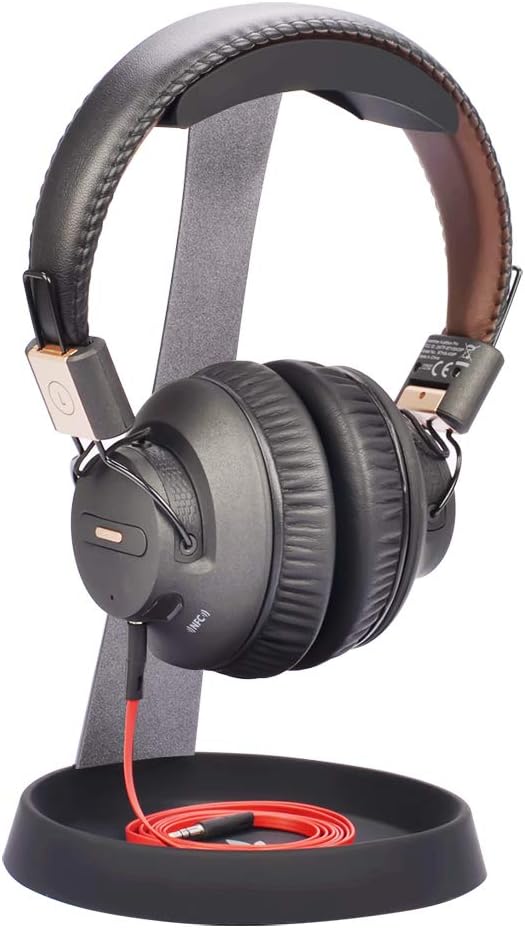
Avantree HS102
Bottom line: A simple steel stand with a silicone cable holder in the base, so it suits gamers who just want the headset off the desk and the cable tamed.
Plain steel is underrated. Avantree's HS102 skips the lights and ports and concentrates on a stable foundation, a soft headband rest and a cable holder.
Pros & Cons
Pros- Silicone pad protects the headband
- Cable holder keeps the cord from dangling
- Solid steel construction for a stable base
- Plain design fits any desk
- Silicone base holder tidies a wired headset cord
Cons- No USB ports or lighting
- Plain steel look will not suit an RGB setup
Why We Picked It
The silicone cable holder at the bottom gives a wired headset's cord somewhere to go instead of hanging off the desk edge. The solid steel construction and silicone top pad keep the headset secure and protect the headband padding, and the clean shape works equally well beside a console TV stand.
Who It's For
Your headset lives next to a console or a TV stand and you want it off the shelf, with the cable tucked away instead of hanging off the edge. The HS102 gives it a soft silicone perch on a solid steel base, and the cable holder in the base keeps the cord tidy.
Specs & Configurations
- Type
- Desk stand
- Frame
- Solid steel with silicone top pad
- Extra
- Silicone cable holder in the base
- Ports
- None
- Lighting
- None

6
Best for Two Headsets
Avantree Neetto HS908 Dual Stand
Bottom line: A dual-hanger stand with a storage tray, ideal for players who keep a gaming headset and a second pair of headphones on the same desk.
Plenty of gamers own two headsets: a wireless one for the console and a wired one for voice chat, or a gaming pair and a music pair. This Avantree stand gives both a home.
Pros & Cons
Pros- Holds two headsets at once
- Tray for dongles, cables and a phone
- No tools needed to assemble
- 9.8 in height suits most over-ear headsets
- Contoured hangers on a solid metal base
Cons- Bigger footprint than a single stand
- No USB ports or lighting
Why We Picked It
The contoured hanger design supports two headphones on a solid metal base, and the tray holds cables, pens or a phone. Assembly needs no screws or tools, and the 9.8 in height suits most over-ear headsets.
Who It's For
You keep a wireless headset for the console and a wired one for voice chat, or a gaming pair next to a music pair, and both end up in a pile on the desk. This stand gives each its own contoured hanger on one solid metal base.
The tray catches dongles, cables or a phone, and it goes together with no screws or tools. It also suits a shared desk, where two people each need a spot.
Specs & Configurations
- Type
- Dual desk stand
- Height
- 9.8 in
- Holds
- Two headphones
- Extra
- Storage tray for cables and a phone
- Assembly
- No tools

7
Best for a Wood Desk Setup
SAMDI Wood Headphone Stand
Bottom line: A one-piece walnut stand with a curved rest, best for gamers whose desk leans toward wood and warm tones instead of RGB.
If your desk is a butcher-block slab or a dark walnut surface, RGB towers can look out of place. SAMDI's stand sits comfortably alongside wood and warm lighting.
Pros & Cons
Pros- No assembly, one-piece design
- Curved wooden rest is gentle on headband padding
- Looks at home on a wood or minimalist desk
- Stated limits cover most gaming headsets
- Walnut wood finish
Cons- Only fits headsets within 5.7 in headband width and 10.23 in height
- No ports, lighting or cable management
Why We Picked It
It is a single piece of walnut with an Omega-shaped body, so nothing to assemble and nothing to wobble loose. The curved rest supports the headband, and the stated limits (headband up to 5.7 in wide, headset up to 10.23 in tall) cover most gaming headsets. Check your headset's size before ordering.
Who It's For
Your desk is butcher-block or dark walnut, the lighting is warm and glowing RGB towers would look out of place. This one-piece walnut stand blends in, cradles the headband on a curved rest and works as decor when the headset is away.
Specs & Configurations
- Type
- Desk stand
- Material
- Walnut wood, one piece
- Max headband width
- 5.7 in
- Max headset height
- 10.23 in
- Assembly
- None

8
Best for a Minimal Desk
Kanto H1 Headphone Stand
Bottom line: A slim steel stand with a curved silicone rest and a silicone-covered base, best for gamers who want a clean desk and a stand that quietly stays out of the way.
Kanto's H1 is a minimalist stand that is meant to disappear on a tidy desk. It does one job and avoids adding visual noise.
Pros & Cons
Pros- Slim steel design that stays out of the way
- Silicone rest protects the headband
- Silicone-covered base grips the desk and protects the surface
- Solid steel body holds the headset steadily
- Curved silicone rest
Cons- No USB ports, lighting or cable holder
- Style over features, it only holds a headset
Why We Picked It
The solid steel body and curved silicone rest hold the headset steadily, and the silicone base protects the desk surface. That is the whole pitch, and it works for anyone who dislikes bulky, glowing hardware.
Who It's For
Your setup is neutral and monochrome, the desk is tidy and you would rather not add anything glowing or bulky. The H1 does one job quietly, holding the headset on a curved silicone rest above a silicone base that protects the desk surface.
Specs & Configurations
- Type
- Desk stand
- Frame
- Solid steel
- Rest
- Curved silicone
- Base
- Silicone-covered
- Ports
- None

9
Best for Clamping to a Desk
Brainwavz Hengja
Bottom line: An all-metal clamp-on hanger that keeps the headset off your desk surface, best for crowded desks where a stand has nowhere to sit.
When the desk surface is already full of keyboard, mouse pad, monitor stands and drinks, a clamp-on hanger is a smart workaround. The Hengja grips the desk edge and lets the headset hang below the surface.
Pros & Cons
Pros- Zero desk footprint
- Adjusts to fit different desk thicknesses
- No adhesive or glue
- All-metal build for light and heavy headphones
- Rotates for horizontal or vertical surfaces
Cons- Rotating the mount needs a hex key not in the box
- Needs a clean desk edge it can grip
Why We Picked It
The all-metal build is meant to hold light and heavy headphones without bending, and the clamp adjusts to fit desks of different thicknesses without glue or mess. The mount can rotate for horizontal or vertical surfaces, but you need a hex key to change it.
Who It's For
Your desk is already full of keyboard, mouse pad, monitor stands and drinks, and a freestanding stand has nowhere to sit. The Hengja clamps to the desk edge and lets the headset hang below the surface, so the desktop stays clear.
It adjusts to different desk thicknesses without glue, and the all-metal frame is meant to carry light and heavy headphones alike.
Specs & Configurations
- Type
- Clamp-on hanger
- Material
- All metal
- Mount
- Adjustable clamp, no glue
- Orientation
- Rotatable for horizontal or vertical surfaces
- Tool
- Hex key needed to rotate

10
Best Stick-On Under-Desk Hook
Avantree Neetto HS907 Hanger
Bottom line: A silicone-covered adhesive hanger for under a desk, on a monitor or on a wall, best for anyone who wants the cheapest way to clear a headset off the desk.
The simplest solution costs the least: a curved hook with a sticky back. The HS907 mounts under a desk, on a wall or on the side of a monitor.
Pros & Cons
Pros- Frees the whole desk surface
- Mounts on walls, cabinets, glass or a monitor
- Soft silicone cover
- Holds up to 1 kg in total
- Doubles as a hook for a controller cable or earbuds
Cons- Adhesive does not suit wet, greasy, dusty or wallpapered surfaces
- Needs 24 hours to set and stays in place once mounted
Why We Picked It
A sturdy internal frame sits under a soft, non-abrasive silicone cover shaped to match the curve of most headsets. It holds up to 1 kg in total, which covers most gaming headsets, and it can double as a hook for a controller cable or earbuds. Clean the surface first and wait 24 hours before hanging a headset on it.
Who It's For
You want every inch of the desk for the keyboard, mouse and drinks, and you already know where the headset should hang. The HS907 sticks under the desk, on the wall or on the side of a monitor, and a soft silicone cover shaped to the headband keeps it gentle on the padding.
Specs & Configurations
- Type
- Adhesive hanger
- Mount
- Double-sided tape under a desk, on a wall or on a monitor
- Covering
- Soft silicone over a sturdy frame
- Load limit
- 1 kg total
- Setup
- Adhesive needs 24 hours to set
Quick Comparison: Gaming Headset Stands at a Glance
| Stand |
Type |
Ports |
Best for |
| Razer Base Station V2 Chroma |
Desk stand |
2 USB 3.1 + 3.5mm |
Large headsets |
| EKSA RGB Headset Stand |
Desk stand |
2 USB + 3.5mm |
Hub-style ports |
| New Bee RGB Headphone Stand |
Desk stand |
USB-C + USB |
Small desks |
| Tilted Nation Gaming Headset Stand |
Desk stand |
2 USB 2.0 |
Wired mouse players |
| Avantree HS102 |
Desk stand |
None |
Cable clutter |
| Avantree Neetto HS908 |
Dual desk stand |
None |
Two headsets |
| SAMDI Wood Headphone Stand |
Desk stand |
None |
Wood desk setups |
| Kanto H1 |
Desk stand |
None |
Minimal desks |
| Brainwavz Hengja |
Clamp-on hanger |
None |
Crowded desks |
| Avantree Neetto HS907 |
Adhesive hanger |
None |
Clearing the desk |
How to Choose a Gaming Headset Stand
Stand type
Desk stands are the easiest: set it down, hang the headset. Clamp-on and adhesive hangers keep your desk surface clear but need a spot to grip or stick to.
Material and padding
Metal and wood bases feel steadier than light plastic. Look for silicone, rubber or leather where the headband touches, since a hard edge can mark or flatten padding over time.
Base size and weight
A heavier base resists tipping when you pull the headset off with one hand. A smaller base saves space but may sit less firmly with large headsets.
Built-in features
USB ports, audio jacks, a cable holder or lighting add value only if you will use them. If your desk already has a hub, a plain stand costs less and does the same job.
Headset size and fit
Check height and headband limits. Stands with stated limits, such as the SAMDI, are only a good fit if your headset falls within them.
FAQ
Do I need a headset stand if my headset is not expensive?
It is not essential, but a stand keeps the headband padding from being squashed and keeps the headset from landing on the floor. A basic stand or a stick-on hook costs very little.
Does a wood stand protect a headband better than a metal one?
Material matters less than the contact point. A curved rest with silicone, leather or smooth wood is gentler than a bare edge, whatever the frame is made of.
Is a shelf or wall-mounted holder better than a freestanding stand?
If your desk is crowded, a clamp or adhesive hanger frees the surface. A freestanding stand is easier to move and does not need a mounting spot.
Can a gaming headset stand hold regular headphones?
Yes. Most of these stands are designed for any over-ear headphones, as long as the headset fits within the stand’s height and width limits.
Which Gaming Headset Stand Should You Buy?
For most PC desks, our pick for the best gaming headset stand is the Razer Base Station V2 Chroma, as long as you have room for it and want the ports. If space is tight, the New Bee covers the basics at a smaller size, and if you want zero desk footprint, the Brainwavz Hengja clamp or the Avantree HS907 hook does the job. Share a desk with someone else, and the Avantree HS908 dual stand is the obvious call. Whichever you choose, hanging the headset by the headband beats leaving it on the desk.

