GameCuki is reader-supported. When you buy through links on our site, we may earn an affiliate commission at no extra cost to you. As an Amazon Associate I earn from qualifying purchases. Learn more.
Series X games keep getting bigger, and the console’s internal drive fills up after a few big installs. The best external hard drive for Xbox Series X depends on one fact most listings skip: a USB drive can store current-generation games but cannot run them, so the right pick comes down to what you want to play from it. The eight options below cover the official expansion card that plays everything, plus HDDs and SSDs for backward-compatible libraries and game archiving.
If your storage problem started with a new console, our PS5 Pro vs Xbox Series X comparison covers how the two machines handle storage and games.
Best External Hard Drive for Xbox Series X: Our Picks in Detail
GameCuki may earn a commission if you buy through the links below. That never changes which drives make the list or how they rank.

1
Best for Playing Series X/S Games
Seagate Storage Expansion Card for Xbox Series X/S
Bottom line: The only kind of extra storage that runs Series X/S games straight from the drive, best for players who want one simple upgrade and can pay for it.
If you want your newest games to start from the extra drive, this is the one that does it. Seagate designed it in partnership with Xbox to replicate the console's own storage design, and the card slides into the slot on the back.
Pros & Cons
Pros- Runs Xbox Series X/S games directly, not just stores them
- Matches the internal SSD's speed, so load times stay in line with a game installed internally
- Plugs into the rear Storage Expansion slot with no formatting menu or cables
- Supports Quick Resume from the card
- Can sit alongside a USB hard drive at the same time
- Three capacity sizes to fit different budgets
Cons- Costs far more per terabyte than any USB drive
- Works only in Xbox Series X/S consoles, so it cannot be used on a PC
Why We Picked It
Every other drive here, however fast, can only hold Series X|S games until you copy them back to the console. This card removes that step, because games installed on it launch the same way as ones on the internal drive. It also leaves your USB ports free for a second drive.
Who It's For
You have a Series X filled with big Game Pass installs and you do not want to shuffle files every time you switch games. You would rather spend more once and keep playing than manage an archive.
It also suits anyone using a USB hard drive for older titles who now wants a proper home for the newest ones. The card handles the new, the hard drive handles the old.
Specs & Configurations
- Type
- Xbox expansion card (rear slot)
- Capacities
- 512GB, 1TB, 2TB
- Transfer speed
- 2.4GB/s raw
- Warranty
- 3 years
- Plays Series X/S games
- yes

2
Best Xbox-Licensed Hard Drive
Seagate Game Drive for Xbox 2TB
Bottom line: An Xbox-certified portable HDD with a green LED bar that suits black consoles, best for players who want a no-guesswork archive for Series X/S games.
The Game Drive is the straightforward, licensed route to an external hard drive for Xbox Series X, and it is a sensible first buy if you are not sure what you need.
Pros & Cons
Pros- Xbox-certified, so compatibility is not a question
- Lets you move Series X/S games on and off the console faster than re-downloading them
- Plays Xbox One, Xbox 360 and original Xbox games directly through backward compatibility
- A 2TB drive roughly triples the storage of a 1TB Series X
- Green LED bar looks at home next to a black console
- Includes Rescue Data Recovery Services for three years
- Plug and play with no software
Cons- Cannot run Series X/S games, only store them
- Unbranded drives of the same size can cost less
- Only a black version exists, which clashes with white consoles
Why We Picked It
Seagate designed it around Xbox and the listing carries the certification, so you skip the usual question of whether a random USB drive will behave. It is a mechanical drive, so speeds stay modest, but that is acceptable for archiving and for older games.
Who It's For
You run out of room every time a new release lands and you are tired of deleting games you plan to come back to. A 2TB archive lets you keep them installed on the shelf and copy one back in minutes instead of waiting on a slow connection.
It is also a good fit if you still play a lot of Xbox One or Xbox 360 titles and want them off the internal drive.
Specs & Configurations
- Capacity
- 2TB (larger sizes sold)
- Interface
- USB 3.0
- Certified
- Xbox Series X/S and Xbox One
- Warranty
- 1 year plus 3 years Rescue Data Recovery
- Plays Series X/S games
- no

3
Best for a Tight Budget
Toshiba Canvio Basics 4TB
Bottom line: A plain, low-cost portable HDD with up to 4TB of room, best for players who just want cheap space for archived and older games.
Toshiba's Canvio Basics is the drive for players who care about price per terabyte above anything else, and it still does the one job an Xbox needs from a hard drive.
Pros & Cons
Pros- One of the cheapest ways to add terabytes of space
- Up to 4TB holds a large archive of older and stored games
- Bus-powered, so there is no separate power brick
- Plug and play with no software to install
- Matte finish resists fingerprints
- Slim black body matches a black console
Cons- Cannot run Series X/S games, only store them
- 5,400 RPM means slow loading for backward-compatible titles
- Plain plastic build with no extra features
Why We Picked It
It is a no-frills drive that connects to the console and asks for no extras. Because it is bus-powered, a single USB cable handles everything. The slower spin speed is the trade-off for the low cost, and it is a fair one for archiving.
Who It's For
You want to clear space without spending much, and you do not need fast loading from the drive. Most of what you will put on it is games you finished or older titles you launch now and then.
It works well as a first external drive, since you can learn how Xbox handles external storage before deciding whether to spend more on something faster.
Specs & Configurations
- Capacity
- 4TB (smaller sizes sold)
- Interface
- USB 3.0
- Spin speed
- 5,400 RPM
- Power
- bus-powered, no AC adapter
- Plays Series X/S games
- no

4
Best for Large Game Archives
WD Elements 4TB Portable
Bottom line: A compact 4TB HDD from a familiar brand, best for players who want room for a big back catalog without paying for an SSD.
The Elements line is a familiar, widely sold external drive, and the 4TB size is where the price per terabyte starts to look good for an Xbox.
Pros & Cons
Pros- 4TB covers a long list of archived Series X/S games and older titles
- 5Gbps USB 3.2 Gen 1 connection
- Compact body is easy to move between rooms
- Plug and play, with the Xbox prompting you to format it
- Works with Xbox One, Xbox 360 and original Xbox backward-compatible games
- Available in several sizes if you want more or less space
Cons- Cannot run Series X/S games, only store them
- 5,400 RPM loading speeds are standard rather than quick
Why We Picked It
It gives you a lot of room in a small enclosure and keeps things simple. For a console that mostly needs somewhere to park big installs, that matters more than speed. The ordinary 5,400 RPM drive is fine for stored games and acceptable for older ones.
Who It's For
Your internet is slow or capped, and you do not want to re-download a 100GB game each time you return to it. A 4TB drive lets you hold a full rotation of games and copy back only the ones you play this month.
If a 2TB drive would run out within a year, this is the next step up.
Specs & Configurations
- Capacity
- 4TB (2TB to 6TB sold)
- Interface
- USB 3.2 Gen 1 (5Gbps)
- Spin speed
- 5,400 RPM
- Power
- bus-powered
- Plays Series X/S games
- no

5
Best for a Huge Game Library
WD My Book 8TB Desktop
Bottom line: An 8TB desktop drive that removes storage worries, best for players who want an entire library installed and are happy to leave it plugged in.
If you want to stop thinking about storage altogether, the My Book is the largest and simplest answer here.
Pros & Cons
Pros- 8TB gives room for hundreds of games
- Strong value per terabyte for the capacity
- Desktop design sits neatly beside the console
- Higher spin speed than the 5,400 RPM portable drives
- Works with backward-compatible Xbox games
- Larger models sold if you outgrow it
Cons- Needs its own power adapter and a wall outlet
- Not portable
- Overkill for most players
Why We Picked It
Capacity is the whole argument. Eight terabytes lets you install an entire Game Pass catalog or a big back library and never delete anything. It is a desktop drive, so it trades portability and a single-cable setup for far more space.
Who It's For
You hold a large library across generations of Xbox and you want everything installed at once. The console stays in one place, so a drive that lives next to it and draws mains power is no problem.
It also suits households that share one console and keep several people's games ready at all times.
Specs & Configurations
- Capacity
- 8TB (larger sizes sold)
- Interface
- USB 3.0 (5Gbps)
- Spin speed
- 5,900 RPM
- Power
- external AC adapter
- Plays Series X/S games
- no
6
Best for Fast Game Transfers
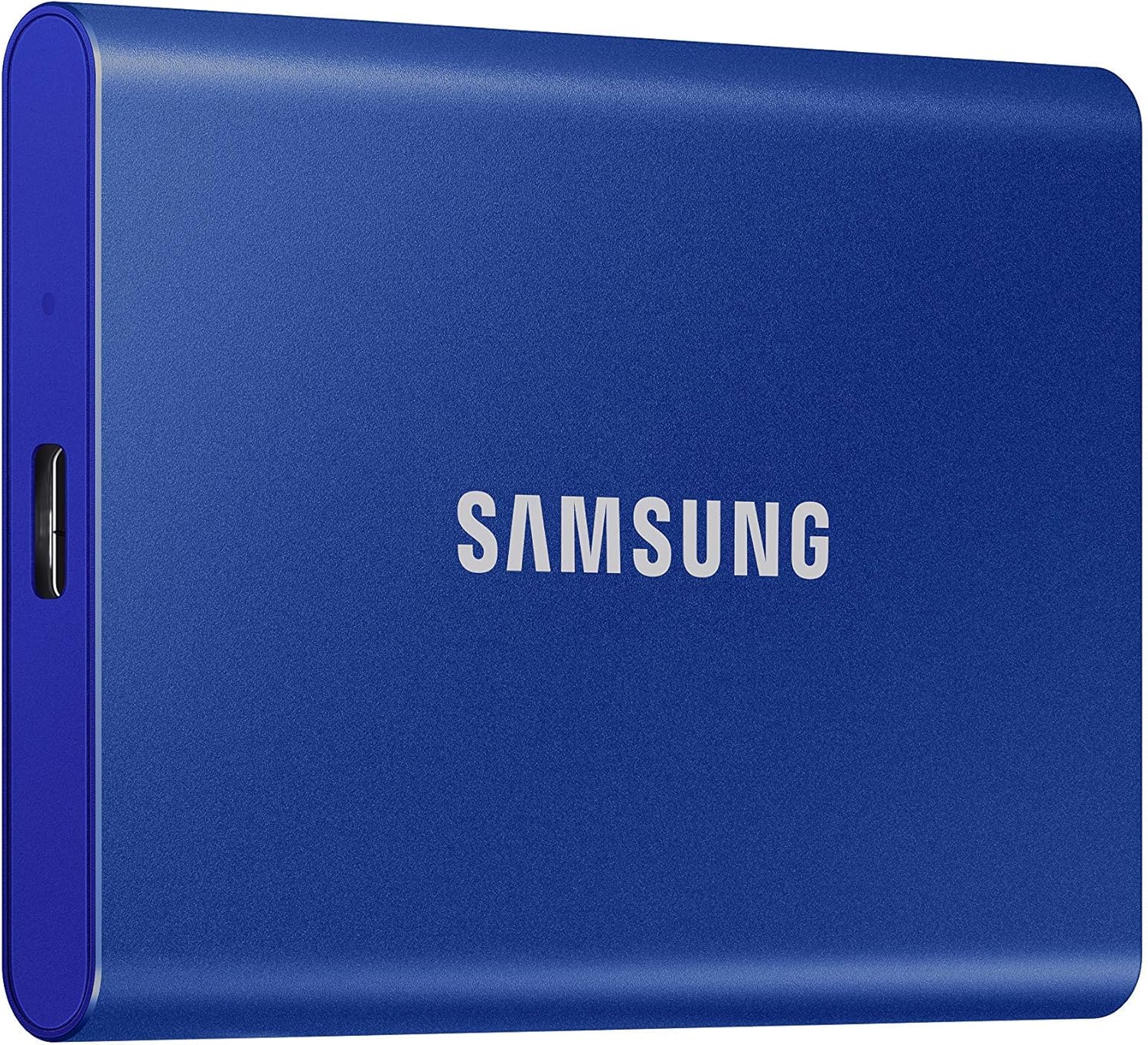
Samsung T7 Portable SSD 1TB
Bottom line: A pocket-sized SSD with far faster copies than any HDD, best for players who move big games on and off the console often.
Samsung's T7 is the practical middle ground between a cheap HDD and a pricey expansion card, because it speeds up everything except playing new games.
Pros & Cons
Pros- Copies large games much faster than a hard drive
- Backward-compatible games load faster than from an HDD
- Light enough to carry in a pocket
- Aluminum body with drop protection up to 6 feet
- No moving parts, so it handles knocks better than a spinning drive
- 3-year limited warranty
- Works on Xbox, PlayStation and PC
Cons- Cannot run Series X/S games, only store them
- Costs more per terabyte than any hard drive here
Why We Picked It
An SSD removes most of the waiting that makes external storage annoying. Moving a 100GB game back to the console takes far less time than from a hard drive, and older games run faster from it too. It still cannot launch Series X|S titles, so think of it as a quick archive.
Who It's For
You swap between several large games each month and the long copy times on a hard drive put you off. You want something small and fast for backward-compatible games without paying expansion card prices.
Pairing it with an expansion card gives you fast new-game storage plus a quick archive for the rest.
Specs & Configurations
- Capacity
- 1TB (500GB to 4TB sold)
- Interface
- USB 3.2 Gen 2
- Read/write
- up to 1,050/1,000MB/s
- Weight
- about 2 oz
- Plays Series X/S games
- no

7
Best Gaming SSD with RGB
WD_BLACK P40 Game Drive SSD 1TB
Bottom line: A fast, shock-resistant gaming SSD with RGB lighting, best for players who want a drive that looks the part and moves games quickly.
The P40 is a gaming-styled SSD that leans on speed and a long warranty.
Pros & Cons
Pros- Speeds far above any hard drive when copying games
- Rated to survive drops of up to 2 meters
- RGB lighting that you can customize on a PC
- Compatible with Xbox Series X/S for archiving Series X/S games
- Includes both USB-C to USB-A and USB-C to USB-C cables
- 5-year limited warranty
- Small and light at under 3 oz
Cons- Cannot run Series X/S games, only store them
- Costs more than a hard drive of the same size
- Can run warm during long transfers
Why We Picked It
Its USB 3.2 Gen 2x2 interface and rated read speeds of up to 2,000MB/s put it well ahead of any hard drive for copying games. The shock-resistant body and five-year warranty make it a safer long-term buy than most cheap portable drives. The RGB strip only changes color through Windows software, so on console it is cosmetic.
Who It's For
You want a fast SSD that also works with a gaming PC or a PlayStation, and you like having the extras. The two included cables mean it is ready out of the box on any of those devices.
If your setup is already full of RGB gear, this drive blends in.
Specs & Configurations
- Capacity
- 1TB (500GB to 2TB sold)
- Interface
- USB 3.2 Gen 2x2
- Read speed
- up to 2,000MB/s
- Warranty
- 5 years
- Plays Series X/S games
- no

8
Best Big Portable Hard Drive
WD_BLACK P10 Game Drive 5TB
Bottom line: A 5TB portable HDD built for consoles with a 3-year warranty, best for players who want lots of room in a drive they can still carry.
The P10 is the portable pick for players who want more than 4TB and still want to carry the drive.
Pros & Cons
Pros- 5TB of space in a portable body
- Built for consoles, with Xbox Series X/S compatibility listed
- Plays Xbox One games and archives Series X/S games
- Metal top cover feels sturdier than plain plastic drives
- 3-year limited warranty
- Bus-powered portable design
- Larger 6TB model sold if you need still more
Cons- Cannot run Series X/S games, only store them
- Hard drive speeds of around 130MB/s are slow next to an SSD
Why We Picked It
Western Digital markets it directly at console players, with the compatibility spelled out for Xbox and PlayStation. The 5TB size stretches past the usual 4TB limit of portable drives. The three-year warranty adds some peace of mind.
Who It's For
You want a large archive but also take your console to a friend's place or move it between rooms. The drive travels without a power brick, and you can bring your whole stored library with you.
It is also a good fit if you share a drive between an Xbox and a PlayStation 5, since it is listed as compatible with both.
Specs & Configurations
- Capacity
- 5TB (up to 6TB sold)
- Speeds
- up to 130MB/s
- Compatibility
- Xbox Series X/S and PlayStation 5
- Warranty
- 3 years
- Plays Series X/S games
- no
Expansion Card vs External Hard Drive for Xbox Series X
Your choice mostly comes down to whether you want to play games from the drive or just store them. An expansion card slots into the back of the console and runs Series X|S games exactly like internal storage. It is quick and simple, but the price per terabyte is high.
An external hard drive plugs into a USB port and is much cheaper per terabyte. The catch is that it only stores Series X|S games, so you copy a game back to the internal drive before you play. It does run backward-compatible Xbox One, Xbox 360 and original Xbox titles directly, which frees internal space for new games.
An external SSD sits between the two. Copying is much faster than with an HDD, but it still cannot run Series X|S games. Many players pair a card for current games with a hard drive for the rest.
How to Set Up an External Hard Drive on Xbox Series X
Plug the drive into a free USB port on the console. Xbox then asks you to format it for games and apps, and you can also name it or set it as the default install location. Once it is formatted, you can check the extra space in the storage devices menu under My games and apps.
Expansion cards are simpler still: slide the card into the Storage Expansion slot on the back of the console and it is ready to use.
Xbox Series X External Hard Drive FAQ
Can you play Xbox Series X games from an external hard drive?
No. External hard drives and SSDs can store Series X|S games but cannot run them. You copy the game back to internal storage or an expansion card first. Backward-compatible Xbox One, Xbox 360 and original Xbox games can be played from the external drive.
Is an SSD or HDD better for Xbox Series X?
An SSD copies and loads faster, but it costs more per terabyte and usually comes in smaller sizes. An HDD gives you far more space for the money, with sizes up to 8TB and beyond. Neither can run Series X|S games, so pick the SSD for speed and the HDD for capacity.
What size external hard drive does Xbox Series X support?
The console needs a drive with at least 128GB of space. Drives larger than 16TB used to be unsupported, but a 2025 update splits them into partitions, so you can connect larger drives.
Can you use an Xbox external hard drive on a PC?
Not without wiping it. The Xbox formats the drive in its own way, so a PC will not read it as is. Use a blank drive and keep it for the console.
Which Is the Best External Hard Drive for Xbox Series X?
For playing new games, nothing beats the Seagate expansion card, and it is worth the money if you can afford it. For pure storage, the Seagate Game Drive is the safe, licensed choice, the Toshiba Canvio Basics is the cheapest, and the WD My Book is the answer when you want everything installed at once. Add the Samsung T7 if copying speed matters more than cost. Whichever one you pick, the best external hard drive for Xbox Series X is the one that fits how you actually play: archive with a drive, play from a card.

