

Blue Lock Rivals codes drop Lucky Style Spins and Lucky Flow Spins, so you can reroll your Style and Flow without spending Robux. Four codes are live right now, and the game only accepts them once you have joined the developer’s Roblox group and reached Level 10.
All Blue Lock Rivals Codes
Code list last updated: October 19, 2026.
What the rewards do:
- Lucky Style Spins reroll your Style, the character-based playstyle you use in matches.
- Lucky Flow Spins reroll your Flow, an extra ability that adds to your build.
| Code | Reward | Status |
|---|---|---|
SORRYFORDELAYAIKU |
5 Lucky Style Spins | New |
HALLOWEEN |
5 Lucky Style Spins | New |
WSNAKE |
5 Lucky Flow Spins | New |
NELAIKU |
5 Lucky Style Spins, 5 Lucky Flow Spins | New |
EPICSENDOU |
7 Lucky Style Spins | Expired |
ONEMOREWEEK |
5 Lucky Flow Spins | Expired |
NELAIKUNEXT |
5 Lucky Style Spins, 5 Lucky Flow Spins | Expired |
DONREVAMP |
No longer redeemable | Expired |
SENDOUNEXT |
No longer redeemable | Expired |
ACEEATER |
No longer redeemable | Expired |
SNUFFYUPD |
No longer redeemable | Expired |
NEWMASTER |
No longer redeemable | Expired |
UBERSVOTE |
No longer redeemable | Expired |
WSNUFFY |
No longer redeemable | Expired |
SNUFFYSOON |
No longer redeemable | Expired |
BUGFIXES |
No longer redeemable | Expired |
UBERSCONTINUES |
No longer redeemable | Expired |
NIKOHERE |
No longer redeemable | Expired |
GATEKEEPOVER |
No longer redeemable | Expired |
QOLNEXTWEEK! |
No longer redeemable | Expired |
NELKING |
No longer redeemable | Expired |
NIKOSOON |
No longer redeemable | Expired |
UBERSMONTH |
No longer redeemable | Expired |
SORRYLOADING |
No longer redeemable | Expired |
UBERSTAKEOVER |
No longer redeemable | Expired |
KINGNEXTWEEK |
No longer redeemable | Expired |
EGODEFENSE |
No longer redeemable | Expired |
Type each code exactly as shown, since a single wrong character makes it fail. Codes expire quickly and most can only be redeemed once per account, so use them as soon as you can.
How to Redeem Blue Lock Rivals Codes
Quick steps
- Launch Blue Lock Rivals on Roblox
- Select Codes from the bottom menu in the lobby
- Type a code into the Enter Code box
- Click Redeem
Before you start: like the game on its Roblox page, join the official Blue Lock Rivals Roblox group, and play until you reach Level 10, or the codes will not work.
Not sure what the process looks like? This video walks through the latest codes in game.
Step 1: Launch Blue Lock Rivals on Roblox and, in the lobby, select Codes from the bottom menu.
Step 2: Type a working code into the Enter Code box, then click Redeem to collect your spins.
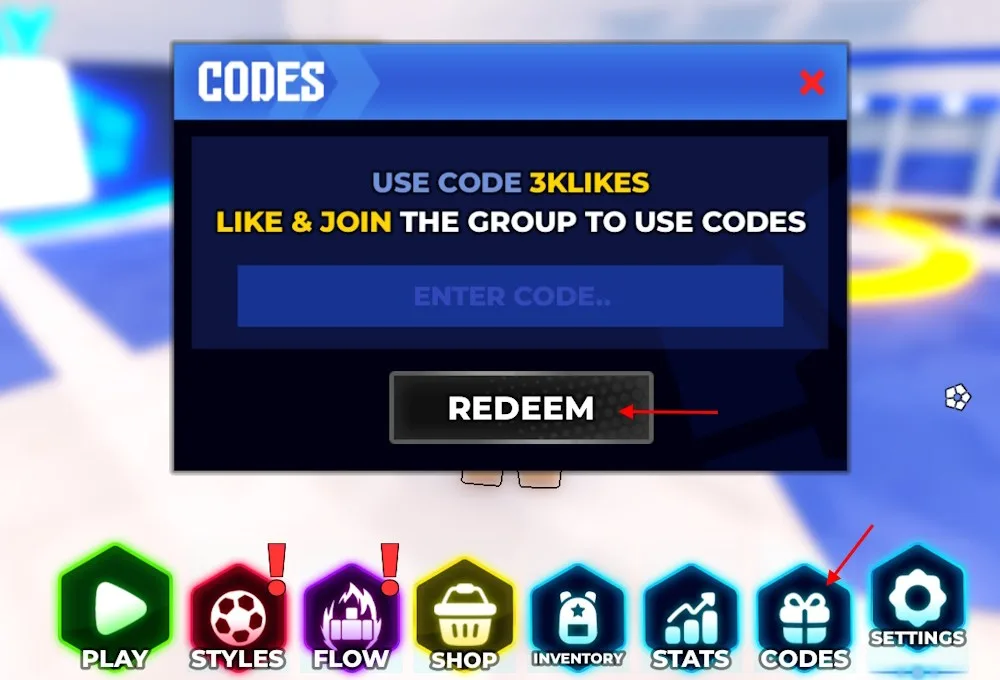
If a code is rejected, check that your account is Level 10 or higher, that you joined the correct group with the same account, and that no extra space sits before or after the code.
Into Roblox sports games? Our Basketball Zero codes page lists free spins and Money for the basketball side of the genre.
Found a new code or one that no longer works? Let us know and we will update the list.